


Canon Pixma Wireless Inkjet MFC Printer TS5160
TS5160BK
NOT AVAILABLE


Play Video


Product Overview
Key Features
- Print, scan and copy with A4 size, 100 sheet tray, double-sided
- 4800 x 1200 print, 1200 x 2400 scan, up to 13ipm black
- PG-640 and CL641 ink, USB cable, LAN 2.4GHz, Canon PRINT app
Key Specifications
- Brand:
- Canon
- Model Number:
- TS5160BK
- Printer Functions:
- Print, Scan & Copy
- Double Sided Printing:
- Yes
- Paper Capacity:
- 100
- Max Print Speed:
- Colour: 6.8ipm, Black & White: 13ipm
- Wireless Connections:
- LAN 2.4GHz, Direct Connection (Wireless LAN)
Computers & Tablets
- Printing Resolution:
- 4800 x 1200
- Paper Size:
- A4, A5, B5, LTR, LGL, 4"x6", 5"x7", 8"x10", Envelopes (DL, COM10), Square (5" x 5"), Card Size (91 x 55mm) [Custom size] Rear Tray; width 55mm - 215.9 mm, length 89mm - 676mm Cassette: A4, A5, B5, LTR, LGL, 4"x6", 5"x7", 8"x10", Envelopes (DL, COM10)
- Compatible Ink / Toner:
- PG-640 and CL641
- Scan Resolution:
- 1200 x 2400
Smart Features
- Compatible Apps:
- Canon PRINT app
Connections
- Wired Connections:
- USB Printer cable
General Information
- Type:
- Inkjet Printer
- Colour:
- Black
- What's In The Box:
- Printer, Power cord, Ink cartridges setup, CD setup, Getting started guide
Warranty
- Manufacturer's Warranty:
- 1 Year
Computers & Tablets
- Printing Resolution:
- 4800 x 1200
- Paper Size:
- A4, A5, B5, LTR, LGL, 4"x6", 5"x7", 8"x10", Envelopes (DL, COM10), Square (5" x 5"), Card Size (91 x 55mm) [Custom size] Rear Tray; width 55mm - 215.9 mm, length 89mm - 676mm Cassette: A4, A5, B5, LTR, LGL, 4"x6", 5"x7", 8"x10", Envelopes (DL, COM10)
- Compatible Ink / Toner:
- PG-640 and CL641
- Scan Resolution:
- 1200 x 2400
Connections
- Wired Connections:
- USB Printer cable
Warranty
- Manufacturer's Warranty:
- 1 Year
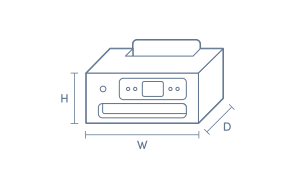
Product Dimensions
- Product Height (mm):
- 147
- Product Width (mm):
- 425
- Product Depth (mm):
- 315
- Product Weight (g):
- 6500
Box Dimensions
- Box Height (mm):
- 147
- Box Width (mm):
- 425
- Box Depth (mm):
- 315
- Box Weight (kg):
- 7

Product Reviews of Canon Pixma Wireless Inkjet MFC Printer TS5160

Overall Rating Snapshot
4.3 out of 5 stars from 320 reviews
86% of users recommend this product
What customers say, summarised by AI
- Easy to set up and use, even for those not tech savvy or elderly.
- Wireless and Bluetooth connectivity allows printing from phones and tablets.
- Compact size fits well on desks, ideal for home or small office use.
- Print quality is generally good, with solid photo and double-sided print options.
- Ink cartridges are expensive and can run out quickly, but only two are needed.
- Some users reported slow startup, paper feed errors, and tricky Wi-Fi setup.
Pros
Easy (79)
Quality (25)
Cheap (5)
Value (6)
Quiet (5)
Reliable (3)
Efficient (3)
Cons
Slow (3)
Updates (1)
Complex (1)
Canon Pixma Wireless Inkjet MFC Printer TS5160
Bought this printer to replace a previous Canon Pixma printer with similar features. This has taken a bit of getting used to because some things are different. Price was very good. Ink cartridges are more expensive but a plus is that there are only two not multiple of the separate colours.
Imelda Nicol
Confirmed purchase 25 February 2025
Published on 21 March 2025
Yes, I recommend this product.
This customer is a verified purchaser who may have received an incentive in return for providing an authentic review.
Easy to use
The best features of this product is wireless. I can print from my phone
Myra De Castro
Confirmed purchase 14 February 2025
Published on 12 March 2025
Yes, I recommend this product.
This customer is a verified purchaser who may have received an incentive in return for providing an authentic review.
Canon Printer
Works well, easy to use and good price
John
Confirmed purchase 13 February 2025
Published on 11 March 2025
Yes, I recommend this product.
This customer is a verified purchaser who may have received an incentive in return for providing an authentic review.
Just the right fit
Easy to install. Just the right size for home use. Though ink cartridges a bit expensive, but it balance out overall as I don't print often.
Happy
Confirmed purchase 9 February 2025
Published on 5 March 2025
Yes, I recommend this product.
This customer is a verified purchaser who may have received an incentive in return for providing an authentic review.
Canin Pixma Wireless inkjet Printer
Recently went back to the Canon printers after disappointment with another brand. This small printer is doing the job I need it to at home. Install was easy.
Dale
Confirmed purchase 28 January 2025
Published on 19 February 2025
Yes, I recommend this product.
This customer is a verified purchaser who may have received an incentive in return for providing an authentic review.
Great
Recommend
Anonymous
Confirmed purchase 22 January 2025
Published on 19 February 2025
This customer is a verified purchaser who may have received an incentive in return for providing an authentic review.
Awesome features
Blue tooth features easy cartridge instal
Mark Taylor
Confirmed purchase 15 January 2025
Published on 13 February 2025
Yes, I recommend this product.
This customer is a verified purchaser who may have received an incentive in return for providing an authentic review.
excellent
D
Confirmed purchase 19 December 2024
Published on 14 January 2025
Yes, I recommend this product.
This customer is a verified purchaser who may have received an incentive in return for providing an authentic review.
Fantastic Features and Quality for the price
This inexpensive AIO is delivering almost the same quality prints as a multi hundred dollar one. Only lacking CD printing compared to more expensive ones. Free delivery within a 2 hour window was a complete surprise!
Stephen de Looze
Confirmed purchase 11 December 2024
Published on 13 January 2025
Yes, I recommend this product.
This customer is a verified purchaser who may have received an incentive in return for providing an authentic review.
Printer
Excellent
Liz
Confirmed purchase 8 December 2024
Published on 31 December 2024
Yes, I recommend this product.
This customer is a verified purchaser who may have received an incentive in return for providing an authentic review.
You've viewed 10 of 320 reviews
ABOUT THE GOOD GUYS REVIEWSThe Good Guys product reviews are collected from verified purchasers who may have received an incentive in return for providing an authentic review.
The below information is AI generated based on Australian websites information around this item. We have done our best to ensure its accuracy but suggest verifying any information within this tab before purchasing.
At a glance
The Canon Pixma TS5160 is a compact wireless all-in-one inkjet printer built for everyday home tasks, schoolwork and casual photo printing. It suits families, students and home offices that want simple setup, mobile printing and good-looking colour documents. Key strengths are ease of use, versatile paper handling and solid photo quality. Its main limitation is that running costs can be higher than tank or business-focused models.
What it’s great for
- Everyday Printing
- School Assignments
- Home Office Tasks
- Casual Photo Printing
- Mobile Printing
Where it works best
- Home Office
- Family Home
- Study Nook
- Apartment
- Student Desk
Who it’s for
- Family Household
- Student
- Remote Worker
- Everyday Home User
- Casual Photo User
Things to consider
Compared with premium office printers or refill-tank models, it is less suited to heavy-volume printing because cartridge costs can add up over time.
Home office suitability score
7.5/10 - a strong fit for light home office printing, scanning and copying, but not ideal for high monthly print volumes.
Photo printing quality
8/10 - good colour and detail for casual home photo printing, though enthusiasts may want a more photo-specialised model.
Ease of use rating
8.5/10 - simple controls, straightforward setup and easy mobile printing make it approachable for most households.
Running cost guidance
Best for light to moderate use; cartridge costs are manageable for everyday home printing but can feel expensive for frequent colour or high-volume users.
Family friendliness
8.5/10 - well suited to mixed household needs such as homework, forms, recipes and occasional photos.
Key benefits
- Wireless Connectivity: Print from laptops, smartphones and tablets without needing a constant USB connection.
- All-in-One Design: Handles printing, scanning and copying in one compact unit to save desk space.
- Compact Footprint: Fits more comfortably in small home offices, bedrooms and shared family spaces.
- Automatic Duplex Printing: Prints on both sides of the page automatically to reduce paper use.
- Rear Paper Feed: Makes it easier to load photo paper and different media types for flexible home printing.
- Mobile Printing Support: Lets you send jobs quickly from compatible mobile apps and common wireless print services.
- Colour Display and Simple Controls: Helps make setup, maintenance and everyday navigation straightforward for most users.
- Photo-Capable Inkjet Output: Produces sharper, more vibrant photos than many basic document-focused printers.
Q: What ink cartridges does the Canon Pixma TS5160 use?
A: Canon TS5160 uses Canon PG-640 black and CL-641 colour ink cartridges, with higher-yield XL versions also commonly available. It uses a two-cartridge system, so colour comes from one tri-colour cartridge rather than separate cyan, magenta and yellow tanks.
Q: Is the Canon Pixma TS5160 better for occasional home use or heavier printing?
A: The TS5160 is better suited to low to moderate home printing than heavier office workloads. It is a compact inkjet all-in-one, so it suits homework, everyday documents and casual photo printing, but frequent high-volume use is usually cheaper on a tank or laser model.
Q: Can the Canon TS5160 print wirelessly from a phone or laptop without USB?
A: Yes, the TS5160 is designed for wireless printing, so compatible phones, tablets and laptops can print once the printer is joined to the same network. That is more convenient than USB for shared home use, but initial Wi-Fi setup still needs to be completed first.
Q: Does the Canon Pixma TS5160 have an automatic document feeder for multi-page scanning?
A: No, the TS5160 scans from a flatbed rather than an automatic document feeder, so multi-page jobs need each sheet placed on the glass one at a time. That suits occasional copying and scanning, but it is slower for regular forms or long documents.
Q: Does the Canon TS5160 support automatic double-sided printing?
A: Yes, the TS5160 supports automatic double-sided printing, which helps reduce paper use for schoolwork and everyday documents. It is worth noting that duplex printing can be slower than single-sided output, especially on longer colour jobs.