


Canon Pixma Home All In One Wireless Printer TS3160
TS3160
NOT AVAILABLE


Play Video


Product Overview
Key Features
- Print, scan, copy and fax with A4 to legal size, 60 sheet tray, double-sided
- 4800 x 1200 print and 600 x 1200 scan resolution, 7.7 ipm speed
- Uses 645XL Black, 645 Black, 646XL Colour, 646 Colour; Wi-Fi and USB
- Borderless photo printing up to 5 x 7 Inch, Canon PRINT app compatible
Key Specifications
- Brand:
- Canon
- Model Number:
- TS3160
- Printer Functions:
- Print, Scan, Copy & Fax
- Double Sided Printing:
- Yes
- Paper Capacity:
- 60 Sheets
- Max Print Speed:
- 7.7 ipm
- Wireless Connections:
- IEEE802.11n/IEEE802.11g/IEEE802.11b
Computers & Tablets
- Printing Resolution:
- 4800 x 1200
- Paper Size:
- A4, A5, B5, Letter, Legal, 4"x6", 5"x7", Square (5"x5"), Custom Size (width 101.6–215.9 mm, length 127–676 mm)
- Compatible Ink / Toner:
- 645XL Black, 645 Black, 646XL Color, 646 Color
- Scan Resolution:
- 600 x 1200 dpi
Smart Features
- Compatible Apps:
- Canon PRINT app
Connections
- Wired Connections:
- USB Printer cable
General Information
- Type:
- Inkjet Printer
- Colour:
- Black
- Additional Features:
- Able to print borderless images up to 5" x 7" size
Warranty
- Manufacturer's Warranty:
- 1 Year
Computers & Tablets
- Printing Resolution:
- 4800 x 1200
- Paper Size:
- A4, A5, B5, Letter, Legal, 4"x6", 5"x7", Square (5"x5"), Custom Size (width 101.6–215.9 mm, length 127–676 mm)
- Compatible Ink / Toner:
- 645XL Black, 645 Black, 646XL Color, 646 Color
- Scan Resolution:
- 600 x 1200 dpi
Connections
- Wired Connections:
- USB Printer cable
Warranty
- Manufacturer's Warranty:
- 1 Year
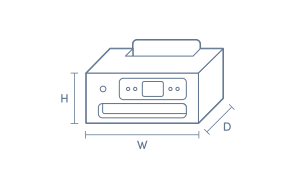
Product Dimensions
- Product Height (mm):
- 145
- Product Width (mm):
- 435
- Product Depth (mm):
- 316
- Product Weight (g):
- 3900
Box Dimensions
- Box Height (mm):
- 398
- Box Width (mm):
- 196
- Box Depth (mm):
- 500
- Box Weight (kg):
- 5

No reviews found for this product.
Product Reviews of Canon Pixma Home All In One Wireless Printer TS3160

Overall Rating Snapshot
You've viewed 0 of 0 reviews
The below information is AI generated based on Australian websites information around this item. We have done our best to ensure its accuracy but suggest verifying any information within this tab before purchasing.
At a glance
The Canon Pixma TS3160 is an entry-level wireless all-in-one inkjet printer designed for everyday home use, covering basic printing, scanning and copying. It suits students, families and light home office users who want compact size and easy wireless setup. Its main strengths are convenience and straightforward operation, but it is not the best choice for high-volume printing or fast office workflows.
What it’s great for
- Everyday Home Printing
- School Assignments
- Occasional Document Printing
- Basic Scanning
- Family Use
Where it works best
- Home Office
- Apartment
- Study Nook
- Family Home
- Student Room
Who it’s for
- Student
- Family Household
- Home User
- Light Home Office User
- First-Time Printer Buyer
Things to consider
Compared with premium home office or business inkjets, the TS3160 is better for light, occasional use and may feel slower and less economical for frequent, high-volume printing.
Home office suitability score
7/10 - good for light admin, forms and occasional scanning, but not ideal for heavy daily workloads.
Photo printing quality
7/10 - suitable for casual home photos and colour projects, though photo enthusiasts may want a higher-end model.
Ease of use rating
8/10 - straightforward for everyday users with simple controls and convenient wireless printing.
Running cost guidance
Best for occasional to moderate home use; frequent printing can make cartridge costs less economical than higher-capacity models.
Family friendliness
8/10 - a good fit for homework, forms, colour handouts and general household printing in a compact shared-space setup.
Key benefits
- Wireless Printing: Print from compatible devices without keeping the printer next to your computer.
- All-In-One Design: Handles printing, scanning and copying in one compact unit for everyday home tasks.
- Compact Footprint: Fits more easily into small desks, shelves and study spaces than bulkier office printers.
- Easy Home Setup: Suits users who want straightforward installation and simple day-to-day operation.
- Borderless Photo Support: Useful for casual photo printing at home for family snapshots and school projects.
- Scan And Copy Convenience: Lets you digitise forms or make quick copies without needing separate devices.
- Affordable Entry Point: A practical option for buyers who need core print functions without paying for office-focused extras.
- Everyday Plain Paper Output: Well suited to routine documents such as homework, recipes, forms and occasional colour pages.
Q: Is the Canon Pixma TS3160 better suited to occasional home printing or heavier weekly use?
A: The Canon Pixma TS3160 is better suited to occasional home printing. It is a compact all in one inkjet for schoolwork, forms and colour documents, but regular high-volume printing is usually more economical on a higher-yield or tank-style printer.
Q: Which ink cartridges does the Canon Pixma TS3160 use?
A: The Canon Pixma TS3160 uses Canon PG-645 black and CL-646 colour cartridges, with XL versions also available for higher page yield. It uses a two-cartridge system, so replacing colour ink means changing the whole colour cartridge rather than individual tanks.
Q: How does the Canon Pixma TS3160 connect to Wi-Fi at home?
A: The Canon Pixma TS3160 connects over Wi-Fi using the printer setup process and Canon's mobile app or software on a computer. Setup is usually straightforward on a 2.4GHz home network, but dual-band routers may need the phone or computer on the same band during pairing.
Q: Can the Canon Pixma TS3160 print from a phone or tablet?
A: Yes, the Canon Pixma TS3160 can print wirelessly from a compatible phone or tablet. It is designed for app-based mobile printing over the same Wi-Fi network, which is handy for photos, PDFs and school documents without needing a USB connection.
Q: Can the Canon Pixma TS3160 scan documents to a computer?
A: Yes, the Canon Pixma TS3160 can scan to a computer as it is an all in one printer with a flatbed scanner. It suits single pages and photos, but it does not have an automatic document feeder, so multi-page jobs need to be scanned one sheet at a time.