


Brother A3 Inkjet Multifunction Printer MFC-J6540W
MFC-J6540DW
NOT AVAILABLE


Product Overview
Key Features
- Print, scan, copy and fax A3 with 250 sheet tray and duplex
- 1200 x 4800 print, up to 28 pages per minute speed
- USB printer cable, LAN, WiFi, Brother Mobile Connect app
- 6.8cm display screen for easy navigation and control
Key Specifications
- Brand:
- Brother
- Model Number:
- MFC-J6540DW
- Printer Functions:
- Print, Scan, Copy & Fax
- Paper Capacity:
- 250 sheets
- Max Print Speed:
- Up to 28ppm
- Wireless Connections:
- 2.4GHz IEEE 802.11 b/g/n & 5GHz IEEE 802.11a/n
Computers & Tablets
- Printing Resolution:
- 1200 x 4800
- Paper Size:
- A4, LTR, EXE, A3, LGR, LGL, Folio, A5, A6, Photo (102x152mm/4x6inch), Indexcard (127x203mm/5x8inch), Photo-L (89x127mm/3.5x5inch), Photo-2L (127x178mm/5x7inch), C5, Com-10, DL Envelope, Monarch, Mexico Legal, India Legal
- Scan Resolution:
- Colour: Up to 300 x 600 dpi Mono: Up to 600 x 600 dpi
Smart Features
- Compatible Apps:
- Brother Mobile Connect app
Connections
- Wired Connections:
- USB Printer cable, LAN
General Information
- Type:
- Inkjet Printer
- Colour:
- White
- Additional Features:
- 6.8cm Display Screen
- What's In The Box:
- Power supply cord, Product safety guide, Supplies, User guide, Warranty card, Quick setup guide
Warranty
- Manufacturer's Warranty:
- 1 Year
Computers & Tablets
- Printing Resolution:
- 1200 x 4800
- Paper Size:
- A4, LTR, EXE, A3, LGR, LGL, Folio, A5, A6, Photo (102x152mm/4x6inch), Indexcard (127x203mm/5x8inch), Photo-L (89x127mm/3.5x5inch), Photo-2L (127x178mm/5x7inch), C5, Com-10, DL Envelope, Monarch, Mexico Legal, India Legal
- Scan Resolution:
- Colour: Up to 300 x 600 dpi Mono: Up to 600 x 600 dpi
Connections
- Wired Connections:
- USB Printer cable, LAN
Warranty
- Manufacturer's Warranty:
- 1 Year
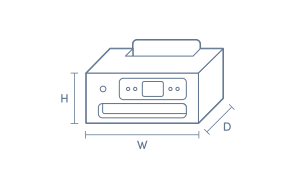
Product Dimensions
- Product Height (mm):
- 305
- Product Width (mm):
- 576
- Product Depth (mm):
- 477
- Product Weight (g):
- 19800
Box Dimensions
- Box Height (mm):
- 563
- Box Width (mm):
- 681
- Box Depth (mm):
- 561
- Box Weight (kg):
- 34

Product Reviews of Brother A3 Inkjet Multifunction Printer MFC-J6540W

Overall Rating Snapshot
4.2 out of 5 stars from 34 reviews
88% of users recommend this product
What customers say, summarised by AI
- Simple to set up and user-friendly, ideal for home or office use.
- Fast printing speeds and high print quality, including A3 format.
- Compact design but heavier than some previous models; fits multiple needs.
- Lacks built-in cropping function during scanning; can be inconvenient.
- Requires separate purchase of a cord for non-wireless setup.
- Some users found setup challenging and had compatibility issues with older computers.
Pros
Easy (11)
Quality (5)
Speed (2)
Efficient (1)
Quiet (1)
awesome
easy for me to use
anna
Confirmed purchase 30 November 2025
Published on 2 November 2026
Yes, I recommend this product.
This customer is a verified purchaser who may have received an incentive in return for providing an authentic review.
Brother A3 Inkjet Multifunction Printer
Simple set up, easy to use. Fast print rate. Overall a great printer for a home office
Carl Anderson
Confirmed purchase 20 July 2026
Published on 12 August 2026
Yes, I recommend this product.
This customer is a verified purchaser who may have received an incentive in return for providing an authentic review.
Great small business printer
Great features in one machine. I have 2 offices, and after the success with the first printer, I ended up getting one for the second office.
Chris
Confirmed purchase 16 May 2026
Published on 10 June 2026
Yes, I recommend this product.
This customer is a verified purchaser who may have received an incentive in return for providing an authentic review.
Superb
This compact printer has all the features of a large printer and perfect for our needs. Three students (Years 5 & 11 and one at university) as well as meeting all of our financial reporting needs.
Sandra
Confirmed purchase 4 July 2025
Published on 1 May 2026
Yes, I recommend this product.
This customer is a verified purchaser who may have received an incentive in return for providing an authentic review.
Good product
Easy to use
Anna
Confirmed purchase 30 November 2025
Published on 13 January 2026
Yes, I recommend this product.
This customer is a verified purchaser who may have received an incentive in return for providing an authentic review.
Good product
Awesome easy to use
Anna
Confirmed purchase 30 November 2025
Published on 13 January 2026
Yes, I recommend this product.
This customer is a verified purchaser who may have received an incentive in return for providing an authentic review.
Awesome
Its a good product
Anna
Confirmed purchase 30 November 2025
Published on 26 December 2025
Yes, I recommend this product.
This customer is a verified purchaser who may have received an incentive in return for providing an authentic review.
Awesome features
Works awesome
Anna
Confirmed purchase 30 November 2025
Published on 24 December 2025
Yes, I recommend this product.
This customer is a verified purchaser who may have received an incentive in return for providing an authentic review.
Great printer for the price
This printer is easy to set up and use.
John Guy
Confirmed purchase 12 August 2025
Published on 3 September 2025
Yes, I recommend this product.
This customer is a verified purchaser who may have received an incentive in return for providing an authentic review.
Printer
Really good
Brian
Confirmed purchase 28 June 2025
Published on 24 July 2025
Yes, I recommend this product.
This customer is a verified purchaser who may have received an incentive in return for providing an authentic review.
You've viewed 10 of 34 reviews
ABOUT THE GOOD GUYS REVIEWSThe Good Guys product reviews are collected from verified purchasers who may have received an incentive in return for providing an authentic review.
The below information is AI generated based on Australian websites information around this item. We have done our best to ensure its accuracy but suggest verifying any information within this tab before purchasing.
At a glance
The Brother MFC-J6540W is a robust A3 inkjet multifunction printer ideal for home offices and small businesses needing flexible printing, scanning, copying, and faxing up to A3 size. It stands out for its fast print speeds, wireless connectivity, and high paper capacity. While it handles everyday documents and colour prints well, photo print quality is average compared to specialist photo printers.
What it’s great for
- High-Volume Printing
- A3 Document Production
- Wireless Printing
- Scanning and Copying
- Small Business Productivity
Where it works best
- Home Office
- Small Business
- Shared Workspace
Who it’s for
- Small Business Owner
- Home Office Worker
- Remote Professional
- Creative Teams
Things to consider
Photo print quality is good for documents and casual images, but not as vibrant or detailed as dedicated photo printers.
Home office suitability score
9/10 - Excellent for home offices needing A3 capability and multifunction features.
Photo printing quality
6/10 - Suitable for everyday colour prints, but lacks the vibrancy and detail of specialist photo printers.
Ease of use rating
8/10 - Intuitive touchscreen and simple wireless setup make operation straightforward.
Running cost guidance
Moderate - Individual ink cartridges help control costs, but high-volume users may find ink expenses add up over time.
Family friendliness
Good - Easy to use and safe for family environments, but large footprint may not suit all homes.
Key benefits
- A3 Printing: Supports up to A3 paper size, ideal for posters, plans, and large spreadsheets.
- Fast Print Speeds: Delivers up to 22 pages per minute (mono), reducing wait times for large jobs.
- Automatic Duplex Printing: Saves paper and time with built-in double-sided printing.
- High Paper Capacity: 250-sheet input tray minimises the need for frequent refills.
- Wireless & Mobile Printing: Print from laptops, tablets, and smartphones via Wi-Fi and cloud services.
- Large Touchscreen Display: 6.8 cm colour touchscreen simplifies navigation and setup.
- Multi-Function Capability: Print, scan, copy, and fax in one device for all-in-one convenience.
- Individual Ink Cartridges: Replace only the colour you need, helping manage ongoing costs.
Q: Does the Brother MFC-J6540DW print A3 documents double-sided?
A: Yes. It supports automatic 2-sided printing on A3, so larger reports, plans and spreadsheets do not need manual page flipping. Duplex printing applies to print jobs, while scanning is listed as single-sided on this model.
Q: Can the Brother MFC-J6540DW scan double-sided originals automatically?
A: No. The listed scan function is single-sided, so double-sided originals need to be scanned in two passes or turned over manually. That matters if a lot of invoices or contracts arrive printed on both sides.
Q: What ink cartridges does the Brother MFC-J6540DW use?
A: This model uses Brother LC462 series ink cartridges, with high-yield options available. Brother lists yields of 3,000 black pages and 1,500 colour pages for replacement cartridges, based on standard test conditions rather than every job.
Q: Is the Brother MFC-J6540DW a good fit for a small office that prints often?
A: Yes. With print speeds of 28 pages per minute, a 4.4 second first page out time and a 250-sheet tray, it suits regular business printing better than entry models. Heavy A3 and A4 switching may be less convenient because it has one main tray.
Q: Does the Brother MFC-J6540DW support both Wi-Fi and wired networking?
A: Yes. It supports dual-band Wi-Fi on 2.4GHz and 5GHz, plus Ethernet, Wi-Fi Direct and USB. That gives flexibility for shared office use, although 5GHz is typically faster at short range and 2.4GHz generally reaches further.