


TP-LINK 5-Port Gigabit Desktop Switch
LS105G


Play Video


Product Overview
Key Features
- Network switch with IEEE 802.3i/u/ab/x/1p, 10/100/1000Mbps
- Five RJ45 ports for wired connections
- Compact blue design, 0.30 kg, 25 mm high
Key Specifications
- Brand:
- TP-LINK
- Model Number:
- LS105G
- Connections:
- RJ45
- Wi-Fi:
- IEEE 802.3i, IEEE 802.3u, IEEE 802.3ab, IEEE 802.3x, IEEE 802.1p
- Type:
- Network Switch
Connections
- Data Transfer Speed:
- 10/100/1000Mbps
General Information
- Colour:
- Blue
- What's In The Box:
- 5-Port 10/100/1000Mbps Desktop Switch, Power Adapter, Installation Guide
Warranty
- Manufacturer's Warranty:
- 5 Year
Connections
- Data Transfer Speed:
- 10/100/1000Mbps
Warranty
- Manufacturer's Warranty:
- 5 Year
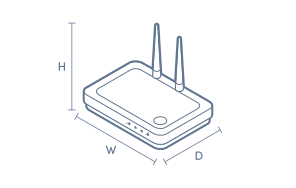
Product Dimensions
- Product Height (mm):
- 25
- Product Width (mm):
- 99.8
- Product Depth (mm):
- 98
- Product Weight (kg):
- 0.3
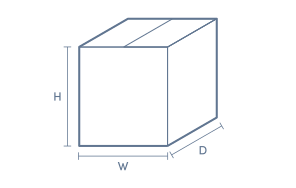
Box Dimensions
- Box Height (mm):
- 120
- Box Width (mm):
- 120
- Box Depth (mm):
- 90
- Box Weight (kg):
- 0
No reviews found for this product.
Product Reviews of TP-LINK 5-Port Gigabit Desktop Switch

Overall Rating Snapshot
You've viewed 0 of 0 reviews
The below information is AI generated based on Australian websites information around this item. We have done our best to ensure its accuracy but suggest verifying any information within this tab before purchasing.
At a glance
The TP-LINK 5-Port Gigabit Desktop Switch is an easy-to-use, unmanaged network switch ideal for home offices and small businesses needing fast, reliable wired connections. Its metal housing and fanless design ensure quiet, durable operation. Energy-efficient features help reduce power use. However, it lacks advanced management or VLAN features found in higher-end switches.
What it’s great for
- Expanding Wired Networks
- Reliable Connectivity
- Plug-and-Play Setup
- Small Office Networking
- Home Networking
Where it works best
- Home Office
- Small Business
- Study Room
- Shared Workspaces
Who it’s for
- Remote Worker
- Small Business Owner
- Home User
- Student
Things to consider
Does not support advanced network management or VLAN configuration; not suited for complex or enterprise-grade networking needs.
Compatibility with major brands
Compatible with all major networking brands and standard Ethernet devices.
Ease of setup score
10/10 - True plug-and-play with no software or configuration required.
Home office suitability
Excellent for home offices needing stable, wired connections for multiple devices.
Upgrade flexibility
Limited-does not support advanced features like VLANs or link aggregation.
Durability vs category average
9/10 - Metal housing and fanless design offer above-average durability for its class.
Key benefits
- Gigabit Speed: All five ports support 10/100/1000 Mbps for fast data transfer and smooth streaming.
- Plug-and-Play: No configuration required-simply connect devices and power up for instant network expansion.
- Auto-MDI/MDIX: Automatically detects cable type, eliminating the need for crossover cables.
- Energy Efficient: Green Ethernet technology reduces power consumption by up to 70% depending on link status and cable length.
- Fanless Design: Silent operation makes it suitable for quiet environments like home offices and bedrooms.
- Metal Housing: Durable steel case provides better protection and heat dissipation than plastic alternatives.
- QoS Support: 802.1p/DSCP QoS enables traffic prioritisation for smoother video and voice performance.
- Flexible Installation: Compact size and wall-mounting option fit a variety of spaces.
Q: How fast is the TP-Link 5-Port Gigabit Desktop Switch in real use?
A: It supports gigabit Ethernet, which means each port can link at 10, 100 or 1000Mbps depending on the connected device and cable. To get full 1000Mbps speeds, both devices and the Ethernet cable need to support gigabit.
Q: Is this TP-Link 5-Port Gigabit Desktop Switch managed or plug-and-play?
A: It is an unmanaged switch, so it is designed for simple plug-and-play use with no software setup for everyday networking. It will not suit buyers who need VLANs, traffic monitoring, remote management or advanced port controls.
Q: What is a 5-port gigabit desktop switch like this best used for?
A: It is best for adding more wired network connections when one router or modem port is not enough. A common setup is linking a TV, gaming console, desktop PC and NAS on the same network, using one port to connect back to the router.
Q: Does this TP-Link 5-Port Gigabit Desktop Switch support PoE?
A: No, this desktop switch is for network data only and does not provide Power over Ethernet to devices such as cameras, access points or VoIP phones. If a device needs power through the cable, a PoE switch or injector is required.
Q: What is the difference between this TP-Link LiteWave switch and a TP-Link SG105-style model?
A: The LiteWave model is aimed at straightforward home or small office expansion with basic unmanaged switching. SG105-style models are often chosen when buyers want a more premium build or extra switching features, not just extra ports.


