


Microsoft Surface Laptop Studio 2 EVO i7 16GB 512GB - Platinum
ZRF-00015
NOT AVAILABLE


Play Video


Product Overview
Key Features
- 14.4 Inch HDR touchscreen with 2400 x 1600 resolution
- 16GB RAM, Intel Core i7-13700H, 512GB SSD storage
- Intel integrated graphics
- Responsive touch screen for easy navigation
- Up to 19 hours battery, quad speakers with Dolby Atmos
Key Specifications
- Brand:
- Microsoft
- Model Number:
- ZRF-00015
- Touch Screen:
- Yes
- Graphics Processing Unit:
- Intel Integrated
- Screen Size (Inches):
- 14.4
- Total Storage:
- 512GB
- Wireless Connections:
- Wi-Fi 6E: 802.11ax compatible, Bluetooth v5.3
- Battery:
- Up to 19 hours on typical usage
- Operating System:
- Windows 11 Home
Computers & Tablets
- Processor Brand:
- Intel
- Processor Specifications:
- Intel Core i7-13700H
- Card Reader:
- MicroSDXC card reader
- Webcam:
- Yes
Screen Technology
- Display Resolution (px):
- 2400 x 1600, 200 PPI
- Refresh Rate (Hz):
- 120
Screen Features
- Screen Size Range:
- 14 - 15.9 Inches
- Screen Type:
- HDR Touchscreen
Capacity
- Storage:
- 512GB SSD
- RAM (GB):
- 16
Connections
- Wired Connections:
- 2 x USB-C with USB4 / Thunderbolt 4 (with DisplayPort and Power Delivery), USB-A 3.1, 3.5mm Headphone Jack, Surface Connect port
- Cellular or Wi-Fi Only:
- Wi-Fi Only
Audio
- Sound:
- Quad Omnisonic speakers with Dolby Atmos
General Information
- Type:
- Surface Laptop
- Family:
- Surface Laptop Studio 2
- Colour:
- Silver
- Supplier Colour:
- Platinum
- Additional Features:
- Microsoft 365 Family 30-day trial and Xbox Game Pass Ultimate 30-day trial, • Auto brightness via Ambient Colour Sensor, Accelerometer, Gyroscope
- What's In The Box:
- Surface Laptop Studio 2, Power supply, Quick start guide, Safety and warranty documents
Warranty
- Manufacturer's Warranty:
- 2 Year
Computers & Tablets
- Processor Brand:
- Intel
- Processor Specifications:
- Intel Core i7-13700H
- Card Reader:
- MicroSDXC card reader
- Webcam:
- Yes
Screen Features
- Screen Size Range:
- 14 - 15.9 Inches
- Screen Type:
- HDR Touchscreen
Connections
- Wired Connections:
- 2 x USB-C with USB4 / Thunderbolt 4 (with DisplayPort and Power Delivery), USB-A 3.1, 3.5mm Headphone Jack, Surface Connect port
- Cellular or Wi-Fi Only:
- Wi-Fi Only
General Information
- Type:
- Surface Laptop
- Family:
- Surface Laptop Studio 2
- Colour:
- Silver
- Supplier Colour:
- Platinum
- Additional Features:
- Microsoft 365 Family 30-day trial and Xbox Game Pass Ultimate 30-day trial, • Auto brightness via Ambient Colour Sensor, Accelerometer, Gyroscope
- What's In The Box:
- Surface Laptop Studio 2, Power supply, Quick start guide, Safety and warranty documents
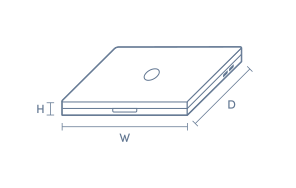
Product Dimensions
- Product Height (mm):
- 22
- Product Width (mm):
- 230
- Product Depth (mm):
- 323
- Product Weight (kg):
- 1.89
Box Dimensions
- Box Height (mm):
- 69
- Box Width (mm):
- 252
- Box Depth (mm):
- 347
- Box Weight (kg):
- 4

Product Reviews of Microsoft Surface Laptop Studio 2 EVO i7 16GB 512GB - Platinum

Overall Rating Snapshot
5 out of 5 stars from 1 review
100% of users recommend this product
One of the best Windows laptops you can buy
Really love the 2 in 1 feature, plus the 19 hour battery life
Adnan
Confirmed purchase 24 August 2025
Published on 24 September 2025
Yes, I recommend this product.
This customer is a verified purchaser who may have received an incentive in return for providing an authentic review.
You've viewed 1 of 1 reviews
ABOUT THE GOOD GUYS REVIEWSThe Good Guys product reviews are collected from verified purchasers who may have received an incentive in return for providing an authentic review.
The below information is AI generated based on Australian websites information around this item. We have done our best to ensure its accuracy but suggest verifying any information within this tab before purchasing.
At a glance
The Microsoft Surface Laptop Studio 2 is a premium 2-in-1 performance laptop built for users who want a powerful Windows device for work, study and creative tasks. Its standout strengths are the versatile folding display, polished build and strong all-round responsiveness. The main limitation is portability, as it is heavier and bulkier than many traditional thin-and-light laptops.
What it’s great for
- Everyday Productivity
- Creative Work
- Business Use
- Multitasking
- Study
- Presentation Mode Computing
Where it works best
- Home Office
- Corporate Office
- University Campus
- Creative Studio
- Hybrid Work Setups
Who it’s for
- Everyday Professional
- Creative Professional
- University Student
- Remote Worker
- Power User
Things to consider
It offers more flexibility than a standard laptop, but it is less portable than slimmer ultraportables and not as gaming-focused as dedicated gaming laptops.
Student suitability
High - excellent for note-taking, research, presentations and creative coursework, though its size and price may be more than some students need.
Gaming suitability score
6/10 - capable for casual to moderate gaming, but not the best fit if gaming is a top priority.
Portability rating
6/10 - portable enough for commuting, but heavier and thicker than many slim productivity laptops.
Battery endurance rating
7/10 - solid for a premium performance laptop, though battery life can vary more under demanding creative or multitasking workloads.
Pro vs casual fit
Leans professional - best for users who will benefit from its flexible design, premium build and stronger multitasking performance.
Key benefits
- Flexible display design: Switches between laptop, stage and studio-style positions for typing, presenting and sketching.
- Touchscreen display: Makes navigation, note-taking and creative work feel more direct and intuitive than a non-touch laptop.
- Intel Evo platform: Delivers a responsive premium laptop experience designed for fast wake, smooth everyday performance and reliable mobile use.
- Premium build quality: Feels sturdy and refined, making it well suited to regular travel between home, office and campus.
- Comfortable keyboard and large touchpad: Supports long work sessions with easier typing and precise control.
- Creative-friendly form factor: Better suited to drawing, reviewing visuals and annotating documents than a standard clamshell laptop.
- Strong multitasking performance: Handles office apps, browser-heavy workflows and creative software more smoothly than basic entry-level laptops.
- Distinctive platinum finish: Offers a clean, professional look that fits well in business, study and studio environments.
Q: Does the Microsoft Surface Laptop Studio 2 include a pen in the box?
A: No. Surface Slim Pen support means the touchscreen can be used for handwriting and sketching, but the pen is sold separately. If pen input matters, budget for a compatible Surface Slim Pen rather than assuming one is included.
Q: What are the Laptop, Stage and Studio modes actually useful for on this model?
A: The three-position hinge is designed for different tasks. Laptop mode suits typing, Stage mode pulls the screen forward for presenting or streaming, and Studio mode lowers it for inking or drawing, but it remains a full laptop, not a detachable tablet.
Q: Is the Intel Iris Xe graphics in this Surface Laptop Studio 2 suitable for gaming or heavy creative work?
A: It is better suited to office work, streaming, photo editing and lighter creative apps than demanding 3D rendering or modern AAA gaming. This configuration uses Intel Iris Xe graphics, so buyers needing stronger GPU performance should compare other variants.
Q: Can the Thunderbolt 4 ports on this Surface Laptop Studio 2 be used with docks and fast external drives?
A: Yes. The two USB-C Thunderbolt 4 ports are the main connections for high-speed external SSDs, modern docks and other performance accessories, while USB-A helps with older peripherals. If you use HDMI or SD cards, an adapter or dock may still be needed.
Q: Is 512GB of storage enough for this Surface Laptop Studio 2 if you work with large files?
A: 512GB suits many work and study users, but large creative apps, RAW photo libraries and video projects can fill it quickly. The SSD is removable, which helps with long-term planning, but this model starts with a single 512GB internal drive.
Q: How realistic is the battery life on the Surface Laptop Studio 2 with everyday use?
A: The quoted battery life is about 19 hours under typical usage, not heavy workloads. Expect less if you run the display at 120Hz, keep brightness high, spend hours on video calls or use sustained creative apps that put more load on the processor.