


Microsoft Surface Pro Copilot+ PC 12" Snapdragon X Plus 8 Core 16GB 512GB -Violet
EP2-27748


Online Only

Microsoft Surface Pro Copilot+ PC 12" Snapdragon X Plus 8 Core 16GB 256GB -Platinum
EP2-27652
(8 Reviews)
$1799

Microsoft Surface Pro 12" Snapdragon X2 Plus 6 Core 16GB 512GB - Graphite
EP2-75505
No reviews yet
$2199

Microsoft Surface Pro Copilot+ PC 12" Snapdragon X Plus 8 Core 16GB 512GB -Ocean
EP2-27780
No reviews yet
$1999

Microsoft Surface Pro Copilot+ PC 12" Snapdragon X Plus 8 Core 16GB 512GB -Platinum
EP2-27668
No reviews yet
$1999

Microsoft Surface Pro 12" Snapdragon X1 Plus 8 Core 12GB 256GB - Platinum
EP2-81974
No reviews yet
$1649

Microsoft Surface Pro 12" Snapdragon X2 Plus 6 Core 16GB 256GB - Platinum
EP2-75845
No reviews yet
$1999

Microsoft Surface Pro 12" Snapdragon X2 Plus 6 Core 16GB 256GB - Graphite
EP2-83416
No reviews yet
$1999

Microsoft Surface Pro (11th Ed) Copilot+ PC 13" X Plus 10 Core 16GB 512GB - Plat
ZHY-00012
(3 Reviews)
$2199

Microsoft Surface Pro 12" Snapdragon X2 Plus 6 Core 24GB 512GB - Graphite
EP2-76340
No reviews yet
$2499
Microsoft Surface Pro Copilot+ PC 12" Snapdragon X Plus 8 Core 16GB 256GB -Platinum
EP2-27652
(8 Reviews)
$1799
Microsoft Surface Pro 12" Snapdragon X2 Plus 6 Core 16GB 512GB - Graphite
EP2-75505
No reviews yet
$2199
Microsoft Surface Pro Copilot+ PC 12" Snapdragon X Plus 8 Core 16GB 512GB -Ocean
EP2-27780
No reviews yet
$1999
Microsoft Surface Pro Copilot+ PC 12" Snapdragon X Plus 8 Core 16GB 512GB -Platinum
EP2-27668
No reviews yet
$1999
Microsoft Surface Pro 12" Snapdragon X1 Plus 8 Core 12GB 256GB - Platinum
EP2-81974
No reviews yet
$1649
Microsoft Surface Pro 12" Snapdragon X2 Plus 6 Core 16GB 256GB - Platinum
EP2-75845
No reviews yet
$1999
Microsoft Surface Pro 12" Snapdragon X2 Plus 6 Core 16GB 256GB - Graphite
EP2-83416
No reviews yet
$1999
Microsoft Surface Pro (11th Ed) Copilot+ PC 13" X Plus 10 Core 16GB 512GB - Plat
ZHY-00012
(3 Reviews)
$2199
Microsoft Surface Pro 12" Snapdragon X2 Plus 6 Core 24GB 512GB - Graphite
EP2-76340
No reviews yet
$2499
Product Overview
Key Features
- 12 Inch touch screen, 2196 x 1464, 400 nits
- Snapdragon X Plus 8 Core, 16GB memory
- 10MP Ultra HD rear, Full HD front Surface Studio Camera
- Up to 16 hours video, up to 12 hours web usage
Key Specifications
- Brand:
- Microsoft
- Model Number:
- EP2-27748
- Screen Size (Inches):
- 12
- Peak Brightness (Nits):
- 150
- Storage Capacity:
- 512GB
- Cellular or Wi-Fi Only:
- Wi-Fi Only
- Battery:
- Lithium-ion, Up to 16 hours
- Supplier Colour:
- Violet
- Processor:
- Snapdragon X Plus (8 Core)
- Release Year:
- 2025
Computers & Tablets
- Touch Screen:
- Yes
Screen Technology
- Display Resolution (px):
- 2196 x 1464
Screen Features
- Screen Size Range:
- 12 - 12.9 Inches
Capacity
- Memory:
- 16GB
Connections
- Wireless Connections:
- Wi-Fi 7, Bluetooth v5.4
- Wired Connections:
- 2x USB-C/USB 3.2
Cameras
- Video:
- Up to 4K
General Information
- Type:
- Tablet
- Family:
- Surface Pro
- Colour:
- Purple
- Operating System:
- Windows 11 Home
Warranty
- Manufacturer's Warranty:
- 1 Year
Computers & Tablets
- Touch Screen:
- Yes
Screen Features
- Screen Size Range:
- 12 - 12.9 Inches
Connections
- Wireless Connections:
- Wi-Fi 7, Bluetooth v5.4
- Wired Connections:
- 2x USB-C/USB 3.2
General Information
- Type:
- Tablet
- Family:
- Surface Pro
- Colour:
- Purple
- Operating System:
- Windows 11 Home
Product Dimensions
- Product Height (mm):
- 36
- Product Width (mm):
- 209
- Product Depth (mm):
- 293
- Product Weight (g):
- 686
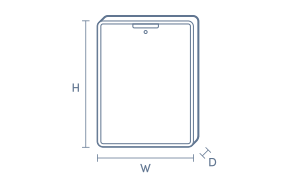
Box Dimensions
- Box Height (mm):
- 36
- Box Width (mm):
- 209
- Box Depth (mm):
- 293
- Box Weight (kg):
- 1

Product Reviews of Microsoft Surface Pro Copilot+ PC 12" Snapdragon X Plus 8 Core 16GB 512GB -Violet

Overall Rating Snapshot
5 out of 5 stars from 2 reviews
100% of users recommend this product
Awesome Machine
Easy use, clean lines, Fast operating speed and sleek design. Having a full PC Microsoft operating system experience in a tablet is very handy and compact.
Brod
Confirmed purchase 1 August 2026
Published on 25 August 2026
Yes, I recommend this product.
This customer is a verified purchaser who may have received an incentive in return for providing an authentic review.
Great laptop
Excellent laptop. Easy to use and access
Sue
Confirmed purchase 1 October 2025
Published on 26 December 2025
Yes, I recommend this product.
This customer is a verified purchaser who may have received an incentive in return for providing an authentic review.
You've viewed 2 of 2 reviews
ABOUT THE GOOD GUYS REVIEWSThe Good Guys product reviews are collected from verified purchasers who may have received an incentive in return for providing an authentic review.
The below information is AI generated based on Australian websites information around this item. We have done our best to ensure its accuracy but suggest verifying any information within this tab before purchasing.
At a glance
The Microsoft Surface Pro Copilot+ PC 12-inch is a lightweight Windows tablet for students, commuters and everyday professionals who want portability, solid multitasking and all-day flexibility. It is especially strong for office work, study, web use and video calls, with Wi-Fi 7 and long battery life adding convenience. One limitation is its 150-nit display, which is less suited to very bright environments.
What it’s great for
- Everyday Productivity
- Office Work
- Student Computing
- Remote Study
- Web Browsing
- Video Calls
- Travel-Friendly Computing
Where it works best
- Home Office
- University Campus
- Classroom
- Corporate Office
- Shared Living Spaces
- On the Go
Who it’s for
- University Student
- Everyday Professional
- Remote Worker
- Frequent Traveller
- Home User
Things to consider
Its 150-nit display brightness is lower than premium tablets and laptops aimed at bright-room use, colour-critical creative work or outdoor visibility.
Student suitability score
9/10 - Lightweight, portable and well suited to research, documents, online classes and multitasking.
Travel portability rating
9/10 - Its 686 g weight and compact 12-inch size make it easy to pack for commuting and travel.
Creative use fit
Best for light creative tasks such as document layout, basic image work and content review rather than demanding professional creation.
Family sharing suitability
7/10 - Good for shared browsing, streaming and homework, though it is more productivity-focused than family entertainment-first tablets.
Productivity vs entertainment balance
Leans strongly toward productivity, while still handling casual streaming, browsing and everyday media use well.
Key benefits
- 12-inch touchscreen: Easy to use for tapping, scrolling, note-taking and everyday work in a compact format.
- 686 g design: Light enough to carry comfortably between classes, meetings or daily commutes.
- Windows 11 Home: Runs familiar Windows apps for study, productivity and general home use.
- Up to 16 hours battery life: Supports long video playback sessions and helps reduce charging during the day.
- Wi-Fi 7 connectivity: Supports faster wireless networking when used with compatible routers.
- Bluetooth v5.4: Connects smoothly to modern wireless accessories such as headphones, keyboards and mice.
- Dual USB-C ports: Makes it easier to connect docks, chargers and external displays without relying on a single port.
- Up to 4K video capability: Suitable for clear video calls, recordings and media playback.
Q: Can the Microsoft Surface Pro Copilot+ PC run regular Windows apps on Snapdragon X Plus?
A: Yes. Many everyday Windows apps run well either natively on ARM or through Microsoft’s Prism translation layer. The main caveat is older utilities, some VPNs, drivers and niche business software, which may need ARM-specific support.
Q: Is this 12-inch Surface Pro better for work and study, or for heavy creative and gaming use?
A: It is better suited to work, study, web use, video calls and light creative tasks than demanding 3D or gaming workloads. The 16GB memory helps with multitasking, but heavy AAA games and pro-grade rendering are better on a more powerful laptop.
Q: Do I need to buy a keyboard separately for this Microsoft Surface Pro?
A: Usually yes. Surface Pro devices are often sold as the tablet first, with the keyboard and pen available separately unless a bundle is clearly listed. That matters if you want a laptop-style setup for typing, trackpad use and travel.
Q: Can this Surface Pro be used as both a tablet and a laptop replacement?
A: Yes, for many buyers it can do both. Used on its own, it works as a compact touch device, and with a compatible keyboard it becomes closer to a laptop, though the smaller 12-inch screen may feel tight for full-day spreadsheet or design work.
Q: What should I know about gaming on the Surface Pro Copilot+ PC?
A: It can handle lighter games, streaming and some PC titles, but it is not a gaming-first machine. ARM app compatibility and integrated graphics mean some newer games, anti-cheat protected titles and launcher-based games may not run as expected.
Q: Will a USB-C dock or external monitor work properly with this Surface Pro?
A: Yes, a USB-C dock or monitor can be a practical way to turn it into a desk setup. The key limitation is driver support, because some older docks and accessories rely on software that may not be fully compatible with Windows on ARM.


