

Microsoft Surface Pro 12" Snapdragon X2 Plus 6 Core 16GB 256GB - Graphite
Participating Credit Cards. 50 Months Interest Free.
No Interest. No Deposit. Monthly payments required.


Product Overview
Key Features
Key Specifications
- Brand:
- Microsoft
- Model Number:
- EP2-83416
- Screen Size (Inches):
- 12
- Storage Capacity:
- 256GB
- Cellular or Wi-Fi Only:
- Wi-Fi Only
- Battery:
- 38hr
- Supplier Colour:
- Graphite
- Processor:
- Qualcomm Snapdragon X2 Plus 6 Core, 22MB, 4GHz
- Release Year:
- 2026
Computers & Tablets
- Touch Screen:
- Yes
Screen Technology
- Display Resolution (px):
- 2196 x 1464 (220 PPI)
Screen Features
- Screen Size Range:
- 12 - 12.9 Inches
Capacity
- Memory:
- 16GB
Connections
- Wireless Connections:
- Wi-Fi 7, Bluetooth Core 5.4 Technology
General Information
- Type:
- Tablet
- Colour:
- Black
- Operating System:
- Windows 11 Home
Warranty
- Manufacturer's Warranty:
- 2 Year
Computers & Tablets
- Touch Screen:
- Yes
Screen Features
- Screen Size Range:
- 12 - 12.9 Inches
Connections
- Wireless Connections:
- Wi-Fi 7, Bluetooth Core 5.4 Technology
Warranty
- Manufacturer's Warranty:
- 2 Year
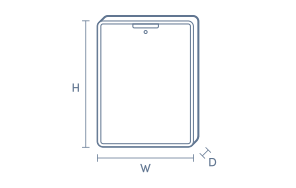
Product Dimensions
- Product Height (mm):
- 274
- Product Width (mm):
- 190
- Product Depth (mm):
- 7.8
Box Dimensions
- Box Height (mm):
- 36
- Box Width (mm):
- 209
- Box Depth (mm):
- 293

No reviews found for this product.
Product Reviews of Microsoft Surface Pro 12" Snapdragon X2 Plus 6 Core 16GB 256GB - Graphite

Overall Rating Snapshot
You've viewed 0 of 0 reviews
The below information is AI generated based on Australian websites information around this item. We have done our best to ensure its accuracy but suggest verifying any information within this tab before purchasing.
At a glance
The Microsoft Surface Pro 12-inch is a premium Windows tablet for students, professionals and frequent travellers who want laptop-style productivity in a lighter, more flexible form. Its key strengths are portability, a responsive touchscreen, long claimed battery life and kickstand versatility. The main limitation is that accessories such as the keyboard and pen are sold separately, which can raise the total cost.
What it’s great for
- Everyday Productivity
- Student Computing
- Remote Work
- Travel-Friendly Computing
- Media Streaming
- Note Taking
Where it works best
- Home Office
- University Campus
- Corporate Office
- On the Go
- Shared Living Spaces
Who it’s for
- University Student
- Everyday Professional
- Remote Worker
- Frequent Traveller
- Creative Note Taker
Things to consider
Best experience often depends on optional accessories like the keyboard and pen, so it may cost more overall than some tablets or traditional laptops.
Student suitability score
9/10 - Light, versatile and well suited to note taking, research, assignments and campus mobility.
Travel portability rating
9/10 - Compact 12-inch size and tablet form make it easy to carry for commuting, flights and hybrid work.
Creative use fit
Strong for sketching, handwritten notes and light creative work with a compatible pen, but more specialised creators may want larger displays or dedicated high-end graphics hardware.
Family sharing suitability
7/10 - Good for browsing, streaming and everyday use, though its premium positioning and work focus make it less ideal as a casual shared household tablet.
Productivity vs entertainment balance
Leans toward productivity, while still handling streaming and casual entertainment comfortably.
Key benefits
- 12-inch touchscreen: Gives you a compact, hands-on display that is easy to use for tapping, sketching and working on the move.
- 3:2 display shape: Provides more vertical room for documents, web pages and multitasking than many entertainment-focused screens.
- Adjustable 165-degree kickstand: Makes it easier to set a comfortable viewing or working angle at a desk, on a bench or while travelling.
- Up to 15.5 hours battery life: Supports longer use between charges for study days, meetings and travel, though actual runtime varies by use.
- Two USB-C ports: Offers flexible connection options for charging, displays, accessories and fast file transfers.
- Windows 11 Home: Lets you use familiar desktop-style apps and workflows that many students and office users already rely on.
- Wi-Fi 7 connectivity: Supports newer wireless networking for fast, modern home, campus and office connections when compatible networks are available.
- Surface Slim Pen storage and charging support: Helps keep a compatible pen protected, charged and ready for quick notes or sketches.
Q: Does this Surface Pro have built-in 4G or 5G mobile data
A: No. This model is Wi-Fi only, so it does not have built-in 4G or 5G mobile data. Away from Wi-Fi, internet access depends on using a phone hotspot or another external connection, which matters if you work or study on the move.
Q: Are the keyboard and pen included with the tablet
A: No. The keyboard and Surface Slim Pen are sold separately. The tablet works on its own for touch use, but laptop-style typing, trackpad control and pen input all depend on adding those accessories.
Q: Can the USB-C ports run a monitor and other accessories
A: Yes. The two USB-C ports can handle charging, displays, accessories and fast file transfers. A dock, hub or adapter may still be needed for some monitors or older USB devices, because this model does not include full-size ports.
Q: Will Windows apps work properly on this Snapdragon Surface Pro
A: Microsoft Surface Pro runs Windows 11 Home and supports many everyday productivity, browsing and creative apps. Some older or highly specialised programs can vary by app and configuration, so software compatibility is worth checking before buying.
Q: Is 256GB enough storage for uni and office use
A: Yes. 256GB suits documents, web apps, email, spreadsheets and a practical amount of offline media. It can fill faster if you keep large photo libraries, videos or bulky creative project files stored locally instead of in the cloud.
Q: How practical is the 12-inch screen for multitasking
A: The 12-inch display is a workable size for split-screen tasks, notes and travel, and its taller screen shape gives more vertical room for documents. It is less comfortable for very large spreadsheets, detailed timelines or long desktop sessions.