

Microsoft Surface Pro 12" Snapdragon X2 Plus 6 Core 16GB 512GB - Graphite
Participating Credit Cards. 50 Months Interest Free.
No Interest. No Deposit. Monthly payments required.


Product Overview
Key Features
Key Specifications
- Brand:
- Microsoft
- Model Number:
- EP2-75505
- Screen Size (Inches):
- 12
- Storage Capacity:
- 512GB
- Cellular or Wi-Fi Only:
- Wi-Fi Only
- Battery:
- 38hr
- Supplier Colour:
- Graphite
- Processor:
- Qualcomm Snapdragon X2 Plus 6 Core, 22MB, 4GHz
- Release Year:
- 2026
Computers & Tablets
- Touch Screen:
- Yes
Screen Technology
- Display Resolution (px):
- 2196 x 1464 (220 PPI)
Screen Features
- Screen Size Range:
- 12 - 12.9 Inches
Capacity
- Memory:
- 16GB
Connections
- Wireless Connections:
- Wi-Fi 7, Bluetooth Core 5.4 Technology
General Information
- Type:
- Tablet
- Colour:
- Black
- Operating System:
- Windows 11 Home
Warranty
- Manufacturer's Warranty:
- 2 Year
Computers & Tablets
- Touch Screen:
- Yes
Screen Features
- Screen Size Range:
- 12 - 12.9 Inches
Connections
- Wireless Connections:
- Wi-Fi 7, Bluetooth Core 5.4 Technology
Warranty
- Manufacturer's Warranty:
- 2 Year
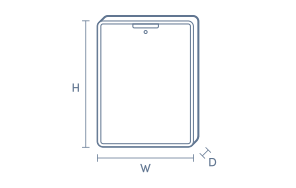
Product Dimensions
- Product Height (mm):
- 274
- Product Width (mm):
- 190
- Product Depth (mm):
- 7.8
Box Dimensions
- Box Height (mm):
- 36
- Box Width (mm):
- 209
- Box Depth (mm):
- 293

No reviews found for this product.
Product Reviews of Microsoft Surface Pro 12" Snapdragon X2 Plus 6 Core 16GB 512GB - Graphite

Overall Rating Snapshot
You've viewed 0 of 0 reviews
The below information is AI generated based on Australian websites information around this item. We have done our best to ensure its accuracy but suggest verifying any information within this tab before purchasing.
At a glance
The Microsoft Surface Pro 12-inch is a premium 2-in-1 tablet for students, professionals and frequent travellers who want Windows flexibility in a light, portable device. Its main strengths are strong everyday productivity, a quality touchscreen and long claimed battery life. One limitation is that key accessories like the keyboard and pen are sold separately, which can raise the total setup cost.
What it’s great for
- Everyday Productivity
- Student Computing
- Remote Work
- Note-Taking
- Streaming
- Travel-Friendly Computing
Where it works best
- Home Office
- University Campus
- Corporate Office
- On the Go
- Shared Living Spaces
Who it’s for
- University Student
- Remote Worker
- Everyday Professional
- Frequent Traveller
- Creative Hobbyist
Things to consider
To get the full laptop-style experience, accessories such as the keyboard and pen are sold separately, so it may cost more than some all-in-one tablet or laptop alternatives.
Student suitability score
9/10 - highly portable, well suited to note-taking and assignments, with strong battery life for campus use.
Travel portability rating
9/10 - compact 12-inch size and tablet form make it easy to carry for commuting and travel.
Creative use fit
Good for sketching, handwritten notes and light creative work, especially with a compatible pen.
Family sharing suitability
7/10 - versatile for browsing, streaming and household tasks, though its premium focus is better suited to personal productivity than casual shared use.
Productivity vs entertainment balance
Leans toward productivity, while still being well suited to streaming, web browsing and casual entertainment.
Key benefits
- 12-inch touchscreen: Gives you a portable display that is easy to use for browsing, note-taking, streaming and everyday work.
- 3:2 display shape: Provides more vertical room for documents, web pages and multitasking than many wider entertainment-focused tablets.
- Windows 11 Home: Lets you use a familiar desktop-style operating system for study, admin tasks and general productivity.
- Adjustable kickstand: Helps you set a comfortable viewing angle for typing, video calls, streaming or sketching.
- Up to 15.5 hours battery life: Supports longer use across the day with fewer charging breaks, though actual life varies by settings and workload.
- Two USB-C ports: Makes it easier to connect charging, displays, accessories and external storage without relying on a single port.
- Wi-Fi 7 connectivity: Supports faster wireless networking on compatible networks for smoother downloads, streaming and cloud-based work.
- Slim Pen support: Gives you a natural option for handwritten notes, markups and sketching when paired with a compatible pen.
Q: Does this Surface Pro include the keyboard and Slim Pen?
A: No. Microsoft sells the Surface Pro 12-inch keyboard and Surface Slim Pen separately, so the tablet does not become a full laptop-style setup straight out of the box. Factor those extras in if typing or handwriting is central to how you plan to use it.
Q: Is the Surface Pro 12-inch Wi-Fi only or can it use SIM?
A: This model is Wi-Fi only, so it does not take a mobile data SIM for standalone cellular access. It supports Wi-Fi 7 and Bluetooth 5.4, which suits home, office and campus networks, but away from Wi-Fi you would need a phone hotspot or similar connection.
Q: Can older USB-A or HDMI accessories plug in without adapters?
A: No. Microsoft Surface Pro has USB-C ports only, so older USB-A drives, HDMI displays and some wired accessories usually need a compatible adapter, hub or dock. That matters if you already own older peripherals and want direct plug-in without extra gear.
Q: Can I connect a monitor and charge it at the same time?
A: Yes. The Surface Pro has two USB-C ports, so one can be used for charging while the other handles a compatible display or accessory. It does not list built-in HDMI or USB-A, so some monitors and older peripherals may need a USB-C adapter or dock.
Q: Does the box include a charger, or is one separate?
A: No. A charger is sold separately for this model, even though charging is supported through its USB-C ports. If you are starting from scratch, add a compatible charger at the same time rather than assuming one is included in the box.
Q: Will 512GB storage be enough for study, work and travel?
A: Yes, for many buyers. Microsoft Surface Pro includes 512GB of storage, which is usually enough for documents, photos, downloaded media and everyday apps. If you keep large video projects or big game libraries offline, external storage may still be worth planning for.