



Epson WorkForce WF-3925 Multifunction Printer
WF-3925


Product Overview
Key Features
- Print, scan and copy in one inkjet printer
- 4800 x 1200 dpi print, 1200 x 2400 dpi scan
- 250 sheet paper capacity
- USB and Wi Fi with AirPrint and app support
Key Specifications
- Brand:
- Epson
- Model Number:
- WF-3925
- Printer Functions:
- Print, Scan & Copy
- Paper Capacity:
- 250 sheets
- Max Print Speed:
- 11 ISO ppm Colour, 21 ISO ppm Black and White
Computers & Tablets
- Printing Resolution:
- 4800 x 1200 dpi
- Paper Size:
- 3.5" x 5", 4" x 6", 5" x 7", 8" x 10", 8.5" x 11", 8.5" x 14", A4, A6, Half Letter, Legal, Executive (Borderless - 3.5" x 5", 5" x 7", 4" x 6", 8" x 10", A4)
- Compatible Ink / Toner:
- 815 Black, 815 Cyan, 815 Magenta, 815 Yellow (High Capacity - 815XL Black, 815XL Cyan, 815XL Magenta, 815XL Yellow)
- Scan Resolution:
- 1200 x 2400 dpi
Smart Features
- Compatible Apps:
- Epson Smart Panel app (iOS, Android) & Epson Remote Print, AirPrint, Google print
Connections
- Wired Connections:
- Y - Both (USB & Wi-Fi)
General Information
- Type:
- Inkjet Printer
- Colour:
- Black
Warranty
- Manufacturer's Warranty:
- 1 Year
Computers & Tablets
- Printing Resolution:
- 4800 x 1200 dpi
- Paper Size:
- 3.5" x 5", 4" x 6", 5" x 7", 8" x 10", 8.5" x 11", 8.5" x 14", A4, A6, Half Letter, Legal, Executive (Borderless - 3.5" x 5", 5" x 7", 4" x 6", 8" x 10", A4)
- Compatible Ink / Toner:
- 815 Black, 815 Cyan, 815 Magenta, 815 Yellow (High Capacity - 815XL Black, 815XL Cyan, 815XL Magenta, 815XL Yellow)
- Scan Resolution:
- 1200 x 2400 dpi
Connections
- Wired Connections:
- Y - Both (USB & Wi-Fi)
Warranty
- Manufacturer's Warranty:
- 1 Year
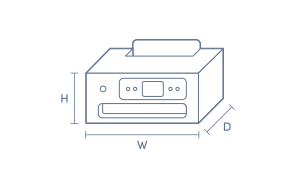
Product Dimensions
- Product Height (mm):
- 249
- Product Width (mm):
- 425
- Product Depth (mm):
- 494
- Product Weight (g):
- 8900
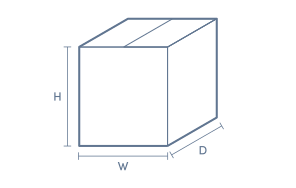
Box Dimensions
- Box Height (mm):
- 330
- Box Width (mm):
- 490
- Box Depth (mm):
- 440
- Box Weight (kg):
- 11
No reviews found for this product.
Product Reviews of Epson WorkForce WF-3925 Multifunction Printer

Overall Rating Snapshot
You've viewed 0 of 0 reviews
The below information is AI generated based on Australian websites information around this item. We have done our best to ensure its accuracy but suggest verifying any information within this tab before purchasing.
At a glance
The Epson WorkForce WF-3925 is a compact all-in-one inkjet printer built for home office users who need printing, scanning and copying in one machine. Its strengths are automatic 2-sided printing, a 250-sheet tray and easy wireless mobile access. It is a solid mid-range choice for everyday document work, though it is not the best fit for high-volume offices or specialist photo printing.
What it’s great for
- Everyday Productivity
- Home Office Printing
- Document Scanning
- Colour Documents
- Admin Tasks
Where it works best
- Home Office
- Study
- Small Business Desk
- Shared Family Workspace
Who it’s for
- Remote Worker
- Home Office User
- Small Business Owner
- Family Household
- Everyday Professional
Things to consider
It is well suited to everyday office printing, but higher-end business printers may offer faster output, larger paper handling and lower running costs for heavy use.
Home office suitability score
9/10 - strong fit for home office users thanks to all-in-one functions, automatic 2-sided printing, wireless access and a 250-sheet tray.
Photo printing quality
7/10 - good for occasional colour and borderless photo prints, but it is primarily aimed at document and office use rather than enthusiast photo output.
Ease of use rating
8/10 - straightforward for everyday use with USB, Wi-Fi and mobile printing options that suit shared and flexible setups.
Running cost guidance
Best for low to moderate print volumes. Individual ink cartridges help avoid replacing a full set at once, but frequent heavy printing may be more economical on higher-volume business models.
Family friendliness
Good for households that need homework, forms, colour pages and occasional scanning in one compact printer.
Key benefits
- Print, Scan and Copy: Handles core home office tasks in one machine to save desk space.
- 250-Sheet Paper Capacity: Reduces how often you need to refill paper during regular weekly printing.
- Auto 2-Sided Printing: Prints on both sides automatically to cut paper use for reports, forms and drafts.
- Wi-Fi Connectivity: Makes it easier to place the printer where it suits your workspace without relying only on a cable.
- USB Connection: Provides a simple wired option for a dedicated desk setup or direct PC connection.
- Mobile Printing Support: Works with AirPrint, Smart Panel and Remote Print for convenient printing from compatible phones and tablets.
- PrecisionCore Heat-Free Technology: Designed for consistent everyday document printing with Epson's inkjet system.
- 4 Individual Ink Cartridges: Lets you replace only the colour that runs out, which can be more practical for mixed document printing.
Q: Does the WF-3925 print double sided pages automatically?
A: Yes. Epson WorkForce WF-3925 includes auto 2-sided printing, so longer documents do not need each sheet turned by hand. It is useful for regular reports and forms, but it does not change the single 250 sheet input tray capacity.
Q: Can this printer print from an iPhone or iPad?
A: Yes. Epson WorkForce WF-3925 supports AirPrint, so compatible Apple devices can print without installing a full printer driver. It also works with the Epson Smart Panel app and Epson Remote Print for mobile access.
Q: Which ink cartridges fit the Epson WorkForce WF-3925?
A: Epson WorkForce WF-3925 uses Epson ink cartridges with a 4 individual cartridge setup, and the bundled set is 815 Black, Cyan, Magenta and Yellow. Individual cartridges mean one colour can be replaced without changing the full set.
Q: Will it work with Windows, Mac and Chromebook?
A: Yes. Epson WorkForce WF-3925 supports Windows 7 through Windows 11, Mac OS X 10.9.5 or later, Mac OS 11 or later, and ChromeOS version 89 or later. Device support still depends on using a compatible connection method such as USB or Wi-Fi.
Q: Can the WF-3925 print borderless on A4 paper?
A: Yes. Epson WorkForce WF-3925 supports borderless printing on A4 as well as common photo sizes. It suits flyers, images and presentation pages, but borderless support does not mean photo-lab paper handling or wide-format printing.
Q: Is this a good fit for a small home office?
A: Yes. Epson WorkForce WF-3925 combines printing, scanning and copying in one desktop unit with a 250 sheet tray, which suits regular home office paperwork. It is designed for documents and colour pages rather than high-volume shared office printing.


