Sign up to Earn or Access 90 Day StoreCash> here

Sign up to Earn or Access 90 Day StoreCash> here

The Good Guys
The Good Guys
Stores
loading...
Seen it Cheaper?1300 942 765
Logo

Brother A3 Inkjet Multifunction

MFC-J6560DW
$399
± Click the icons above as terms, conditions & fees apply

Participating Credit Cards. 6 Months Interest Free.
No Interest. No Deposit. Monthly payments required.

You May Also LikeYou May Also Like

You May Also LikeYou May Also Like

Product Overview

The A3 Inkjet Multifunction prints, scans, copies and faxes documents for home or office use.

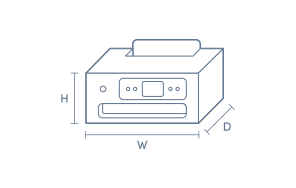
This Brother inkjet printer fits comfortably in a workspace with its 305cm height, 576cm width and 477cm depth. It is suitable for handling a variety of paper sizes, including A4, A5, A3, envelopes and index cards, making it versatile for mixed document tasks and occasional photo printing.

Double sided printing helps reduce paper usage, while the 250 sheet paper capacity allows for uninterrupted large jobs. The printer achieves a maximum print speed of 31ppm and a printing resolution up to 1200 x 4800 dpi for clear text and graphics. Wireless connections include Wi-Fi Direct and Ethernet, and mobile app compatibility enables printing from phones and tablets.

Model MFC-J6560DW in white comes with a 2 year manufacturer's warranty.

Key Features

  • Print, Scan, Copy and Fax
  • Double sided printing
  • Handles A4, A5, A3, envelopes and more
  • 250 sheet paper capacity

Key Specifications

Brand:
Brother
Model Number:
MFC-J6560DW
Printer Functions:
Print, Scan, Copy & Fax
Double Sided Printing:
Yes
Paper Capacity:
250 Sheets
Max Print Speed:
31ppm
Wireless Connections:
Wi-Fi Direct, IEEE 802.11a/n (Infrastructure Mode), IEEE 802.11b/g/n (Infrastructure Mode), Ethernet 10Base-T/100Base-TX/1000Base-T

Computers & Tablets

Printing Resolution:
Up to 1200 x 4800 dpi
Paper Size:
A4, Letter, Portrait, Legal, Folio, A5, A6, Photo 4x6, Index card 5x, Photo 3.5x5, Photo 5x7, C5, Envelope, Monarch, Mexico Legal, India Legal
Compatible Ink / Toner:
LC536BK, LC536C, LC536M, LC536Y, LC536XLBK, LC536XLC, LC536XLM, LC536XLY, LC536XL4PK
Scan Resolution:
From Glass: 1200x2400dpi(mono) / 1200x1200dpi(colour), From ADF: 600x600dpi(mono) / 300x600dpi(colour)

Smart Features

Compatible Apps:
Print Service Plugin, Mobile Connect

General Information

Type:
Inkjet Printer
Colour:
White

Warranty

Manufacturer's Warranty:
2 Year

Computers & Tablets

Printing Resolution:
Up to 1200 x 4800 dpi
Paper Size:
A4, Letter, Portrait, Legal, Folio, A5, A6, Photo 4x6, Index card 5x, Photo 3.5x5, Photo 5x7, C5, Envelope, Monarch, Mexico Legal, India Legal
Compatible Ink / Toner:
LC536BK, LC536C, LC536M, LC536Y, LC536XLBK, LC536XLC, LC536XLM, LC536XLY, LC536XL4PK
Scan Resolution:
From Glass: 1200x2400dpi(mono) / 1200x1200dpi(colour), From ADF: 600x600dpi(mono) / 300x600dpi(colour)

General Information

Type:
Inkjet Printer
Colour:
White

Product Dimensions

Product Height (mm):
305
Product Width (mm):
576
Product Depth (mm):
477
Product Weight (g):
20.1

Box Dimensions

Box Height (mm):
434
Box Width (mm):
681
Box Depth (mm):
576
Box Weight (kg):
25

Product Reviews of Brother A3 Inkjet Multifunction

Brother A3 Inkjet Multifunction MFC-J6560DW

Overall Rating Snapshot

5.0 stars

5 out of 5 stars from 2 reviews

100% of users recommend this product

4
0
3
0
2
0
1
0
  • 5 out of 5

    good

    Prints fast

    Harkiran Singh

    Confirmed purchase 21 September 2026

    Published on 16 October 2026

    Yes, I recommend this product.

    This customer is a verified purchaser who may have received an incentive in return for providing an authentic review.

  • 5 out of 5

    Great Printer

    Great print quality,easy setup and great print speeds for colour and B/W.

    Tim

    Confirmed purchase 13 August 2026

    Published on 10 September 2026

    Yes, I recommend this product.

    This customer is a verified purchaser who may have received an incentive in return for providing an authentic review.

You've viewed 2 of 2 reviews

ABOUT THE GOOD GUYS REVIEWSThe Good Guys product reviews are collected from verified purchasers who may have received an incentive in return for providing an authentic review.

The below information is AI generated based on Australian websites information around this item. We have done our best to ensure its accuracy but suggest verifying any information within this tab before purchasing.

At a glance

The Brother MFC-J6560DW is a versatile A3 inkjet multifunction printer for home offices and small businesses that need printing, scanning, copying and faxing in one machine. Its strengths are A3 capability, fast print speeds, duplex printing and strong mobile and network connectivity. A fair limitation is that it is geared more to business documents than photo enthusiasts wanting specialist photo output.

What it’s great for

  • Home Office Printing
  • Small Business Documents
  • A3 Forms and Spreadsheets
  • Everyday Office Tasks
  • Mobile Printing

Where it works best

  • Home Office
  • Small Business Office
  • Shared Workspace
  • Reception Area

Who it’s for

  • Remote Worker
  • Small Business Owner
  • Home Office User
  • Administrative Professional

Things to consider

While it can handle occasional photo printing, it is better suited to business and document-focused use than premium photo inkjet models designed for higher-end colour accuracy and photo media workflows.

Home office suitability score

9/10 - Strong all-in-one feature set, A3 support and wireless flexibility make it highly capable for serious home office use.

Photo printing quality

7/10 - Good for occasional colour and photo prints, but it is primarily tuned for business documents rather than specialist photo output.

Ease of use rating

8/10 - The touchscreen, ADF and mobile printing options make day-to-day use straightforward for most users.

Running cost guidance

Designed for value-conscious office printing, with up to 1 year of ink included in-box and features that suit regular document workloads.

Family friendliness

7/10 - Useful for mixed household printing like schoolwork and forms, though its A3 office focus may be more than some families need.

Key benefits

  • A3 multifunction capability: Print, scan, copy and fax in one device, making it practical for larger documents and everyday office tasks.
  • Automatic 2-sided A3 printing: Helps reduce paper use while making double-sided reports, forms and presentations easier to produce.
  • Fast print performance: Up to 31 ppm helps keep routine office jobs moving with less waiting between documents.
  • 250-sheet paper tray: Supports longer print runs with fewer paper refills during busy workdays.
  • 50-sheet automatic document feeder: Makes multi-page scanning, copying and faxing more convenient for office paperwork.
  • Flexible connectivity: Dual-band Wi-Fi, Wi-Fi Direct, Ethernet and USB make it easy to fit into different home or office setups.
  • Mobile printing support: Works with Brother Mobile Connect, Apple AirPrint and Mopria for convenient printing from phones and tablets.
  • 6.8 cm colour touchscreen: Simplifies navigation and helps users access common functions and shortcuts quickly.

Q: Does this Brother A3 inkjet multifunction scan and copy in A3 as well as print in A3?

A: Not always. On Brother A3 inkjet multifunction models, A3 printing does not automatically mean A3 scanning and copying. Some use an A4 scanner bed or ADF, so larger originals may need to be reduced or scanned in sections.

Q: Is an A3 inkjet multifunction a better fit than an A3 laser for colour documents at home?

A: Yes, for most home and light office colour work. An A3 inkjet multifunction is usually better for mixed documents, graphics and occasional photos, while an A3 laser is often the stronger option for very high volume text printing.

Q: How much more desk space should be allowed for a Brother A3 inkjet multifunction than an A4 model?

A: Allow noticeably more room than for an A4 multifunction. A3 models are typically around 10 to 20 cm wider and deeper, and they also need extra front space for the output tray and lid clearance above for scanning.

Q: Will A3 printing use much more ink than A4 on this type of Brother multifunction?

A: Yes. An A3 page has about twice the printable area of A4, so full-page colour jobs can use significantly more ink. Real usage depends on page coverage, draft versus standard quality, and whether you print mostly text or graphics.

Q: Is this Brother A3 inkjet multifunction suitable for photos, or is it mainly for office documents?

A: It is generally better suited to office documents and colour graphics, with occasional photo printing as a bonus. For the best photo results, use suitable photo paper. Plain paper photos will not match a dedicated photo printer finish.