


HP HP Envy Photo 7931 All-In-One Printer
B6JX4D


Play Video


Product Overview
Key Features
- Print, Scan and Copy for A4, A5, A6, B5
- 125-sheet tray, 35-sheet ADF
- 22 ppm print speed, 1200 x 1200 dpi scan
Key Specifications
- Brand:
- HP
- Model Number:
- B6JX4D
- Printer Functions:
- Print, Scan & Copy
- Paper Capacity:
- 125-sheet input tray, 15 sheet photo tray, 35-sheet ADF
- Max Print Speed:
- Up to 22 ppm
- Wireless Connections:
- Wi-Fi 802.11a/b/g/n/ac
Computers & Tablets
- Printing Resolution:
- B&W: 1200 x 1200, Colour: 4800 x 1200
- Paper Size:
- A4, Letter, Envelope, A5, A6, B5. Photo Tray: 10 x 15 cm, 13 x 13 cm, 13 x 18 cm
- Compatible Ink / Toner:
- HP SKU T6N09AA, HP SKU T6N12AA, HP SKU 6ZD28AA
- Scan Resolution:
- 1200 x 1200 dpi
Smart Features
- Compatible Apps:
- HP app; Apple AirPrint; Chrome OS; Mopria Print Service; Mopria-certified; HP Print Service Plugin
General Information
- Type:
- Inkjet Printer
- Colour:
- Black
- Supplier Colour:
- OOV white with evening fog accents
- What's In The Box:
- HP Envy Photo 7931 All-in-one Printer; HP 804 Setup Black Original Ink Cartridge; HP Setup Tri-color Original Ink Cartridge; Setup Guide; Reference Guide; Power cord
Warranty
- Manufacturer's Warranty:
- 1 Year
Computers & Tablets
- Printing Resolution:
- B&W: 1200 x 1200, Colour: 4800 x 1200
- Paper Size:
- A4, Letter, Envelope, A5, A6, B5. Photo Tray: 10 x 15 cm, 13 x 13 cm, 13 x 18 cm
- Compatible Ink / Toner:
- HP SKU T6N09AA, HP SKU T6N12AA, HP SKU 6ZD28AA
- Scan Resolution:
- 1200 x 1200 dpi
General Information
- Type:
- Inkjet Printer
- Colour:
- Black
- Supplier Colour:
- OOV white with evening fog accents
- What's In The Box:
- HP Envy Photo 7931 All-in-one Printer; HP 804 Setup Black Original Ink Cartridge; HP Setup Tri-color Original Ink Cartridge; Setup Guide; Reference Guide; Power cord
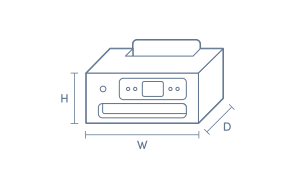
Product Dimensions
- Product Height (mm):
- 233
- Product Width (mm):
- 460
- Product Depth (mm):
- 383
- Product Weight (g):
- 8.12
Box Dimensions
- Box Height (mm):
- 303
- Box Width (mm):
- 464
- Box Depth (mm):
- 568
- Box Weight (kg):
- 8

Product Reviews of HP HP Envy Photo 7931 All-In-One Printer

Overall Rating Snapshot
4.9 out of 5 stars from 18 reviews
94% of users recommend this product
What customers say, summarised by AI
- Easy and quick to set up, with hassle-free wireless connection.
- Produces good print quality, including impressive colour results.
- Fast and quiet printing; a notable improvement for home use.
- Handy cartridge delivery helps prevent ink shortages.
- Suitable for home printing needs, but less ideal for office use.
- Software issues noted by some users may affect advanced features.
Pros
Easy (4)
Quality (3)
Quiet (1)
Value (1)
Top Printer
Hp seams very good so far , also a great idea getting printer cartridges send to you when they see you running out.
Sandra Matchett
Confirmed purchase 9 October 2026
Published on 5 November 2026
Yes, I recommend this product.
This customer is a verified purchaser who may have received an incentive in return for providing an authentic review.
Anonymous
Confirmed purchase 9 October 2026
Published on 3 November 2026
This customer is a verified purchaser who may have received an incentive in return for providing an authentic review.
Quick and simple printing
Great printer. Very quick and good quality.
Hayds
Confirmed purchase 5 October 2026
Published on 28 October 2026
Yes, I recommend this product.
This customer is a verified purchaser who may have received an incentive in return for providing an authentic review.
Huge but functional
Decent quality. Software issues means a full 5 stars isn't possible (as I haven't had chance to use all the functions)
Terry
Confirmed purchase 1 October 2026
Published on 28 October 2026
Yes, I recommend this product.
This customer is a verified purchaser who may have received an incentive in return for providing an authentic review.
Printer
I used it to print documents for traveling. It was easy to connect using my phone.
Candice Holden
Confirmed purchase 16 September 2026
Published on 14 October 2026
Yes, I recommend this product.
This customer is a verified purchaser who may have received an incentive in return for providing an authentic review.
Exactly what I needed at the best price
My old printer died in the middle of a job - quick trip to the Good Guys and I picked up the perfect printer at a fabulous price-thank you
Dawn Tarrant
Confirmed purchase 2 September 2026
Published on 29 September 2026
Yes, I recommend this product.
This customer is a verified purchaser who may have received an incentive in return for providing an authentic review.
Awesome prints
Best feature
Prasanth
Confirmed purchase 3 September 2026
Published on 29 September 2026
Yes, I recommend this product.
This customer is a verified purchaser who may have received an incentive in return for providing an authentic review.
Looks
It's very good it preforms very smoothly not hard to set up prints looks clean
Paving ragothu
Confirmed purchase 8 August 2026
Published on 6 September 2026
Yes, I recommend this product.
This customer is a verified purchaser who may have received an incentive in return for providing an authentic review.
HP ENVY
Great printer, fast printing and quiet. A big improvement on my older unit I replaced.
Jade
Confirmed purchase 22 July 2026
Published on 18 August 2026
Yes, I recommend this product.
This customer is a verified purchaser who may have received an incentive in return for providing an authentic review.
No problems!
Very easy to set up and easy to use
Marg Clarkson
Confirmed purchase 1 July 2026
Published on 29 July 2026
Yes, I recommend this product.
This customer is a verified purchaser who may have received an incentive in return for providing an authentic review.
You've viewed 10 of 18 reviews
ABOUT THE GOOD GUYS REVIEWSThe Good Guys product reviews are collected from verified purchasers who may have received an incentive in return for providing an authentic review.
The below information is AI generated based on Australian websites information around this item. We have done our best to ensure its accuracy but suggest verifying any information within this tab before purchasing.
At a glance
The HP Envy Photo 7931 is a versatile home inkjet printer for printing schoolwork, colour documents and family photos, with scanning, copying and easy wireless printing from phones or laptops. Its strengths are automatic duplex printing, a photo tray and an ADF for multi-page jobs. The main limitation is that its monthly duty cycle and home-focused design make it less suitable for heavier office workloads.
What it’s great for
- Everyday Home Printing
- Schoolwork
- Family Photo Printing
- Colour Projects
- Light Home Office Tasks
Where it works best
- Home Office
- Family Home
- Study Area
- Remote Learning Setup
Who it’s for
- Families
- School Students
- Parents
- Home Users
- Remote Workers with Light Print Needs
Things to consider
This model is better suited to home and light-duty use than busy offices, with a recommended monthly page volume of 300 to 400 pages and a maximum monthly duty cycle of up to 1,000 pages.
Home office suitability score
8/10 - strong for light home office use thanks to wireless printing, auto duplex and a 35-sheet ADF, but not intended for heavy monthly volumes.
Photo printing quality
8.5/10 - very good for a home all-in-one, with a dedicated photo tray and up to 4800 x 1200 optimised colour output.
Ease of use rating
8/10 - straightforward for households, with wireless setup, mobile print support and separate trays for standard paper and photos.
Running cost guidance
Best for low to moderate home printing volumes rather than high-volume office use; automatic duplex printing can help reduce paper consumption.
Family friendliness
9/10 - well suited to family homes with support for schoolwork, photo printing, mobile devices and mixed everyday printing tasks.
Key benefits
- All-in-One Functionality: Handles printing, scanning and copying in one device, reducing the need for separate home equipment.
- Automatic Document Feeder: The 35-sheet ADF makes multi-page scanning and copying easier for homework packs, forms and family paperwork.
- Dual Paper Handling: A 125-sheet input tray plus a 15-sheet photo tray helps you keep plain paper and photo media ready at the same time.
- Automatic Duplex Printing: Prints on both sides automatically, helping reduce paper use on everyday documents.
- Mobile Printing Support: Works with HP app, Apple AirPrint, Chrome OS and Mopria Print Service for easy printing from phones, tablets and laptops.
- Photo Printing Capability: Up to 4800 x 1200 optimised colour print quality helps produce vibrant family photos and colourful creative projects.
- Sharp Document Output: Up to 1200 x 1200 rendered dpi in black helps keep text clear for school assignments and everyday documents.
- Fast Everyday Printing: Draft speeds of up to 22 ppm black and up to 20 ppm colour help finish routine print jobs more quickly.
Q: Is this printer suitable for frequent home office printing?
A: HP Envy Photo 7931 is better suited to light to moderate use than heavy daily printing. It has a recommended monthly page volume of 300 to 400 pages and a monthly duty cycle of 1,000 pages, so regular high-volume users may want more headroom.
Q: Does it print double sided automatically or manually?
A: Yes. HP Envy Photo 7931 supports automatic duplex printing, so it can print on both sides without turning each sheet by hand. That is useful for school notes and forms, but duplex jobs can take longer than single-sided printing.
Q: Can it keep photo paper loaded separately from A4?
A: Yes. This model has a 15-sheet photo tray as well as a 125-sheet main input tray, so photo paper and standard paper can stay loaded at the same time. That saves swapping media for occasional photo prints, but both trays are sized for home use.
Q: Will it work on both 2.4GHz and 5GHz Wi-Fi?
A: Yes. HP Envy Photo 7931 supports dual-band Wi-Fi on 2.4GHz and 5GHz networks using 802.11a/b/g/n/ac. That gives more setup flexibility around the home, but wireless performance still depends on router range and network stability.
Q: Can it scan or copy multi page documents automatically?
A: Yes. HP Envy Photo 7931 has a 35-sheet automatic document feeder for multi-page scanning and copying, so you do not need to place every sheet on the glass one by one. It is more convenient for forms and homework packs than a flatbed-only printer.
Q: Can I connect this printer by USB as well?
A: Yes. HP Envy Photo 7931 includes a USB 2.0 client connection as well as Wi-Fi, so it can be used with a direct wired connection if preferred. That is useful where wireless is inconsistent, though phone printing is designed around a network connection.