


HP Deskjet 2922 AIO Printer Instant Ink Enabled
A24HYC


Play Video


Product Overview
Key Features
- Print, Scan and copy for A4, B5, A6 DL; 60-sheet input tray
- HP 68 ink; USB, Wi-Fi, Apple AirPrint, Google Cloud Print
- 1200 x 1200 print, 4800 x 1200 colour print
Key Specifications
- Brand:
- HP
- Model Number:
- A24HYC
- Printer Functions:
- Print, Scan & Copy
- Double Sided Printing:
- Yes
- Paper Capacity:
- 60 Sheets
- Max Print Speed:
- B&W: 7.5ppm, Colour: 5.5ppm
- Wireless Connections:
- Wi-Fi 802.11a/b/g/n, 2.4 GHz and 5GHz
- Ink Colours:
- Black, Cyan, Magenta, Yellow
Computers & Tablets
- Printing Resolution:
- B&W: 1200 x 1200, Colour: 4800 x 1200
- Paper Size:
- 10 x 15 cm A4 Envelopes, A4; B5; A6 DL Envelope, 76 x 127 to 215 x 355 mm.
- Compatible Ink / Toner:
- HP SKU 7FP21TA, HP SKU 7FP20TA, HP SKU 7FP22TA
- Scan Resolution:
- 1200 x 1200
Smart Features
- Compatible Apps:
- HP app; Apple AirPrint; Mopria Print Service; HP Print Service Plugin (Android printing)
General Information
- Type:
- Inkjet Printer
- Colour:
- Black
- What's In The Box:
- HP DeskJet 2922 All-in-One; HP 68 Setup Black Cartridge; HP 68 Setup Tri-color Cartridge; Regulatory flyer; Setup guide; Reference guide; Power cord
Warranty
- Manufacturer's Warranty:
- 1 Year
Computers & Tablets
- Printing Resolution:
- B&W: 1200 x 1200, Colour: 4800 x 1200
- Paper Size:
- 10 x 15 cm A4 Envelopes, A4; B5; A6 DL Envelope, 76 x 127 to 215 x 355 mm.
- Compatible Ink / Toner:
- HP SKU 7FP21TA, HP SKU 7FP20TA, HP SKU 7FP22TA
- Scan Resolution:
- 1200 x 1200
General Information
- Type:
- Inkjet Printer
- Colour:
- Black
- What's In The Box:
- HP DeskJet 2922 All-in-One; HP 68 Setup Black Cartridge; HP 68 Setup Tri-color Cartridge; Regulatory flyer; Setup guide; Reference guide; Power cord
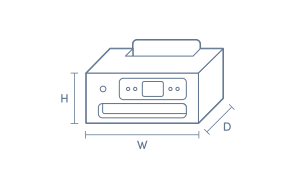
Product Dimensions
- Product Height (mm):
- 250
- Product Width (mm):
- 425
- Product Depth (mm):
- 546.6
Box Dimensions
- Box Height (mm):
- 354
- Box Width (mm):
- 191
- Box Depth (mm):
- 475
- Box Weight (kg):
- 5

Product Reviews of HP Deskjet 2922 AIO Printer Instant Ink Enabled

Overall Rating Snapshot
4.6 out of 5 stars from 5 reviews
100% of users recommend this product
What customers say, summarised by AI
- Simple to set up, making installation stress-free for users.
- Delivers quality results for printing, scanning, and copying tasks.
- Competitive pricing makes it a strong value proposition.
- No need for an HP Instant Ink subscription with this purchase.
- Reliable functionality—consistently performs expected tasks.
- Helpful and knowledgeable staff enhance the buying experience.
Value for money
Another excellent buy from The Good Guys. With price matching, knowledgeable staff and a very good printer that is so easy to set up and gives excellent results whether printing, scanning or copying what more do you want. Also you don't need to subscribe to HP Instant Ink with your printer purchase.
Da. J.
Confirmed purchase 11 October 2026
Published on 4 November 2026
Yes, I recommend this product.
This customer is a verified purchaser who may have received an incentive in return for providing an authentic review.
great price
replacing printer that stopped working, does the job, very good price
paul
Confirmed purchase 30 September 2026
Published on 29 October 2026
Yes, I recommend this product.
This customer is a verified purchaser who may have received an incentive in return for providing an authentic review.
Hpdeskjet2922A10 Printer
Way to install works well
Val
Confirmed purchase 20 July 2026
Published on 11 August 2026
Yes, I recommend this product.
This customer is a verified purchaser who may have received an incentive in return for providing an authentic review.
Easy to install
Easy to install working well
Val
Confirmed purchase 20 July 2026
Published on 11 August 2026
Yes, I recommend this product.
This customer is a verified purchaser who may have received an incentive in return for providing an authentic review.
Very good
Handy
Lalit
Confirmed purchase 23 May 2026
Published on 16 June 2026
Yes, I recommend this product.
This customer is a verified purchaser who may have received an incentive in return for providing an authentic review.
You've viewed 5 of 5 reviews
ABOUT THE GOOD GUYS REVIEWSThe Good Guys product reviews are collected from verified purchasers who may have received an incentive in return for providing an authentic review.
The below information is AI generated based on Australian websites information around this item. We have done our best to ensure its accuracy but suggest verifying any information within this tab before purchasing.
At a glance
The HP DeskJet 2922 is an affordable all-in-one inkjet printer for home users who need simple printing, scanning and copying for schoolwork, forms and everyday colour documents. Its strengths are wireless mobile printing, automatic double-sided printing and easy day-to-day use. The main limitation is that it is better for occasional printing than higher-volume or more demanding home office workloads.
What it’s great for
- Everyday Printing
- Schoolwork
- Home Administration
- Casual Colour Printing
- Basic Scanning and Copying
Where it works best
- Home
- Study Nook
- Family Workspace
- Apartment
- Light Home Office
Who it’s for
- Student
- Parent
- Household User
- Occasional Printer User
- Budget-Conscious Buyer
Things to consider
This model is best for light, occasional use and does not offer the faster performance, larger paper capacity or heavier-duty output handling you would expect from more premium home office printers.
Home office suitability score
7/10 - a good fit for light home admin, forms and occasional document printing, but not ideal for frequent high-volume work.
Photo printing quality
Good for casual home photo prints and colour graphics, though not intended as a specialist photo printer.
Ease of use rating
8/10 - simple all-in-one functions, mobile printing support and included cartridges make it easy for most households to get started.
Running cost guidance
Best suited to occasional printing; ongoing ink costs matter more if you print frequently, so heavier users may want a higher-capacity model.
Family friendliness
High - well suited to shared family use for homework, permission slips, colour worksheets and basic copying.
Key benefits
- All-in-One Design: Print, scan and copy from one compact device, which is convenient for everyday household tasks.
- Wireless Printing: Wi-Fi support lets you print from compatible devices without needing a permanent USB-connected computer.
- Mobile Print Support: Works with Apple AirPrint and Mopria Print Service for straightforward printing from phones and tablets.
- Automatic Double-Sided Printing: Helps reduce paper use on routine jobs by printing on both sides automatically.
- 60-Sheet Input Tray: Holds enough paper for small home print runs without frequent refilling.
- Flexible Media Support: Handles A4, B5, A6 and DL sizes, making it practical for letters, homework and forms.
- Included HP 68 Cartridges: Comes with compatible ink cartridges to make initial setup easier.
- Instant Ink Enabled: Supports HP's ink subscription option for users who want a simpler way to manage replacement ink.
Q: What kind of printing is the HP DeskJet 2922 best for?
A: HP DeskJet 2922 suits light home printing such as schoolwork, forms and everyday colour documents. It is a better fit for occasional use than frequent, time-critical jobs, because print performance is modest for larger workloads.
Q: Can the HP DeskJet 2922 print from an iPhone or Android phone?
A: Yes. HP DeskJet 2922 can print over Wi-Fi from phones and tablets using Apple AirPrint or Mopria Print Service once setup is complete. That means a computer is not required for everyday mobile printing after connection.
Q: Which ink cartridges does the HP DeskJet 2922 use?
A: HP DeskJet 2922 uses HP 68 ink cartridges, and compatible cartridges are included to get started. That matters when buying replacements later, because searching by HP 68 helps narrow your match to the correct cartridge family.
Q: Is the HP DeskJet 2922 suitable for printing photos at home?
A: Yes, for casual home photos. HP DeskJet 2922 prints colour at 4800 x 1200 resolution, so snapshots and school projects can look clear, but it is not aimed at high-detail or professional photo printing.
Q: What paper sizes fit in the DeskJet 2922 input tray?
A: HP DeskJet 2922 has a 60-sheet input tray and supports A4, B5, A6 and DL media. That covers common home jobs such as assignments, letters and forms, though the tray size is better suited to shorter runs than bulk printing.