


Canon PIXMA Home Inkjet 3-in-1 Printer TS3660
TS3660


Play Video


Product Overview
Key Features
- Print, scan and copy with A4 size, 60 sheet paper capacity
- 4800 x 1200 print, 600 x 1200 scan, up to 7.7ipm B&W
- PG-645, PG-645XL, CL-646, CL-646XL, USB and Wi-Fi
Key Specifications
- Brand:
- Canon
- Model Number:
- TS3660
- Printer Functions:
- Print, Scan & Copy
- Double Sided Printing:
- Yes
- Paper Capacity:
- Plain Paper (A4): 60, Photo Paper (4"x6"): 20 Photo Paper (5x7"): 10
- Max Print Speed:
- B&W: 7.7ipm, Colour: 4.0ipm
- Wireless Connections:
- LAN 2.4GHz & 5GHz, Direct Connection
Computers & Tablets
- Printing Resolution:
- 4800 x 1200
- Paper Size:
- A4, A5, B5, LTR, LGL, 4" x 6", 5" x 7", Square (127 mm x 127 mm), Custom Size (width: 89 mm - 215.9 mm, length: 127 - 676 mm)
- Compatible Ink / Toner:
- PGBK: PG-645, PG-645XL Colour: CL-646, CL-646XL
- Scan Resolution:
- 600 x 1200
Smart Features
- Compatible Apps:
- Canon PRINT app
Connections
- Wired Connections:
- USB Printer cable
General Information
- Type:
- Inkjet Printer
- Colour:
- Black
- Additional Features:
- AirPrint / Mopria / PIXMA Cloud Link / Canon PRINT app (for iOS / Android) Android)/ Camera Direct (
- What's In The Box:
- Printer, Power Cord, Ink Cartridges Setup, CD Setup, Getting Started Guide
Warranty
- Manufacturer's Warranty:
- 2 Year
Computers & Tablets
- Printing Resolution:
- 4800 x 1200
- Paper Size:
- A4, A5, B5, LTR, LGL, 4" x 6", 5" x 7", Square (127 mm x 127 mm), Custom Size (width: 89 mm - 215.9 mm, length: 127 - 676 mm)
- Compatible Ink / Toner:
- PGBK: PG-645, PG-645XL Colour: CL-646, CL-646XL
- Scan Resolution:
- 600 x 1200
Connections
- Wired Connections:
- USB Printer cable
Warranty
- Manufacturer's Warranty:
- 2 Year
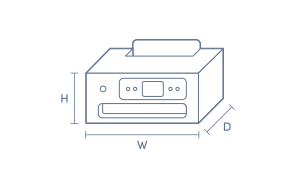
Product Dimensions
- Product Height (mm):
- 145
- Product Width (mm):
- 435
- Product Depth (mm):
- 327
- Product Weight (g):
- 4000
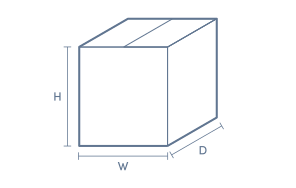
Box Dimensions
- Box Height (mm):
- 390
- Box Width (mm):
- 190
- Box Depth (mm):
- 480
- Box Weight (kg):
- 4
Product Reviews of Canon PIXMA Home Inkjet 3-in-1 Printer TS3660

Overall Rating Snapshot
4.6 out of 5 stars from 125 reviews
94% of users recommend this product
What customers say, summarised by AI
- Print quality is surprisingly high for a budget home printer
- Very simple to set up and easy to use with Wi-Fi and USB
- Compact design saves space; lightweight and easy to move
- Handles printing, scanning, and copying; ideal for home/school use
- Ink cartridges are on the pricey side compared to the printer cost
- Lacks advanced features like double-sided printing and individual colour inks
Pros
Easy (36)
Quality (18)
Value (12)
Cheap (2)
Updates (1)
Efficient (1)
Reliable (1)
Cons
Noisy (1)
Slow (1)
Best photo printer i've ever had
Print quality is excellent. I did not think that a printer this cheap can produce this quality at all!
Nick
Confirmed purchase 24 October 2026
Published on 18 November 2026
Yes, I recommend this product.
This customer is a verified purchaser who may have received an incentive in return for providing an authentic review.
UD
Good with the price.
Anonymous
Confirmed purchase 22 October 2026
Published on 17 November 2026
Yes, I recommend this product.
This customer is a verified purchaser who may have received an incentive in return for providing an authentic review.
Compact and easy to use
Jeanette Malberg
Confirmed purchase 30 September 2026
Published on 28 October 2026
Yes, I recommend this product.
This customer is a verified purchaser who may have received an incentive in return for providing an authentic review.
Compact and easy to use
Jeanette Malberg
Confirmed purchase 30 September 2026
Published on 28 October 2026
Yes, I recommend this product.
This customer is a verified purchaser who may have received an incentive in return for providing an authentic review.
Quick and easy setup plus very convenient due to size
It works very well with easy setup. Wonderful price as well.
Alan
Confirmed purchase 3 October 2026
Published on 28 October 2026
Yes, I recommend this product.
This customer is a verified purchaser who may have received an incentive in return for providing an authentic review.
Does what i need
Bev O'Loughlin
Confirmed purchase 26 September 2026
Published on 24 October 2026
Yes, I recommend this product.
This customer is a verified purchaser who may have received an incentive in return for providing an authentic review.
SO FAR SO GOOD
Easy to set up and use. I have so far done scan and print. Scan is a bit louder than my old epson one but not an issue. Printing was quick and clear. So far happy with purchase.
Russell
Confirmed purchase 16 September 2026
Published on 17 October 2026
Yes, I recommend this product.
This customer is a verified purchaser who may have received an incentive in return for providing an authentic review.
Simply does the job
Simply does the job it is supposed to do, when it is supposed to do it.
H
Confirmed purchase 8 September 2026
Published on 1 October 2026
Yes, I recommend this product.
This customer is a verified purchaser who may have received an incentive in return for providing an authentic review.
All the features I wanted
It took me a little while to understand everything, but after that it was easy to set up. Direct USB connection from main desktop computer, WiFi network connection from laptop and tablet, WiFi direct from phones. Very happy with the print quality.
Robert Mills
Confirmed purchase 6 September 2026
Published on 29 September 2026
Yes, I recommend this product.
This customer is a verified purchaser who may have received an incentive in return for providing an authentic review.
Cannon printer
Product is ok, not really economical,for personal use is ok
jomy mathew
Confirmed purchase 3 September 2026
Published on 29 September 2026
Yes, I recommend this product.
This customer is a verified purchaser who may have received an incentive in return for providing an authentic review.
You've viewed 10 of 125 reviews
ABOUT THE GOOD GUYS REVIEWSThe Good Guys product reviews are collected from verified purchasers who may have received an incentive in return for providing an authentic review.
The below information is AI generated based on Australian websites information around this item. We have done our best to ensure its accuracy but suggest verifying any information within this tab before purchasing.
At a glance
The Canon PIXMA TS3660 is a compact entry-level 3-in-1 inkjet printer designed for households, students and light home office use. Its strengths are simple setup, wireless printing from phones and tablets, and versatile everyday print, scan and copy functions. It is best for regular home tasks rather than higher-volume workloads, as the 60-sheet capacity and cartridge-based running costs are less suited to heavy printing.
What it’s great for
- Everyday Printing
- Homework and Study
- Home Administration
- Casual Photo Printing
- Light Home Office Tasks
Where it works best
- Home Office
- Study Nook
- Family Home
- Small Workspace
- Bedroom Desk
Who it’s for
- Student
- Family Household
- Home User
- Remote Worker
- Small Office User
Things to consider
Compared with premium inkjet or office-focused printers, it has a smaller 60-sheet paper capacity and cartridge-based consumables that may be less economical for frequent, high-volume printing.
Home office suitability score
7/10 - well suited to light document printing, scanning and copying at home, but less ideal for heavier weekly workloads.
Photo printing quality
7.5/10 - good for casual home photo printing and borderless prints, though not aimed at specialist photo enthusiasts.
Ease of use rating
8/10 - straightforward setup, mobile app support, QR-based smartphone connection and a simple display make it beginner-friendly.
Running cost guidance
Best for light to moderate printing. Using XL cartridges can improve value, but frequent high-volume users may prefer a lower-cost-per-page alternative.
Family friendliness
8/10 - a good fit for homework, forms, occasional photos and shared household use thanks to simple controls and flexible wireless printing.
Key benefits
- 3-in-1 FUNCTION: Handles printing, scanning and copying in one compact unit for everyday home tasks.
- Compact design: Fits easily on desks and small workspaces where room is limited.
- Dual-band wi-fi: Supports 2.4 GHz and 5 GHz wireless connections for flexible printing from compatible devices around the home.
- Mobile printing: Works with the Canon PRINT app so you can print from phones and tablets without relying on a desktop computer.
- Auto duplex printing: Supports double-sided printing to reduce paper use on multipage documents.
- Photo printing support: Prints borderless photos up to 12.7 x 17.8 cm for snapshots, school projects and craft use.
- Lcd status screen: A 3.8 cm mono LCD helps make setup and status checking easier at a glance.
- Xl cartridge option: Compatible with XL ink cartridges for higher yield than standard cartridges.
Q: Can the TS3660 connect on both 2.4GHz and 5GHz Wi-Fi?
A: Yes. Canon PIXMA TS3660 supports both 2.4GHz and 5GHz Wi-Fi, which helps if the home network separates bands. It can also connect by USB, so a direct cable setup is available if wireless pairing does not suit your workspace.
Q: Which ink cartridges fit the Canon PIXMA TS3660 printer?
A: Canon PIXMA TS3660 uses Canon PG-645 black and CL-646 colour cartridges. XL versions are available if you print often and want fewer cartridge changes, but this model still suits light to moderate home printing better than heavy daily use.
Q: Does the paper tray suit regular family homework and forms?
A: Yes. The 60 sheet paper capacity suits everyday jobs such as homework, letters and copied forms without taking much desk space. If you print larger batches often, expect to reload paper more regularly than with a higher-capacity home office printer.
Q: What paper sizes and photo formats can this printer handle at home?
A: Canon PIXMA TS3660 supports A4, A5, B5, LTR, LGL and custom paper sizes for mixed home tasks. It also prints borderless photos up to 5x7 inches, so it suits casual snapshots and craft use rather than larger photo output.
Q: How well does the TS3660 work for scanning to a computer?
A: Canon PIXMA TS3660 scans at 600 x 1200, which is suitable for digitising everyday documents and family photos. It is a practical home scanner rather than a specialist unit, so detailed archival or graphic work may need higher scan resolution.
Q: Does the TS3660 have a screen for setup and status?
A: Yes. Canon PIXMA TS3660 has a 1.5 inch mono LCD screen for basic setup prompts and status checks. It is useful for everyday tasks, but it is a simple display rather than a large touch screen for navigating advanced menu options.