


HP DeskJet 2820e AIO Printer Instant Ink Enabled
588L1A


Play Video


In Store Only


Product Overview
Key Features
- Print, scan and copy for A4, B5, A6, DL; 60-sheet input tray
- 4800 x 1200 print, 1200 x 1200 scan; up to 7.5 ppm black
- HP 67 and 67XL ink; USB, Wi-Fi, Apple AirPrint, Google Cloud Print
Key Specifications
- Brand:
- HP
- Model Number:
- 588L1A
- Printer Functions:
- Print, Scan & Copy
- Paper Capacity:
- 60-Sheet Input Tray, 25-Sheet Output Tray
- Max Print Speed:
- Black: 7.5 ISO ppm Colour: 5.5 ISO ppm
- Wireless Connections:
- 802.11b/g/n
Computers & Tablets
- Printing Resolution:
- 4800 x 1200
- Paper Size:
- A4; B5; A6; DL envelope
- Compatible Ink / Toner:
- 3YM55AA HP 67 Tri-color Original Ink Cartridge; 3YM56AA HP 67 Black Original Ink Cartridge; 3YM57AA HP 67XL Black Original Ink Cartridge; 3YM58AA HP 70XL Tri-color Original Ink Cartridge
- Scan Resolution:
- 1200 x 1200
Smart Features
- Compatible Apps:
- HP Smart App
Connections
- Wired Connections:
- USB Printer cable
General Information
- Type:
- Inkjet Printer
- Colour:
- White
- Additional Features:
- Apple AirPrint; Google Cloud Print; USB; Wireless (Wi-Fi®); Wireless direct printing
- What's In The Box:
- HP DeskJet 2820e All-in-One, HP 67 Setup Black Cartridge, HP 67 Setup Tri-color Cartridge, Regulatory flyer, Setup guide, Reference guide, Power cord
Warranty
- Manufacturer's Warranty:
- 1 Year
Computers & Tablets
- Printing Resolution:
- 4800 x 1200
- Paper Size:
- A4; B5; A6; DL envelope
- Compatible Ink / Toner:
- 3YM55AA HP 67 Tri-color Original Ink Cartridge; 3YM56AA HP 67 Black Original Ink Cartridge; 3YM57AA HP 67XL Black Original Ink Cartridge; 3YM58AA HP 70XL Tri-color Original Ink Cartridge
- Scan Resolution:
- 1200 x 1200
Connections
- Wired Connections:
- USB Printer cable
Warranty
- Manufacturer's Warranty:
- 1 Year
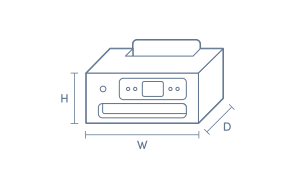
Product Dimensions
- Product Height (mm):
- 250
- Product Width (mm):
- 425
- Product Depth (mm):
- 546
- Product Weight (g):
- 3420
Box Dimensions
- Box Height (mm):
- 250
- Box Width (mm):
- 546
- Box Depth (mm):
- 423
- Box Weight (kg):
- 3

Product Reviews of HP DeskJet 2820e AIO Printer Instant Ink Enabled

Overall Rating Snapshot
4.4 out of 5 stars from 33 reviews
85% of users recommend this product
What customers say, summarised by AI
- Very easy to set up and operate, including straightforward Wi-Fi setup
- Compact size fits well in smaller spaces and home offices
- Instant Ink subscription is convenient and can save money
- Some users report compatibility issues, especially with older Windows systems
- Print quality is good for standard home and occasional office tasks
- Lacks double-sided printing, and some reported delays or issues with longer print jobs
Pros
Easy (9)
Quality (2)
Cheap (1)
Value (1)
Anonymous
Confirmed purchase 2 February 2026
Published on 26 February 2026
Yes, I recommend this product.
This customer is a verified purchaser who may have received an incentive in return for providing an authentic review.
easy to use and fast enough for my needs
good quality printing
rodney
Confirmed purchase 10 November 2025
Published on 3 December 2025
Yes, I recommend this product.
This customer is a verified purchaser who may have received an incentive in return for providing an authentic review.
Anonymous
Confirmed purchase 30 October 2025
Published on 26 November 2025
Yes, I recommend this product.
This customer is a verified purchaser who may have received an incentive in return for providing an authentic review.
Gets the job done
Needed a printer at home so bought this mainly because of the price. It gets the job done, nothing fancy, and the instant ink once you get used to it it’s actually quite convenient
Larry
Confirmed purchase 2 November 2025
Published on 26 November 2025
Yes, I recommend this product.
This customer is a verified purchaser who may have received an incentive in return for providing an authentic review.
Awesome feature
Very easy to operate
Santo
Confirmed purchase 11 October 2025
Published on 9 November 2025
Yes, I recommend this product.
This customer is a verified purchaser who may have received an incentive in return for providing an authentic review.
Not compatible
Not compatible with my Windows 7 PC. So wasted $60 of my store dollars.
Sam Todorovic
Confirmed purchase 2 October 2025
Published on 30 October 2025
This customer is a verified purchaser who may have received an incentive in return for providing an authentic review.
Simple and easy
I wanted something simple and easy to install and operated, this printer hit all 3. With in 30 I had opened, installed and printed my first project, thumbs up all round.
Brendon
Confirmed purchase 25 September 2025
Published on 22 October 2025
Yes, I recommend this product.
This customer is a verified purchaser who may have received an incentive in return for providing an authentic review.
Printer replacement
Simple to set up, prints well
Allen from Australind
Confirmed purchase 4 September 2025
Published on 3 October 2025
Yes, I recommend this product.
This customer is a verified purchaser who may have received an incentive in return for providing an authentic review.
Reliability
Ease of use.
Casey
Confirmed purchase 4 September 2025
Published on 2 October 2025
Yes, I recommend this product.
This customer is a verified purchaser who may have received an incentive in return for providing an authentic review.
simple set up , easy to use .
Sanh
Confirmed purchase 5 September 2025
Published on 1 October 2025
Yes, I recommend this product.
This customer is a verified purchaser who may have received an incentive in return for providing an authentic review.
You've viewed 10 of 33 reviews
ABOUT THE GOOD GUYS REVIEWSThe Good Guys product reviews are collected from verified purchasers who may have received an incentive in return for providing an authentic review.
The below information is AI generated based on Australian websites information around this item. We have done our best to ensure its accuracy but suggest verifying any information within this tab before purchasing.
At a glance
The HP DeskJet 2820e is a compact all-in-one inkjet printer for homes, students and light home office use. It handles printing, scanning and copying, supports wireless printing from phones and laptops, and fits neatly into small spaces. Its simple setup and everyday paper handling make it practical for routine tasks. The main limitation is its modest print speed, which is better for occasional use than heavier workloads.
What it’s great for
- Everyday Printing
- Schoolwork
- Home Administration
- Light Home Office Use
- Occasional Colour Printing
Where it works best
- Home Office
- Apartment
- Study Nook
- Family Home
- Small Workspace
Who it’s for
- Student
- Home User
- Remote Worker
- Family
- Light-Duty Small Office User
Things to consider
This model is best for light, occasional printing; users who need faster output, automatic duplex printing or higher monthly volumes may be better served by a more advanced printer.
Home office suitability score
7/10 - a good fit for light document printing, scanning and copying in compact home workspaces, but not ideal for high-volume use.
Photo printing quality
Good for casual colour prints and simple photos, but not intended as a specialist photo printer.
Ease of use rating
8/10 - simple all-in-one functionality, wireless options and app support make it approachable for everyday users.
Running cost guidance
Best suited to low monthly print volumes of around 50 to 100 pages; higher-volume users should compare cartridge costs with larger-capacity alternatives.
Family friendliness
Well suited to family use for homework, forms, schedules and occasional colour pages thanks to its compact size and straightforward operation.
Key benefits
- All-in-One Functions: Lets you print, scan and copy from one compact device for everyday home tasks.
- Compact Design: Fits neatly on smaller desks, shelves or study areas where space is limited.
- Wireless Printing: Supports 802.11b/g/n Wi-Fi and Wi-Fi Direct so you can print from phones, tablets and laptops with less cable clutter.
- USB Connectivity: Gives you a simple wired setup option for users who prefer a direct printer connection.
- Document Quality Output: Delivers up to 4800 x 1200 print resolution for clear everyday text and colour documents.
- Flatbed Scanning: Offers up to 1200 x 1200 scan resolution for digitising forms, homework and household paperwork clearly.
- Practical Paper Handling: The 60-sheet input tray and 25-sheet output tray suit regular home printing jobs without taking up much room.
- Mobile App Compatibility: Works with the HP Smart App and Apple AirPrint for straightforward printing from everyday devices.
Q: Is this printer suitable for frequent home office printing?
A: HP DeskJet 2820e is better for light, regular printing than heavy daily workloads. It has a recommended monthly page volume of 50 to 100 pages and a monthly duty cycle of 1000 pages, so it suits occasional documents, forms and schoolwork.
Q: Can I print from my phone without home Wi-Fi?
A: Yes. HP DeskJet 2820e supports Wi-Fi Direct, so a phone or tablet can connect to the printer without joining the main home network. It also works with the HP Smart App and Apple AirPrint for everyday mobile printing.
Q: Does the HP DeskJet 2820e print double-sided automatically?
A: No. HP DeskJet 2820e supports manual duplex printing with driver support, which means the paper needs to be turned and fed again for the second side. It can save paper, but it is slower than an auto duplex printer.
Q: Which ink cartridges fit the HP DeskJet 2820e printer?
A: HP DeskJet 2820e uses HP 67 and HP 67XL ink cartridges. The XL option is the better fit if this printer is used more regularly, while standard 67 cartridges suit lighter use and occasional printing around the home.
Q: Can I connect this printer by USB instead of Wi-Fi?
A: Yes. HP DeskJet 2820e supports a wired USB connection as an alternative to wireless setup. That is useful for a fixed desk setup or for homes where Wi-Fi printing is less reliable than a direct cable connection.