


Canon PIXMA Mega Tank G3675
G3675W


Play Video


Product Overview
Key Features
- Print, scan and copy with A4 size and 100 page tray
- 4800 x 1200 print, 600 x 1200 scan, up to 11ipm speed
- GI-61 series ink, USB cable, wireless LAN, Canon PRINT app
- Economy mode prints up to 7,600 black or 8,100 colour pages
Key Specifications
- Brand:
- Canon
- Model Number:
- G3675W
- Printer Functions:
- Print, Scan, Copy & Fax
- Paper Capacity:
- Up to 100 sheets
- Max Print Speed:
- 11ppm
- Wireless Connections:
- Wireless LAN, Direct Connection (Wireless LAN)
Computers & Tablets
- Printing Resolution:
- 4800 x 1200
- Paper Size:
- A4, A5, A6, B5, LTR, LGL, Executive (184.2 mm aA4, A5, A6, B5, LTR, LGL, Executive (184.2 mm x 266.7 mm), 4" x 6", 5" x 7", 7" x 10", 8" x 10", Envelopes DL, Envelopes COM10, Envelopes C5, Envelopes Monarch(98.4 mm x 190.5 mm)), Square (89 mm x 89 mm)
- Compatible Ink / Toner:
- GI-61BK, GI-61C, GI-61M, GI-61Y, MC-G04 Maintenance Cartridge
- Scan Resolution:
- 600 x 1200
Smart Features
- Compatible Apps:
- Canon PRINT app
Connections
- Wired Connections:
- USB Printer cable
General Information
- Type:
- Inkjet Printer
- Colour:
- White
- Additional Features:
- Economy printing mode - up to 7,600 in black, 8,100 in colour
- What's In The Box:
- Printer, Power Cord, Full set of Ink bottles, Printer Heads, Getting started guide
Warranty
- Manufacturer's Warranty:
- 2 Year
Computers & Tablets
- Printing Resolution:
- 4800 x 1200
- Paper Size:
- A4, A5, A6, B5, LTR, LGL, Executive (184.2 mm aA4, A5, A6, B5, LTR, LGL, Executive (184.2 mm x 266.7 mm), 4" x 6", 5" x 7", 7" x 10", 8" x 10", Envelopes DL, Envelopes COM10, Envelopes C5, Envelopes Monarch(98.4 mm x 190.5 mm)), Square (89 mm x 89 mm)
- Compatible Ink / Toner:
- GI-61BK, GI-61C, GI-61M, GI-61Y, MC-G04 Maintenance Cartridge
- Scan Resolution:
- 600 x 1200
Connections
- Wired Connections:
- USB Printer cable
Warranty
- Manufacturer's Warranty:
- 2 Year
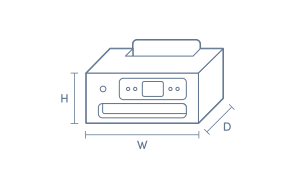
Product Dimensions
- Product Height (mm):
- 177
- Product Width (mm):
- 416
- Product Depth (mm):
- 337
- Product Weight (g):
- 6000
Box Dimensions
- Box Height (mm):
- 277
- Box Width (mm):
- 494
- Box Depth (mm):
- 499
- Box Weight (kg):
- 10

Product Reviews of Canon PIXMA Mega Tank G3675

Overall Rating Snapshot
4.5 out of 5 stars from 74 reviews
92% of users recommend this product
What customers say, summarised by AI
- Easy to set up and install, with clear instructions provided.
- MegaTank ink system offers excellent value and cost savings.
- Print quality is good for documents; photos are satisfactory but not top-tier.
- Does not support automatic double-sided (duplex) printing—manual flipping required.
- Compact size fits well in small spaces; lightweight and unobtrusive.
- Small and dim screen may be difficult for older users to read.
Pros
Easy (17)
Quality (15)
Value (5)
Reliable (2)
Cheap (2)
Lifespan (1)
Efficient (1)
Cons
Slow (1)
Very happy with my purchase
Max
Confirmed purchase 8 October 2026
Published on 4 November 2026
Yes, I recommend this product.
This customer is a verified purchaser who may have received an incentive in return for providing an authentic review.
Excellent easy to use printer
Love the size of the ink cartridges! The machine seemed like it would be difficult to set up but was a breeze once the instructions were followed. The Android app is a little ancient but it still does the job.
Rom
Confirmed purchase 10 October 2026
Published on 4 November 2026
Yes, I recommend this product.
This customer is a verified purchaser who may have received an incentive in return for providing an authentic review.
Compact, lightweight, and easy to set up!
This printer is wonderfully compact and lightweight, making it very easy to fit into a small workspace. Setting it up and starting to print was surprisingly simple and straightforward. Highly recommended for home use!
Julie
Confirmed purchase 4 October 2026
Published on 28 October 2026
Yes, I recommend this product.
This customer is a verified purchaser who may have received an incentive in return for providing an authentic review.
Good all round printer
First mega tank printer - hopefully will print the 7000 copies as claimed. Only issue is it doesn't do double side printing. Paper fed from the back, no tray.
Graham
Confirmed purchase 26 September 2026
Published on 21 October 2026
Yes, I recommend this product.
This customer is a verified purchaser who may have received an incentive in return for providing an authentic review.
No more small cartridge refills.
Loving the large tank capacity, I was spending a fortune on refills with the old style one... A bit more pricey for the printer, but so worth the extra. Great printing quality . 5 stars.
Mandy
Confirmed purchase 18 September 2026
Published on 14 October 2026
Yes, I recommend this product.
This customer is a verified purchaser who may have received an incentive in return for providing an authentic review.
Colour quality could be better
Overall the buying experience was good, fast shipping. The printer itself is ok, but not what I expected for the price. It’s time consuming to set up the first time, though the software steps you through the process so it isn’t too tricky. It’s very slow to get started anytime you want to print something and the colour quality is not good at all. Fine for our needs - mostly home school worksheets and other documents - but I’d hoped it would do a better job on photos and artwork for the price. I wouldn’t buy it again.
Phoebe B
Confirmed purchase 9 September 2026
Published on 6 October 2026
This customer is a verified purchaser who may have received an incentive in return for providing an authentic review.
great product
Ease to use and set up does the job well
Dianne Swarbrick
Confirmed purchase 8 September 2026
Published on 30 September 2026
Yes, I recommend this product.
This customer is a verified purchaser who may have received an incentive in return for providing an authentic review.
The best
This printer eliminates the cartridge problems and prices, great value for money.
Mark Trenoweth
Confirmed purchase 28 August 2026
Published on 24 September 2026
Yes, I recommend this product.
This customer is a verified purchaser who may have received an incentive in return for providing an authentic review.
Perfect for home
This printer/scanner is perfect for personal use. Good quality printing and scanning and long life of ink makes it great value for money. The only drawback is that it has just one in tray, so can't copy or scan multiple pages at once. Unobtrusive size - it's the perfect little product for personal use.
Josi
Confirmed purchase 28 August 2026
Published on 22 September 2026
Yes, I recommend this product.
This customer is a verified purchaser who may have received an incentive in return for providing an authentic review.
love the idea of ink tanks
overall its seems to be what I want in a printer
Rod Rosentreter
Confirmed purchase 21 August 2026
Published on 16 September 2026
Yes, I recommend this product.
This customer is a verified purchaser who may have received an incentive in return for providing an authentic review.
You've viewed 10 of 74 reviews
ABOUT THE GOOD GUYS REVIEWSThe Good Guys product reviews are collected from verified purchasers who may have received an incentive in return for providing an authentic review.
The below information is AI generated based on Australian websites information around this item. We have done our best to ensure its accuracy but suggest verifying any information within this tab before purchasing.
At a glance
The Canon PIXMA Mega Tank G3675 is an all-in-one inkjet printer designed for homes and small offices that print regularly. Its standout strengths are the refillable MegaTank system, wireless printing and compact desk-friendly design. It is best for document-focused users wanting lower refill frequency, but it misses automatic double-sided printing found on some more premium models.
What it’s great for
- Everyday Printing
- Home Office Work
- Family Document Printing
- Small Office Administration
- Low-Refill-Interval Printing
Where it works best
- Home Office
- Study
- Small Business Office
- Shared Family Workspace
Who it’s for
- Remote Worker
- Small Business Owner
- Family Household
- Student
- Everyday Professional
Things to consider
This model is strong on running costs and versatility, but premium alternatives may offer automatic double-sided printing and faster output for heavier office workflows.
Home office suitability score
8/10 - strong fit for regular home office printing thanks to all-in-one functions, wireless support and high ink yield.
Photo printing quality
Good for casual colour photos and general image printing, but not positioned as a specialist photo printer.
Ease of use rating
8/10 - wireless connectivity and Canon PRINT app support make setup and everyday printing straightforward.
Running cost guidance
Well suited to frequent printing, with refillable GI-61 ink bottles and economy mode supporting up to 7,600 black or 8,100 colour pages before refilling.
Family friendliness
High - useful for shared household needs like schoolwork, forms, colour documents and occasional copying or scanning.
Key benefits
- Refillable MegaTank System: Designed for frequent printing with fewer ink top-ups than standard cartridge-based printers.
- High Yield Economy Mode: Supports up to 7,600 black pages or 8,100 colour pages before refilling, helping reduce refill frequency.
- All-in-One Functionality: Print, scan, copy and fax from one device to save desk space and simplify home or small office tasks.
- Wireless LAN Connectivity: Lets multiple users print more easily from compatible devices without keeping the printer tethered to one computer.
- Canon PRINT App Support: Helps streamline setup and day-to-day operation from a mobile device.
- 100-Sheet Paper Capacity: Suitable for routine home or small office jobs with less frequent paper reloading.
- Compact Desk-Friendly Design: Fits comfortably on a desk, making it practical for tighter workspaces.
- Included Full Ink Set: Comes with a full set of ink bottles in the box so you can get started sooner.
Q: Does this printer print on both sides of the page automatically
A: No. Canon PIXMA Mega Tank G3675 does not support automatic double-sided printing, so two-sided jobs need to be turned and reloaded manually. That is fine for occasional documents, but less convenient for longer reports or class notes.
Q: Can I print from my phone without plugging into a computer
A: Yes. Canon PIXMA Mega Tank G3675 supports Wireless LAN and Direct Connection, and the Canon PRINT app handles setup and mobile printing. It suits shared home use, but mobile setup can take longer than a simple USB connection.
Q: Is the print speed fast enough for a busy office
A: Canon PIXMA Mega Tank G3675 prints at 11ppm, which suits steady home or small office use better than rapid multi-user workloads. It is a better fit for regular documents and schoolwork than fast-paced batch printing through the day.
Q: What ink does the Canon G3675W use and what comes included
A: Canon PIXMA Mega Tank G3675 uses GI-61BK, GI-61C, GI-61M and GI-61Y ink bottles, plus an MC-G04 maintenance cartridge. The box includes a full set of ink bottles and printer heads, so you can set it up and start printing straight away.
Q: Which paper sizes and envelopes can this printer handle
A: Canon PIXMA Mega Tank G3675 handles A4, A5, A6, B5, Letter, Legal, Executive, photo sizes from 4" x 6" to 8" x 10", plus DL, COM10, C5 and Monarch envelopes. It is flexible for everyday documents, homework, invitations and basic photo prints.
Q: Can this model fax as well as print scan and copy
A: Yes. Canon PIXMA Mega Tank G3675 is an all-in-one inkjet that prints, scans, copies and faxes, so it can cover older document workflows without a separate machine. That matters if a home office still sends signed forms by fax.