


Brother Colour Laser Multifunction Printer MFC-L8690
MFC-L8690CDW


In Store Only


Product Overview
Key Features
- Print, scan, copy and fax on A4 with 250 sheet tray and duplex
- 2400 x 600 print, 1200 x 2400 scan, up to 31 ppm speed
- Uses TN-441 and TN-443 toner, USB and Wi-Fi connections
- Brother Mobile Connect app for easy wireless printing
Key Specifications
- Brand:
- Brother
- Model Number:
- MFC-L8690CDW
- Printer Functions:
- Print, Scan, Copy & Fax
- Double Sided Printing:
- Yes
- Paper Capacity:
- 250 Sheets
- Max Print Speed:
- Up to 31 ppm Colour/Monochrome
- Wireless Connections:
- IEEE 802.11b/g/n
Computers & Tablets
- Printing Resolution:
- 2400 x 600
- Paper Size:
- A4, Letter, A5, A5(Long Edge), A6, Executive, Legal, Folio, Mexico Legal
- Compatible Ink / Toner:
- TN-441BK, TN-441C, TN-441M, TN-441Y, TN-443BK, TN-443C, TN-443M, TN-443Y
- Scan Resolution:
- 1200 x 2400
Smart Features
- Compatible Apps:
- Brother Mobile Connect app
Connections
- Wired Connections:
- USB Printer cable
General Information
- Type:
- Laser Printer
- Colour:
- White
- What's In The Box:
- Toner Cartridges, Drum, Belt, Waste Toner Box, Power Supply Cord, Driver Software For Windows®, Quick Set-Up Guide, Telephone line cord
Warranty
- Manufacturer's Warranty:
- 1 Year
Computers & Tablets
- Printing Resolution:
- 2400 x 600
- Paper Size:
- A4, Letter, A5, A5(Long Edge), A6, Executive, Legal, Folio, Mexico Legal
- Compatible Ink / Toner:
- TN-441BK, TN-441C, TN-441M, TN-441Y, TN-443BK, TN-443C, TN-443M, TN-443Y
- Scan Resolution:
- 1200 x 2400
Connections
- Wired Connections:
- USB Printer cable
Warranty
- Manufacturer's Warranty:
- 1 Year
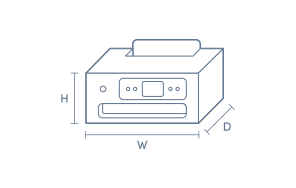
Product Dimensions
- Product Height (mm):
- 539
- Product Width (mm):
- 435
- Product Depth (mm):
- 526
- Product Weight (g):
- 27900
Box Dimensions
- Box Height (mm):
- 526
- Box Width (mm):
- 435
- Box Depth (mm):
- 539
- Box Weight (kg):
- 23

Product Reviews of Brother Colour Laser Multifunction Printer MFC-L8690

Overall Rating Snapshot
4.5 out of 5 stars from 52 reviews
88% of users recommend this product
What customers say, summarised by AI
- Print quality is consistently sharp with vibrant, professional colour output.
- Setup is straightforward, with multiple connectivity options including Wi-Fi.
- Duplex printing and scanning features are praised as efficient time savers.
- The machine runs quietly and quickly, suitable for office and home use.
- Some users report the printer is bulky and has occasional paper tray sensitivities.
- Customer service and port reliability are concerns noted by a few reviewers.
Pros
Easy (12)
Quality (10)
Speed (3)
Quiet (2)
Efficient (1)
Value (1)
Cons
Bulky (1)
Updates (1)
Brother Colour Laser Multifunction Printer MFC-L8690
I recently started using the Brother Colour Laser Multifunction Printer MFC-L8690, and it has been a reliable choice for both office and home use. The print quality is excellent, with sharp text and vibrant colour output that looks professional for documents, reports, and presentations. The multifunction features are very convenient, allowing me to print, scan, copy, and manage daily paperwork easily from one machine. The printing speed is impressive, especially when handling larger documents, and the automatic features help save time during busy workdays. The printer feels sturdy and well-built, with an easy-to-use control panel and practical connectivity options. Setting it up was straightforward, and it works smoothly for regular printing needs. The toner capacity is also helpful for reducing frequent replacements. Overall, the Brother Colour Laser Multifunction Printer MFC-L8690 is a dependable and efficient printer with great performance, good print quality, and useful features. It is a solid option for small offices, businesses, or anyone who needs a reliable colour multifunction printer.
Abhishek Gupta
Confirmed purchase 23 March 2023
Published on 21 July 2026
Yes, I recommend this product.
This customer is a verified purchaser who may have received an incentive in return for providing an authentic review.
Terrible
Sorry very unhelpful. The port doesnt work and the company is unhelpful even when we purchased gold service warranty. After 3 weeks we are returning it
small business owner
Confirmed purchase 30 April 2026
Published on 29 May 2026
This customer is a verified purchaser who may have received an incentive in return for providing an authentic review.
Great overall printer
all essential features from scan to copy, duplex printing and wireless printing
maria p
Confirmed purchase 22 January 2026
Published on 5 February 2026
Yes, I recommend this product.
This customer is a verified purchaser who may have received an incentive in return for providing an authentic review.
Easy to use
I have not had the printer very long, but it was easy to set up and connect wirelessly through my nbn internet connection. I have printed in both black and white and colour so far and have also done double-sided printing, all without any problems. The print quality is good. I was initially hesitant to buy this model (I wanted the next model down, as it was a more compact size), but I can't fault this one so far. It is sitting on my computer desk and I still have enough space to function well using my laptop and 32-inch monitor.
Linda
Confirmed purchase 26 December 2025
Published on 21 January 2026
Yes, I recommend this product.
This customer is a verified purchaser who may have received an incentive in return for providing an authentic review.
Worst Customer Experience
I will never deal with The Good Guys again, repeatedly lied to when it came to all updates regarding delivery. Took almost 2 weeks to get delivered when they said it was in stock in Rockhampton 40 minutes away absolute crap service.
Scott Bailey
Confirmed purchase 13 December 2025
Published on 6 January 2026
This customer is a verified purchaser who may have received an incentive in return for providing an authentic review.
Great product
Very quick and very quiet
Sam
Confirmed purchase 14 June 2025
Published on 9 July 2025
Yes, I recommend this product.
This customer is a verified purchaser who may have received an incentive in return for providing an authentic review.
Multi Function Printer with duplex scanning capability
Replacement for old monchrome printer. Larger than planned but duplex scanning not available on smaller MFP's. Print excellent. Easy to set up via wi fi
Steve
Confirmed purchase 27 May 2025
Published on 17 June 2025
Yes, I recommend this product.
This customer is a verified purchaser who may have received an incentive in return for providing an authentic review.
Great purchase with excellent service from The Good Guys
Replacement for old ink jet printer with tha advantage of laser printing. Did have to go up to this unit as cheaper unit had duplex printing BUT not duplex scanning.
Steve - Bundy
Confirmed purchase 27 May 2025
Published on 11 June 2025
Yes, I recommend this product.
This customer is a verified purchaser who may have received an incentive in return for providing an authentic review.
Quick & Quiet
The best thing about this printer, besides its speed, low noise and perfect printing, is how easy it was to set up, nothing hard about the set up process at all, done in a flash and comes with ink so ready to use upon set up.
Julie
Confirmed purchase 2 March 2025
Published on 25 March 2025
Yes, I recommend this product.
This customer is a verified purchaser who may have received an incentive in return for providing an authentic review.
Great all round printer
Print quality
Jamie
Confirmed purchase 26 February 2025
Published on 25 March 2025
Yes, I recommend this product.
This customer is a verified purchaser who may have received an incentive in return for providing an authentic review.
You've viewed 10 of 52 reviews
ABOUT THE GOOD GUYS REVIEWSThe Good Guys product reviews are collected from verified purchasers who may have received an incentive in return for providing an authentic review.
The below information is AI generated based on Australian websites information around this item. We have done our best to ensure its accuracy but suggest verifying any information within this tab before purchasing.
At a glance
The Brother MFC-L8690 is a colour laser multifunction printer built for small to medium offices that need dependable printing, scanning, copying and faxing in one machine. Its strengths are 31 ppm print speeds, automatic double-sided printing and scanning, and flexible wireless or USB access. It is a practical mid-range office choice, but its 27.9 kg size means it needs a dedicated spot rather than a casual desktop setup.
What it’s great for
- Office Work
- Shared Document Printing
- Administrative Tasks
- Report Printing
- Contract Printing
- Batch Scanning
Where it works best
- Small Office
- Medium Office
- Corporate Office
- Reception Area
- Shared Workgroup Space
Who it’s for
- Office Administrator
- Small Business Team
- Workgroup User
- Everyday Professional
- Operations Staff
Things to consider
This model is better suited to office environments than compact home setups, as its 27.9 kg body and larger footprint need dedicated space and easier access around the scanner and paper tray.
Office suitability
Strong fit for small to medium offices and shared workgroups with steady everyday document volumes.
Home use suitability
Best for dedicated home office users with enough space; less suitable for casual home printing due to its larger footprint.
Running cost vs category average
About average for a colour laser multifunction printer in this class.
Noise level score
6/10 - typical for a workgroup colour laser printer, acceptable in office settings but not especially discreet for quiet rooms.
Ease of setup rating
8/10 - straightforward for an office printer thanks to wireless and USB connectivity, though the larger size makes physical placement more involved.
Key benefits
- 31 ppm print speed: Keeps office document jobs moving with up to 31 pages per minute in both colour and monochrome.
- Print, scan, copy and fax: Consolidates four everyday office functions into one machine to save space and simplify device management.
- Automatic duplex printing: Reduces manual page turning for routine double-sided documents and helps streamline report and contract printing.
- Automatic duplex scanning: Speeds up multi-page document handling by making double-sided scan jobs easier to process.
- 250-sheet paper tray: Supports shared office use with fewer paper refills during regular daily printing.
- Wireless and USB connectivity: Gives teams flexible placement options and straightforward access from computers or mobile devices.
- 1200 x 2400 scan resolution: Captures detailed scans for forms, records and graphics that need clear reproduction.
- 2400 x 600 print resolution: Produces sharp text and clear business graphics for professional-looking office documents.
Q: Will this printer fit on a normal desk at home?
A: Usually, but it is better on a sturdy desk or cabinet with clear access around it. Brother MFC-L8690CDW is 43.5cm wide, 53.9cm deep and 52.6cm high, and its 27.9kg weight makes it less suited to light or shallow desks.
Q: Can it scan both sides of a document automatically?
A: Yes. Brother MFC-L8690CDW supports automatic double-sided scanning, so multi-page originals need less manual page turning. That is useful for contracts, forms and records, especially when scanning batches for filing or email.
Q: Does the MFC-L8690CDW support wireless setup with Mac and Windows?
A: Yes. It supports wireless IEEE 802.11b/g/n, and software is available for Windows, macOS, Linux, iOS and Android. USB is also available if wireless does not suit your desk layout or office network.
Q: Is the paper tray large enough for a small team?
A: Yes, for steady office use. The main tray holds 250 sheets, which cuts down refill stops in a shared workspace, but teams with heavier daily print volumes may prefer a larger-capacity departmental machine.
Q: Can several staff share it over office Wi-Fi or Ethernet?
A: Yes. Brother MFC-L8690CDW can connect by Wi-Fi or Ethernet for shared office access, and USB suits a direct one-computer setup. That flexibility helps if the printer needs to sit away from the main desks because of its size.
Q: Will high-yield toner help keep running costs down?
A: Yes. Brother MFC-L8690CDW supports high-yield toner, which generally lowers cost per page for offices that print regularly. It makes less sense for occasional use, where the larger machine and business-focused features may be underused.
Q: What does CDW mean on this Brother printer model?
A: CDW in Brother's model name refers to colour printing, duplex capability and wireless connectivity. It is a quick way to tell this model is built for colour office documents and automatic two-sided jobs, not just basic single-sided printing.