


Brother Colour DCP Laser Printer DCP-L3560CDW
DCP-L3560CDW


Play Video


Product Overview
Key Features
- Print, scan and copy on A4 with 250 sheet tray and double-sided
- 2400 x 600 print, 1200 x 1200 scan, up to 26 ppm mono/colour
- CMYK toner up to 1,000 pages, USB and Wi-Fi connections
- Web Connect for Google Drive, Dropbox, OneDrive and more
- Brother Mobile Connect app for easy mobile printing and scanning
Key Specifications
- Brand:
- Brother
- Model Number:
- DCP-L3560CDW
- Printer Functions:
- Print, Scan & Copy
- Double Sided Printing:
- Yes
- Paper Capacity:
- 250 sheets
- Max Print Speed:
- Up to 26 ppm Mono/Colour
- Wireless Connections:
- IEEE 802.11 b/g/n
Computers & Tablets
- Printing Resolution:
- 2400 x 600
- Paper Size:
- A4, Letter, Legal, Mexico Legal, India Legal, Executive, A5, A5 Long Edge, A6, B5 (JIS), B5 (ISO), B6 (JIS), A4 Short (270mm), Folio, 16K (195x270mm)
- Compatible Ink / Toner:
- CMYK Toner Standard Yield (TN258C/TN258M/TN258Y/TN258BK) Up to 1,000 pages* Black Toner High Yield (TN258XLBK) Up to 3,000 pages* Colour Toner High Yield (TN258XLC/TN258XLM/TN258XLY) Up to 2,300 pages*
- Scan Resolution:
- 1200 x 1200
Smart Features
- Compatible Apps:
- Brother Mobile Connect
Connections
- Wired Connections:
- USB Printer cable
General Information
- Type:
- Laser Printer
- Colour:
- White
- Additional Features:
- Web Connect Scan To / Download and Print from: Google Drive, Dropbox, OneDrive, Box, OneNote Scan To: Evernote Print from: Creative Centre Brother Apps Office Doc Creator, Easy Scan to Email, Fax Forward to Cloud / Email, Enlarge Text Copy, Scan to Mobile
- What's In The Box:
- Printer, Quick Setup Guide, Users Guide, CD-ROM (Windows), Power Cord, CMYK Toner (TN258C/ TN258M/TN258Y/TN258BK) Up to 1,000 pages
Warranty
- Manufacturer's Warranty:
- 1 Year
Computers & Tablets
- Printing Resolution:
- 2400 x 600
- Paper Size:
- A4, Letter, Legal, Mexico Legal, India Legal, Executive, A5, A5 Long Edge, A6, B5 (JIS), B5 (ISO), B6 (JIS), A4 Short (270mm), Folio, 16K (195x270mm)
- Compatible Ink / Toner:
- CMYK Toner Standard Yield (TN258C/TN258M/TN258Y/TN258BK) Up to 1,000 pages* Black Toner High Yield (TN258XLBK) Up to 3,000 pages* Colour Toner High Yield (TN258XLC/TN258XLM/TN258XLY) Up to 2,300 pages*
- Scan Resolution:
- 1200 x 1200
Connections
- Wired Connections:
- USB Printer cable
Warranty
- Manufacturer's Warranty:
- 1 Year
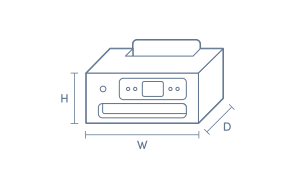
Product Dimensions
- Product Height (mm):
- 401
- Product Width (mm):
- 410
- Product Depth (mm):
- 444
- Product Weight (g):
- 20000
Box Dimensions
- Box Height (mm):
- 533
- Box Width (mm):
- 497
- Box Depth (mm):
- 536
- Box Weight (kg):
- 25

Product Reviews of Brother Colour DCP Laser Printer DCP-L3560CDW

Overall Rating Snapshot
4.6 out of 5 stars from 33 reviews
82% of users recommend this product
What customers say, summarised by AI
- Quick and easy setup process with user-friendly instructions provided
- Fast printing speed and high quality for both text and simple graphics
- Easy wireless connectivity and printing from phones, tablets, and laptops
- Double-sided printing supported, but scanning is single-sided only
- Compact design suits home or small office use, fits well on desks
- Lacks scanning to USB and some USB ports, which disappointed some users
Pros
Quality (8)
Easy (7)
Speed (1)
Value (1)
Anonymous
Confirmed purchase 30 September 2026
Published on 27 October 2026
This customer is a verified purchaser who may have received an incentive in return for providing an authentic review.
Printer is very fast when printing
Mark
Confirmed purchase 16 July 2026
Published on 27 September 2026
Yes, I recommend this product.
This customer is a verified purchaser who may have received an incentive in return for providing an authentic review.
Fast and efficient
Easy to setup, i love that I can print from my phone but I wish it had the option to scan to a usb. Overall I am happy with my purchase
Sarah
Confirmed purchase 26 July 2026
Published on 11 September 2026
Yes, I recommend this product.
This customer is a verified purchaser who may have received an incentive in return for providing an authentic review.
Good
It's good but a bit slow.
Roman
Confirmed purchase 17 June 2026
Published on 15 July 2026
Yes, I recommend this product.
This customer is a verified purchaser who may have received an incentive in return for providing an authentic review.
Great quality
Great print quality. Easy to setup. Fast print.
Marissa
Confirmed purchase 23 May 2026
Published on 17 June 2026
Yes, I recommend this product.
This customer is a verified purchaser who may have received an incentive in return for providing an authentic review.
Laser Printer
Ok but scanned documents can not be dowloaded to USB
sanjay
Confirmed purchase 23 May 2026
Published on 17 June 2026
Yes, I recommend this product.
This customer is a verified purchaser who may have received an incentive in return for providing an authentic review.
Fantastic printer
Works great heaps better than what I had and prints from the iPhone flawlessly Very easy to setup very happy with it
Domenic
Confirmed purchase 15 May 2026
Published on 9 June 2026
Yes, I recommend this product.
This customer is a verified purchaser who may have received an incentive in return for providing an authentic review.
Perfect
Perfect printer for a small family with kids that wants a color printable sheets daily. It's fast and dries the ink quick. Highly recommended
N
Confirmed purchase 9 April 2026
Published on 5 May 2026
Yes, I recommend this product.
This customer is a verified purchaser who may have received an incentive in return for providing an authentic review.
Excellent printer
Great printer
Shahi
Confirmed purchase 20 March 2026
Published on 14 April 2026
Yes, I recommend this product.
This customer is a verified purchaser who may have received an incentive in return for providing an authentic review.
Perfect for home or Office
The printer is an excellant compact solution for my printing needs at home. I had considered ink tank printers but decided to investigate laser printers as an option. The Good Guys presented a very reasonable price and I decided to switch to laser. I am extremely happy with this printer as it does everything that I require, black and white and colour print, scan and copy.
Alan
Confirmed purchase 25 February 2026
Published on 25 March 2026
Yes, I recommend this product.
This customer is a verified purchaser who may have received an incentive in return for providing an authentic review.
You've viewed 10 of 33 reviews
ABOUT THE GOOD GUYS REVIEWSThe Good Guys product reviews are collected from verified purchasers who may have received an incentive in return for providing an authentic review.
The below information is AI generated based on Australian websites information around this item. We have done our best to ensure its accuracy but suggest verifying any information within this tab before purchasing.
At a glance
The Brother DCP-L3560CDW is a compact colour laser multifunction printer designed for home offices and small workgroups that need dependable print, scan and copy performance. Its strengths are automatic duplex printing, a 250-sheet tray, 26 ppm output and flexible wireless or wired connectivity. A key limitation is that scanning is single-sided only, so higher-end office models suit heavier scan workflows better.
What it’s great for
- Everyday Productivity
- Home Office Printing
- Small Office Work
- Schoolwork
- Colour Documents
Where it works best
- Home Office
- Small Business Office
- Shared Work Area
- Study
Who it’s for
- Remote Worker
- Small Business User
- Home Office User
- Family Household
- Student
Things to consider
This model is strong for general office use, but premium multifunction printers may offer faster speeds, larger paper handling and duplex scanning for heavier document workflows.
Office suitability
Well suited to small offices and home offices with regular colour printing, copying and occasional multi-page scanning.
Home use suitability
Very good for households that want sharper text, regular schoolwork printing and occasional colour documents without moving to a larger office machine.
Running cost vs category average
About average to below average when using optional high-yield toners.
Noise level score
8/10 - designed as a quiet compact office printer and suitable for shared home or small office spaces.
Ease of setup rating
9/10 - straightforward to install with wireless, Wi-Fi Direct, Ethernet and USB connection options.
Key benefits
- 26 ppm print speed: handles regular mono and colour office printing quickly enough for day-to-day home office and small team use.
- Automatic 2-sided printing: reduces paper use on longer jobs without needing to manually re-feed sheets.
- 250-sheet paper tray: supports routine printing with fewer paper top-ups during the week.
- 35-sheet automatic document feeder: makes multi-page copying and scanning easier than placing pages one by one.
- Wireless, Wi-Fi Direct, Ethernet and USB connectivity: gives flexible setup options for computers, phones and tablets.
- Compact multifunction design: fits more comfortably on desks and in smaller work areas than bulkier office printers.
- Brother Mobile Connect compatibility: simplifies mobile printing and scanning from supported devices.
- High-yield toner support: helps lower cost per page compared with relying only on standard-yield consumables.
Q: Can this Brother printer scan both sides of a page automatically
A: No. Brother DCP-L3560CDW uses a 35-sheet automatic document feeder for multi-page jobs, but scanning is single-sided only. Two-sided originals need to be turned and scanned in separate passes, which matters if you digitise duplex paperwork often.
Q: Does the DCP-L3560CDW work with Ethernet as well as Wi-Fi
A: Yes. Brother DCP-L3560CDW supports wired Ethernet, Wi-Fi and USB, so it can suit a shared office network or a single desk setup. Ethernet is the better fit if you want a fixed network connection rather than relying on wireless coverage.
Q: Can I print from my phone without connecting by USB
A: Yes. Brother DCP-L3560CDW supports wireless printing from phones and tablets, and it also works with Brother Mobile Connect for print and scan tasks. USB is available for a direct computer connection, but it is not required for mobile use.
Q: What toner does Brother DCP-L3560CDW use and are high-yield options available
A: Brother DCP-L3560CDW uses Brother toner cartridges made for this model, and replaceable high-yield toner options are available. That gives buyers a lower-refill approach for regular printing, but cartridge compatibility should be matched to the exact model number.
Q: Is this a good choice for colour photos or documents
A: Brother DCP-L3560CDW is better suited to colour documents, schoolwork and graphics than photo-focused printing. Laser output is typically strongest on text and simple images, so buyers wanting frequent glossy photo prints may prefer a printer built for that use.
Q: Will it handle regular home office printing without constant paper refills
A: Yes. The 250-sheet paper tray suits regular home office or school printing better than smaller entry models. Brother DCP-L3560CDW also adds automatic two-sided printing, so longer jobs need less manual paper handling once the tray is loaded.