


Apple Mac mini M2 512GB SSD
MMFK3X/A
NOT AVAILABLE


Product Overview
Key Features
- 8GB memory, Apple M2 8 core CPU, 512GB SSD
- Apple integrated 10 core GPU for smooth graphics
- Built-in speaker, HDMI multichannel audio output
Key Specifications
- Brand:
- Apple
- Model Number:
- MMFK3X/A
- Graphics Processing Unit:
- Apple Integrated
- Total Storage:
- 512GB
- Wireless Connections:
- Wi-Fi 6E (802.11ax), Bluetooth v5.3
- Operating System:
- macOS Ventura
Computers & Tablets
- Processor Brand:
- Apple
- Processor Specifications:
- Apple M2 8 core CPU (4 Performance, 4 Efficiency), 16 core Neural Engine
- GPU Specificiations:
- 10 core GPU
Screen Features
- Screen Size Range:
- 11.9 Inches & Below
Capacity
- Storage:
- 512GB SSD
- RAM (GB):
- 8
Connections
- Wired Connections:
- 2 x Thunderbolt 4, 2 x USB-A Gen 3, HDMI, Gigabit Ethernet (10Gb), 3.5mm Headphone Jack
- Cellular or Wi-Fi Only:
- Wi-Fi Only
Audio
- Sound:
- Built-in speaker, HDMI supports multichannel audio output, high impedance headphone support
General Information
- Type:
- Mac mini
- Family:
- Mac mini M2
- Colour:
- Silver
- Release Year:
- 2023
- Additional Features:
- Supports up to 2 external displays via Thunderbolt & HDMI (max: 6K@60Hz Thunderbolt, 4K@60Hz HDMI), DisplayPort, Dolby Vision, Dolby Atmos, Over 40% recycled content in the entire product
- What's In The Box:
- Mac mini, Power Cord
Warranty
- Manufacturer's Warranty:
- 1 Year
Computers & Tablets
- Processor Brand:
- Apple
- Processor Specifications:
- Apple M2 8 core CPU (4 Performance, 4 Efficiency), 16 core Neural Engine
- GPU Specificiations:
- 10 core GPU
Capacity
- Storage:
- 512GB SSD
- RAM (GB):
- 8
Audio
- Sound:
- Built-in speaker, HDMI supports multichannel audio output, high impedance headphone support
Warranty
- Manufacturer's Warranty:
- 1 Year
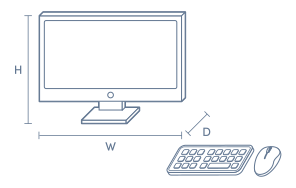
Product Dimensions
- Product Height (mm):
- 35.8
- Product Width (mm):
- 197
- Product Depth (mm):
- 197
- Product Weight (kg):
- 1.18
Box Dimensions
- Box Height (mm):
- 120
- Box Width (mm):
- 244
- Box Depth (mm):
- 253
- Box Weight (kg):
- 2

Product Reviews of Apple Mac mini M2 512GB SSD

Overall Rating Snapshot
5 out of 5 stars from 4 reviews
100% of users recommend this product
Excellent
Small compact and packs plenty of punch. Does not take up much desk space and is a vast improvement on my previous iMac desktop.
Herb Fletcher
Confirmed purchase 1 June 2023
Published on 30 August 2023
Yes, I recommend this product.
Check out what this reviewer thought after the first 3-6 months.
As expected so far
Reluctantly updating from a late-2012 mini in hope this might be as reliable ... Note - I suppose it goes without saying one needs extra interfacing ( display, keyboard and mouse ) to initiate Migration Assistant between minimacs, but it had not occurred to me.
Steven
Confirmed purchase 7 July 2023
Published on 21 July 2023
Yes, I recommend this product.
This customer is a verified purchaser who may have received an incentive in return for providing an authentic review.
AWESOME FEATURES
TAKE UP LITTLE ROOM GOOD PRICE
AUSSIE JOHN
Confirmed purchase 3 February 2023
Published on 5 May 2023
Yes, I recommend this product.
Check out what this reviewer thought after the first 3-6 months.
GREAT
WORKS FAST
JOHN
Confirmed purchase 3 February 2023
Published on 18 February 2023
Yes, I recommend this product.
This customer is a verified purchaser who may have received an incentive in return for providing an authentic review.
You've viewed 4 of 4 reviews
ABOUT THE GOOD GUYS REVIEWSThe Good Guys product reviews are collected from verified purchasers who may have received an incentive in return for providing an authentic review.
The below information is AI generated based on Australian websites information around this item. We have done our best to ensure its accuracy but suggest verifying any information within this tab before purchasing.
At a glance
The Apple Mac mini M2 512GB SSD is a compact desktop for people who want a small, capable Mac for work, study and light creative projects. It suits home offices, students and professionals who already have a monitor and accessories. Key strengths are its quiet operation, compact size and smooth everyday performance. One limitation is that internal upgrades are very limited after purchase.
What it’s great for
- Everyday Productivity
- Office Work
- Study
- Content Creation
- Media Streaming
- Light Photo Editing
- Coding
Where it works best
- Home Office
- Study Nook
- Corporate Office
- Reception Desk
- Creative Workspace
- Shared Family Desk
Who it’s for
- University Student
- Remote Worker
- Everyday Professional
- Small Business User
- Apple Ecosystem User
- Home Office User
Things to consider
It is less flexible than traditional tower desktops because internal component upgrades are very limited, so buyers should choose their configuration carefully upfront.
Creative professional suitability
7/10 - strong for light to moderate creative workflows, but higher-end Mac models suit heavier professional workloads better.
Home office fit
9/10 - excellent for home offices thanks to its compact size, quiet running and smooth everyday performance.
Upgrade flexibility score
3/10 - very limited internal upgrade options compared with conventional desktop towers.
Noise level vs category average
9/10 - noticeably quieter than many desktop PCs in normal daily use.
All-in-one convenience
No - requires a separate monitor, keyboard and mouse, but offers more choice in desk setup.
Key benefits
- Compact Design: Small footprint fits neatly on crowded desks, shelves or reception counters.
- macOS Integration: Works smoothly with other Apple devices for easier file sharing, messaging and workflow continuity.
- 512GB SSD Storage: Provides fast system responsiveness and enough room for apps, documents and a solid media library.
- Quiet Operation: Runs very quietly in typical office and study use, making it well suited to shared spaces.
- Low Power Use: Uses substantially less power than many full-size desktop towers, helping reduce heat and running costs in everyday use.
- Desk Setup Flexibility: Lets you choose your own monitor, keyboard and mouse instead of being locked into an all-in-one layout.
- Strong Everyday Performance: Handles web browsing, office apps, video calls and multitasking smoothly for most users.
- Creative App Readiness: Suitable for light to moderate photo, audio and video work without taking up much space.
Q: Can the Apple Mac mini M2 512GB SSD run two monitors?
A: Yes. The Mac mini with M2 supports two displays at the same time, including one up to 6K at 60Hz over Thunderbolt and a second up to 5K at 60Hz over Thunderbolt, or 4K at 60Hz over HDMI.
Q: Is 512GB of storage enough on this Mac mini for everyday use?
A: Yes, 512GB suits macOS, everyday apps, documents and a moderate photo library. It can fill faster with large games, RAW photo libraries or video projects, and the internal SSD is not designed as a user upgrade later.
Q: Can you upgrade the RAM or SSD in the Mac mini M2 after purchase?
A: No. On Apple silicon Mac mini models, unified memory and the internal SSD are not intended for user upgrades, so it is worth choosing the right configuration from the start. External storage can add capacity later, but not memory.
Q: Is the Mac mini M2 powerful enough for creative work as well as office tasks?
A: Yes. The M2 version uses an 8 core CPU, 10 core GPU and dedicated media engines for H.264, HEVC, ProRes and ProRes RAW, so it suits office work, photo editing and lighter video workflows better than older Intel Mac mini models.
Q: Is this Mac mini M2 still worth considering if you have an older Intel Mac mini?
A: Yes. The 2023 Mac mini with M2 is a major step up from older Intel models for speed, efficiency and media processing, especially in a compact desktop. The main check is app compatibility if you still rely on older Intel-only software.
Q: Is the Apple Mac mini M2 discontinued, and does that matter when buying one?
A: Yes, the M2 generation has been superseded by newer Mac mini models, but that does not make it obsolete. It remains a 2023 Apple silicon desktop with modern media engines and strong everyday performance for home, study and office use.