



Alienware 34" QD-OLED Curved Gaming Monitor
AW3426DW


Product Overview
Key Features
- 34 Inch QD OLED with 3440 x 1440
- 280 Hertz refresh and 0.03 ms response
- Display HDR True Black 500 and G SYNC
- 2 HDMI, DisplayPort and USB C connectivity
Key Specifications
- Brand:
- Alienware
- Model Number:
- AW3426DW
- Screen Size (Inches):
- 34
- Resolution Type:
- Dual Quad HD
- Peak Brightness (Nits):
- 300
- Refresh Rate (Hz):
- 280
- Connections:
- 2 HDMI ports (HDCP 1.4 & HDCP 2.3) (Supports up to 3440 x 1440, 280 Hz, HDR, VRR, DSC as specified in HDMI 2.1 (FRL)) 1 DisplayPort 1.4 (HDCP 1.4 & HDCP 2.3) port 1 USB Type-B 5Gbps upstream port 1 USB Type-A 5Gbps downstream port 1 USB-C 5Gbps downstream
- Type:
- Gaming Monitor
Screen Technology
- Screen Technology:
- QD-OLED
- Aspect Ratio:
- 21:09
- Display Resolution (px):
- 3440 x 1440
- Response Time (ms):
- 0.03
- Curvature (R):
- 1800R
Computers & Tablets
- Contrast Ratio:
- 1,500,000:1
- Positional Adjustments:
- Horizontal 178 Degrees, Vertical 178 Degrees, Tilt - 5 to 21 Degrees, Swivel - 20 to 20 Degrees, Slant -5/5 Degrees
Screen Features
- Screen Size Range:
- 30 Inches and Above
- G-Sync / Freesync Compatible:
- NVIDIA G-SYNC
Mounting
- VESA Wall Mount Size (mm):
- 100 x 100
General Information
- Colour:
- Black
- Additional Features:
- Quantum Dot Technology Anti-reflective VESA DisplayHDR True Black 500 eSports Mode NVIDIA G-SYNC Low Blue Light Flicker-free
- What's In The Box:
- Monitor Stand Microfiber cloth QR card Safety, Environmental, and Regulatory Information Power cable 1 x DisplayPort-DisplayPort 1.4 cable - 1.80 m 1 x HDMI 2.1 FRL cable - 1.80 m 1 x USB Type A to Type B upstream cable - 1.80 m
Warranty
- Manufacturer's Warranty:
- 3 Year
Screen Technology
- Screen Technology:
- QD-OLED
- Aspect Ratio:
- 21:09
- Display Resolution (px):
- 3440 x 1440
- Response Time (ms):
- 0.03
- Curvature (R):
- 1800R
Screen Features
- Screen Size Range:
- 30 Inches and Above
- G-Sync / Freesync Compatible:
- NVIDIA G-SYNC
General Information
- Colour:
- Black
- Additional Features:
- Quantum Dot Technology Anti-reflective VESA DisplayHDR True Black 500 eSports Mode NVIDIA G-SYNC Low Blue Light Flicker-free
- What's In The Box:
- Monitor Stand Microfiber cloth QR card Safety, Environmental, and Regulatory Information Power cable 1 x DisplayPort-DisplayPort 1.4 cable - 1.80 m 1 x HDMI 2.1 FRL cable - 1.80 m 1 x USB Type A to Type B upstream cable - 1.80 m
Without Stand Dimensions
- Height Without Stand (mm):
- 361.55
- Width Without Stand (mm):
- 814.15
- Depth Without Stand (mm):
- 111.23
- Weight Without Stand (kg):
- 4.88
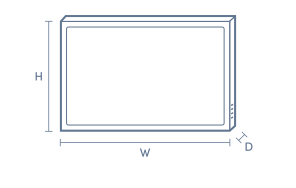
With Stand Dimensions
- Height With Stand (mm):
- 555.1
- Width With Stand (mm):
- 814.15
- Depth With Stand (mm):
- 232
- Weight With Stand (kg):
- 7.91
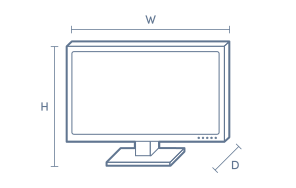
Box Dimensions
- Box Height (mm):
- 485
- Box Width (mm):
- 235
- Box Depth (mm):
- 966
- Box Weight (kg):
- 13

No reviews found for this product.
Product Reviews of Alienware 34" QD-OLED Curved Gaming Monitor

Overall Rating Snapshot
You've viewed 0 of 0 reviews
The below information is AI generated based on Australian websites information around this item. We have done our best to ensure its accuracy but suggest verifying any information within this tab before purchasing.
At a glance
The Alienware AW3426DW is a premium ultrawide curved gaming monitor designed for PC players who want very fast motion handling and strong OLED-style contrast. It is especially well suited to racing, shooters and immersive single-player games thanks to its 280Hz refresh rate and QD-OLED panel. A fair trade-off is that its 34-inch curved ultrawide format is less ideal for users wanting a simple dual-screen office setup.
What it’s great for
- Competitive Gaming
- Immersive PC Gaming
- Racing Games
- FPS Games
- Open-World Gaming
- HDR Entertainment
Where it works best
- Home Gaming Setup
- Home Office
- Dedicated PC Desk
- Streaming Room
Who it’s for
- PC Gamer
- Competitive Gamer
- Enthusiast Gamer
- Content Consumer
- Home Office User
Things to consider
The ultrawide curved format is excellent for immersion, but it can be less practical than a flat 16:9 monitor for standard office layouts, shared workspaces or neat multi-monitor alignment.
Gaming suitability score
9.8/10 - outstanding for fast PC gaming thanks to its 280Hz refresh rate, 0.03ms response time, ultrawide format and strong contrast.
Home office fit
Good for mixed work-and-play desks, especially if you like a wide single-screen workspace, though the curved ultrawide shape is more gaming-focused than office-focused.
Colour accuracy rating
9/10 - very strong colour performance with wide DCI-P3 coverage, making it suitable for visually rich content and general creative use.
Multi-monitor setup compatibility
Moderate - usable in multi-monitor setups, but the 34-inch curved ultrawide design is less seamless to align beside other displays than a flat standard-format monitor.
Eye comfort score
8/10 - low blue light and flicker-free viewing support longer sessions, though the bright HDR performance may still feel intense in dark rooms.
Key benefits
- 280Hz Refresh Rate: delivers very smooth on-screen motion for fast competitive games.
- 0.03ms Response Time: helps reduce visible blur and keeps movement looking sharp during rapid action.
- QD-OLED Panel: produces deep blacks, vivid colour and strong contrast for a more cinematic image.
- 34-Inch Ultrawide Curved Screen: creates a wider field of view that suits racing, simulation and open-world gaming.
- VESA DisplayHDR True Black 500: improves shadow detail and highlight impact in HDR-compatible games and video.
- NVIDIA G-SYNC Support: helps reduce screen tearing for smoother gameplay with compatible systems.
- Ergonomic Stand Adjustments: height, tilt, swivel and slant adjustments make it easier to position comfortably on a desk.
- USB-C and Multiple USB Ports: makes it easier to connect accessories and keep a gaming or work setup organised.
Q: Does this monitor have built-in speakers for game or PC audio
A: Alienware AW3426DW is not listed with built-in speakers, so audio needs to come from headphones, external speakers or your PC or console output. That matters if you want sound straight from the screen without extra gear.
Q: Is the 34 inch ultrawide shape a good fit for consoles
A: It can work with consoles over HDMI, but the 21:9 screen is aimed more at PC gaming than console-first use. Many console games and menus are built around 16:9, so the full ultrawide shape is not always used.
Q: Which connection is best for the highest refresh rate on PC
A: DisplayPort 1.4 is the safer choice if your goal is the highest refresh settings on a gaming PC. HDMI is included for compatibility, but the refresh options you actually get depend on the connected device, graphics output and cable.
Q: Can the USB-C port connect a laptop with one cable
A: USB-C is included, but Alienware AW3426DW is not listed with USB-C power delivery for charging a laptop. For a one-cable laptop setup, check that your laptop supports video over USB-C and expect separate power if it does not.
Q: Will a 34 inch curved ultrawide suit a smaller desk setup
A: Yes, if it will be your main screen. The 34 inch panel and 1800R curve suit an immersive single-monitor setup, but they take more lateral space than a standard 16:9 display and are less practical if your desk is shallow or already crowded.
Q: Does 3440 x 1440 look sharp for work as well
A: Yes, 3440 x 1440 gives more horizontal room than a standard 1440p screen, which suits side-by-side windows and wide timelines. The trade-off is that some office apps and older software are laid out more naturally on a regular 16:9 display.


