



TP-LINK 4G+ Cat6 AC1200 Wireless Dual Band Gigabit Router
ARCHER-MR500


Play Video
Online Only


Product Overview
Key Features
- Wi-Fi router with WiFi 5 802.11ac and up to 300Mbps speeds
- Dual detachable external antennas and WPA/WPA2 security
- 4G+ Cat6, DSL, Wi-Fi router mode, nano SIM card slot
- 1 LAN/WAN port, 3 LAN ports, supports 2.4 and 5 GHz bands
Key Specifications
- Brand:
- TP-LINK
- Model Number:
- ARCHER-MR500
- Security:
- 64/128-bit WEP, WPA/WPA2 Personal, WPA/WPA2 Enterprise
- Connections:
- 1 x LAN/WAN Port, 3 x LAN Ports, 1 x Nano Sim Card Slot
- Wi-Fi:
- IEEE 802.11a/n/ac 5 GHz, IEEE 802.11b/g/n 2.4 GHz
- Type:
- Wi-Fi Router
Computers & Tablets
- Antennas:
- 2 Detachable External LTE Antennas
Connections
- Data Transfer Speed:
- Up to 300Mbps
General Information
- Wi-Fi Standard:
- WiFi 5 802.11ac
- Colour:
- Black
- Additional Features:
- Wi-Fi Router Mode, 4G+ Cat6, DSL
- What's In The Box:
- 4G+ Cat6 300 Mbps LTE AC1200 Wireless Dual Band Gigabit Router Archer MR500, Power Adapter, RJ45 Ethernet Cable, Quick Installation Guide
Warranty
- Manufacturer's Warranty:
- 3 Year
Computers & Tablets
- Antennas:
- 2 Detachable External LTE Antennas
General Information
- Wi-Fi Standard:
- WiFi 5 802.11ac
- Colour:
- Black
- Additional Features:
- Wi-Fi Router Mode, 4G+ Cat6, DSL
- What's In The Box:
- 4G+ Cat6 300 Mbps LTE AC1200 Wireless Dual Band Gigabit Router Archer MR500, Power Adapter, RJ45 Ethernet Cable, Quick Installation Guide
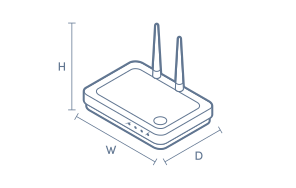
Product Dimensions
- Product Height (mm):
- 141
- Product Width (mm):
- 202
- Product Depth (mm):
- 33.6
- Product Weight (kg):
- 0.78
Box Dimensions
- Box Height (mm):
- 70
- Box Width (mm):
- 310
- Box Depth (mm):
- 220
- Box Weight (kg):
- 1

No reviews found for this product.
Product Reviews of TP-LINK 4G+ Cat6 AC1200 Wireless Dual Band Gigabit Router

Overall Rating Snapshot
You've viewed 0 of 0 reviews
The below information is AI generated based on Australian websites information around this item. We have done our best to ensure its accuracy but suggest verifying any information within this tab before purchasing.
At a glance
The TP-LINK Archer MR500 is a flexible WiFi router that can use either a 4G nano SIM or wired broadband, making it a strong fit for homes, rentals, small offices and backup internet use. Its main strengths are easy deployment, dual-band WiFi and gigabit wired ports. A fair limitation is that it uses WiFi 5, so it is less advanced than newer WiFi 6 models.
What it’s great for
- Backup Internet
- Rental Living
- Small Office Connectivity
- Regional Internet Access
- Temporary Setups
- Everyday Home Networking
Where it works best
- Home Office
- Apartment
- Rental Property
- Small Business
- Regional Home
- Temporary Workspace
Who it’s for
- Remote Worker
- Small Business Owner
- Renter
- Regional Household
- Home User
- Mobile Broadband User
Things to consider
It offers solid everyday performance, but buyers wanting the latest WiFi 6 speeds, lower latency for demanding gaming, or stronger coverage for larger homes may prefer a more advanced router or mesh system.
Large home coverage score
6/10 - suitable for small to medium spaces, but larger homes may need a stronger router or mesh system for more consistent coverage.
Smart home device compatibility
Good for typical smart home setups with dual-band WiFi and multiple wired ports, especially for everyday connected devices.
Gaming performance rating
6/10 - gigabit ports help wired gaming, but mobile broadband dependence and WiFi 5 make it less ideal than gaming-focused or WiFi 6 routers.
Easy setup suitability
9/10 - very convenient for quick deployment thanks to nano SIM support, compact design and straightforward home or small office use.
Key benefits
- 4G+ Cat6 Mobile Broadband: Lets you get online with a nano SIM when fixed-line internet is unavailable, unreliable or only needed temporarily.
- Dual Broadband Flexibility: Supports both mobile broadband and wired broadband, giving you more setup options for home or business use.
- AC1200 Dual Band WiFi: Provides separate 2.4 GHz and 5 GHz bands to help balance everyday browsing, streaming and device connectivity.
- 2.4 GHz Speed Support: Supports up to 300 Mbps on the 2.4 GHz band for everyday internet tasks and wider-reaching connections.
- Gigabit Ethernet Ports: Gives wired devices a faster and more stable connection for desktops, TVs, consoles or office equipment.
- LAN/WAN Port Flexibility: The dedicated LAN/WAN port makes it easier to switch between wired broadband use and other network configurations.
- Detachable External LTE Antennas: Helps improve mobile signal stability and gives you more flexibility when positioning the router.
- WPA/WPA2 Personal and Enterprise Security: Supports established wireless security standards to help protect home and office network access.
Q: Can this router use both a SIM card and wired broadband?
A: Yes. Archer MR500 can connect through a nano SIM for 4G internet or through its LAN/WAN port for wired broadband. That suits homes, rentals or small offices that may switch between mobile internet and a fixed service over time.
Q: Is the Archer MR500 a modem router or mainly a 4G router?
A: Archer MR500 is mainly a 4G router with routing for mobile broadband and Ethernet WAN connections. It suits a nano SIM setup or a broadband handoff from existing network equipment, rather than a phone-line style broadband connection.
Q: How many wired devices can plug into the Archer MR500?
A: Archer MR500 has three dedicated LAN ports and one LAN/WAN port. If the LAN/WAN port is being used to bring in wired broadband, three wired devices can connect directly. If broadband comes from the SIM slot, that shared port can be used as another LAN port.
Q: Will this router cover a large or multi-storey home?
A: It can suit a medium to large home, but walls, floors and router placement still matter. Archer MR500 uses dual detachable LTE antennas for the mobile link and is OneMesh compatible, so extra mesh gear may be needed for dead spots or upper levels.
Q: What affects 4G speed on the TP-Link Archer MR500?
A: Archer MR500 uses 4G+ Cat6 with external LTE antennas, but mobile speed is still shaped by signal strength, network congestion and where the router is placed indoors. It is best suited to addresses with a stable 4G signal rather than weak indoor coverage.
Q: Does Cat6 mean the router needs a Category 6 cable?
A: No. In Archer MR500, Cat6 refers to the 4G LTE category, not a requirement for a Category 6 Ethernet cable. Wired devices and broadband equipment connect through the gigabit Ethernet ports, with cable choice depending on the connection already in use.


