


Logitech BRIO 500 Full HD 1080p webcam (Rose)
960-001433


Online Only


Product Overview
Key Features
- Full HD webcam for video calls and streaming
- 1920 x 1080 pixel resolution with 90 degree camera view
- 4x digital zoom and stereo microphone up to 1.22 metre range
- USB-C connection and 1.5 metre cable for flexible setup
Key Specifications
- Brand:
- Logitech
- Model Number:
- 960-001433
- Camera:
- 90 degrees
- Resolution Type:
- Full HD
- Microphone:
- Stereo microphone, range: Up to 1.22 m
- Connections:
- USB-C
- Type:
- Webcam
Cameras
- Motion Tracking:
- 4x digital zoom
Screen Technology
- Display Resolution (px):
- 1920 x 1080, Full HD
General Information
- Colour:
- Pink
- Supplier Colour:
- Rose
- System Requirements:
- Windows 8 or later (Windows 8.1 or higher required for resolutions greater than 1080p), macOS 10.10 or later, ChromeOS
- What's In The Box:
- Brio 500 with attached USB-C cable, Mount clip with removable mount adapter, User documentation
Warranty
- Manufacturer's Warranty:
- 1 Year
Cameras
- Motion Tracking:
- 4x digital zoom
General Information
- Colour:
- Pink
- Supplier Colour:
- Rose
- System Requirements:
- Windows 8 or later (Windows 8.1 or higher required for resolutions greater than 1080p), macOS 10.10 or later, ChromeOS
- What's In The Box:
- Brio 500 with attached USB-C cable, Mount clip with removable mount adapter, User documentation
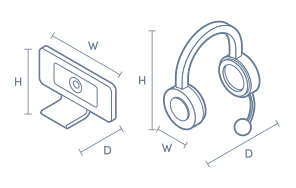
Product Dimensions
- Product Height (mm):
- 51.5
- Product Width (mm):
- 110
- Product Depth (mm):
- 45
- Product Weight (g):
- 121
- Cord Length (m):
- 1.5
Box Dimensions
- Box Height (mm):
- 85
- Box Width (mm):
- 57
- Box Depth (mm):
- 130
- Box Weight (kg):
- 0

No reviews found for this product.
Product Reviews of Logitech BRIO 500 Full HD 1080p webcam (Rose)

Overall Rating Snapshot
You've viewed 0 of 0 reviews
The below information is AI generated based on Australian websites information around this item. We have done our best to ensure its accuracy but suggest verifying any information within this tab before purchasing.
At a glance
The Logitech BRIO 500 is a stylish Full HD webcam for remote workers, students and everyday professionals who want clearer video calls without a complicated setup. Its wide 90 degree view, stereo microphones and USB-C connection make it easy for modern desktops and laptops. A fair limitation is that it stays at 1080p, so it is not the best choice for users wanting sharper 4K video.
What it’s great for
- Video Calls
- Remote Work
- Online Classes
- Everyday Content Recording
- Presentations
Where it works best
- Home Office
- Study Space
- Corporate Office
- Shared Workstation
Who it’s for
- Remote Worker
- University Student
- Everyday Professional
- Hybrid Worker
- Home Office User
Things to consider
It delivers solid everyday call quality, but premium webcams may offer 4K capture, stronger low-light performance or more advanced creator-focused image controls.
Remote work suitability
9/10 - strong fit for daily meetings thanks to clear 1080p video, built-in stereo microphones and easy compatibility with common computer platforms.
Gaming vs office fit
Best suited to office, study and remote work rather than specialist streaming or gaming setups.
Audio/video quality score
8/10 - clear Full HD video and practical microphone pickup for calls, though it does not reach premium 4K webcam quality.
Plug-and-play ease
9/10 - USB-C connection and support for Windows, macOS and ChromeOS make it straightforward for most users to get started.
Key benefits
- Full HD 1080p video: Delivers clear, professional-looking image quality for meetings, classes and recordings.
- 90 degree field of view: Captures a wider view, which is helpful for presentations, collaborative calls or fitting more of your space on screen.
- 4x digital zoom: Helps you frame yourself more tightly or draw attention to details during presentations.
- Stereo microphones: Picks up voice clearly for calls without needing a separate desk microphone.
- 1.22 metre voice pickup range: Supports clear speaking capture from a practical seated distance in typical desk setups.
- USB-C connectivity: Provides a simple, reliable connection for many current laptops and desktops.
- 1.5 metre cable: Gives you more flexibility to position the webcam around your monitor or desk.
- Windows, macOS and ChromeOS compatibility: Makes setup easier across common work and study devices.
Q: Does this webcam need a USB-C port on your computer
A: Yes. Logitech BRIO 500 connects by USB-C, so a computer with a USB-C port is the straightforward fit. If your device only has older USB ports, you may need a separate adapter, and that is not the same as a native USB-C connection.
Q: Does the BRIO 500 webcam record in 4K resolution
A: No. Logitech BRIO 500 captures video at 1920 x 1080, so it is aimed at clear everyday calls and recordings rather than 4K output. If 4K capture is a must-have for your setup, this model is not the right fit.
Q: Can the built-in microphones replace a separate desk mic
A: Yes, for typical calls and classes. The stereo microphones are designed to pick up voices from as far as 1.22 metres away, which suits a desk setup, but a dedicated microphone is still the better choice for more controlled audio capture.
Q: Is the 90 degree view too wide for solo desk calls
A: Not usually. A 90 degree field of view can fit one person at a desk without feeling cramped, and it also helps in shared spaces or presentations. If you want a tighter frame, the 4x digital zoom can crop in without moving the webcam.
Q: Will the 1.5 metre cable reach a desktop under the desk
A: In many desk setups, yes. The 1.5 metre cable gives more placement flexibility than a very short lead, whether the webcam sits on a monitor or laptop screen, but a tower placed well away from the screen may still need an extension.
Q: Do you need software to use the Logitech BRIO 500
A: No, not for basic setup. Logitech BRIO 500 is designed for plug-and-play use over USB-C with Windows, macOS and ChromeOS, so it can be ready for calls quickly. Extra software is not required just to connect and start using it.