



Lenovo IdeaCentre 3 27" i3 8GB 512GB AIO
F0GJ00UHAU
NOT AVAILABLE


Play Video


Product Overview
Key Features
- 27 Inch FHD IPS display with 1920 x 1080 resolution
- 8GB memory, 12th Gen Intel Core i3, 512GB SSD
- Intel integrated graphics
Key Specifications
- Brand:
- Lenovo
- Model Number:
- F0GJ00UHAU
- Graphics Processing Unit:
- Intel Integrated
- Screen Size (Inches):
- 27
- Peak Brightness (Nits):
- 250
- Total Storage:
- 512GB
- Wireless Connections:
- Wi-Fi 6 11ax 2x2, Bluetooth v5.1
- Operating System:
- Windows 11 Home
Computers & Tablets
- Processor Brand:
- Intel
- Processor Specifications:
- Intel 12th Generation Core i3
- Webcam:
- High-resolution webcam
Screen Technology
- Display Resolution (px):
- 1920 x 1080, Full HD
Screen Features
- Screen Size Range:
- 24 Inches & Above
- Screen Type:
- FHD, IPS
Capacity
- Storage:
- 512GB M.2 2280 PCIe SSD
- RAM (GB):
- 8
Connections
- Wired Connections:
- 1x HDMI 1.4, 2x USB 2.0, 2x USB 3.2 Gen 2, 1x Ethernet (RJ-45), 1x power connector
- Cellular or Wi-Fi Only:
- Wi-Fi Only
Audio
- Sound:
- High Definition (HD) Audio, Realtek® ALC256 codec
General Information
- Type:
- All In One Desktop
- Family:
- IdeaCentre
- Colour:
- White
- What's In The Box:
- Calliope Wireless Keyboard, Calliope Wireless Mouse, Power Adapter, QSG/Warranty
Warranty
- Manufacturer's Warranty:
- 1 Year
Computers & Tablets
- Processor Brand:
- Intel
- Processor Specifications:
- Intel 12th Generation Core i3
- Webcam:
- High-resolution webcam
Screen Features
- Screen Size Range:
- 24 Inches & Above
- Screen Type:
- FHD, IPS
Connections
- Wired Connections:
- 1x HDMI 1.4, 2x USB 2.0, 2x USB 3.2 Gen 2, 1x Ethernet (RJ-45), 1x power connector
- Cellular or Wi-Fi Only:
- Wi-Fi Only
General Information
- Type:
- All In One Desktop
- Family:
- IdeaCentre
- Colour:
- White
- What's In The Box:
- Calliope Wireless Keyboard, Calliope Wireless Mouse, Power Adapter, QSG/Warranty
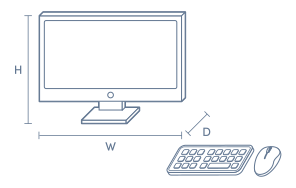
Product Dimensions
- Product Height (mm):
- 472.91
- Product Width (mm):
- 613.1
- Product Depth (mm):
- 200
- Product Weight (kg):
- 8.82
Box Dimensions
- Box Height (mm):
- 570
- Box Width (mm):
- 232
- Box Depth (mm):
- 763
- Box Weight (kg):
- 13

Product Reviews of Lenovo IdeaCentre 3 27" i3 8GB 512GB AIO

Overall Rating Snapshot
5 out of 5 stars from 1 review
100% of users recommend this product
Anonymous
Confirmed purchase 16 November 2024
Published on 11 December 2024
Yes, I recommend this product.
This customer is a verified purchaser who may have received an incentive in return for providing an authentic review.
You've viewed 1 of 1 reviews
ABOUT THE GOOD GUYS REVIEWSThe Good Guys product reviews are collected from verified purchasers who may have received an incentive in return for providing an authentic review.
The below information is AI generated based on Australian websites information around this item. We have done our best to ensure its accuracy but suggest verifying any information within this tab before purchasing.
At a glance
The Lenovo IdeaCentre 3 27 AIO is a practical all-in-one desktop for everyday work, web browsing, video calls and study. It suits homes, students and office users who want a large screen with a clean, space-saving setup. Its key strengths are simplicity, low clutter and easy day-to-day usability. The main limitation is that it is not ideal for demanding creative workloads or serious gaming.
What it’s great for
- Everyday Productivity
- Office Work
- Student Computing
- Web Browsing
- Video Calls
- Home Administration
Where it works best
- Home Office
- Study Nook
- Family Desk
- Reception Area
- Small Business Office
Who it’s for
- University Student
- School Student
- Everyday Professional
- Remote Worker
- Family User
- Small Business User
Things to consider
This model is better suited to general computing than demanding tasks, so buyers needing stronger graphics performance, heavier multitasking capability or deeper upgrade options may prefer a higher-tier desktop.
Gaming suitability score
3/10 - fine for very light or older games, but not aimed at modern AAA gaming or high-end graphics workloads.
Home office fit
Very good for everyday home office use thanks to its large screen, simple setup and space-saving all-in-one design.
Student use suitability
8/10 - a strong match for assignments, research, online classes and general study, but less suited to specialist design or engineering software.
Upgrade flexibility
Limited compared with a traditional tower desktop, as all-in-one systems are generally less expandable.
Noise level vs category average
Usually quieter than many traditional desktop setups in everyday use due to its integrated all-in-one form factor.
Key benefits
- All-in-One Design: Combines the computer and display in one unit to keep your desk neater and reduce cable clutter.
- 27-inch Display: Gives you a roomy viewing area that is comfortable for documents, web browsing and split-screen work.
- Clean Workspace Footprint: Takes up less desk space than a separate tower-and-monitor setup, which suits compact home offices.
- Everyday Performance: Handles common daily tasks like email, word processing, streaming and online meetings with minimal fuss.
- Fast Everyday Storage: Solid-state storage helps the system feel responsive during boot-up, app launches and file access.
- Integrated Webcam Setup: Makes it easier to jump into video calls without needing an extra external camera.
- Simple Family-Friendly Desktop: Easy for shared household use across study, admin tasks, casual browsing and media playback.
- Low-Clutter Home Office Option: Offers a more streamlined setup than many traditional desktops, which can make smaller workspaces feel tidier.
Q: Is the Lenovo IdeaCentre 3 27 inch i3 8GB 512GB AIO a good fit for everyday home use?
A: Yes. The Intel Core i3, 8GB RAM and 512GB SSD suit web browsing, study, email, streaming and office tasks, while the 27 inch Full HD screen gives a larger workspace. It is less suited to demanding creative apps or gaming.
Q: Is the 27 inch screen on this Lenovo IdeaCentre 3 a touch display?
A: No. This model uses a 27 inch Full HD 1920 x 1080 non-touch display, so navigation is designed for the keyboard and mouse rather than tap control. The borderless style helps keep the screen looking cleaner and more modern on a desk.
Q: Is Full HD resolution enough on a 27 inch all-in-one like this?
A: Yes, for general use. Full HD 1920 x 1080 works well for browsing, documents, video calls and streaming, but text and fine detail will look less sharp than on a 27 inch QHD or 4K screen, especially if you sit quite close.
Q: Why might this Lenovo IdeaCentre 3 feel slow if you keep lots of apps open?
A: The main limit is the 8GB memory and entry-level Core i3 processor. They are fine for everyday tasks, but performance can drop with many browser tabs, heavier spreadsheets or photo editing apps open at once compared with an i5 or 16GB setup.
Q: Does the Lenovo IdeaCentre 3 all-in-one have a battery for portable use?
A: No. This is an all-in-one desktop PC, so it is designed to stay plugged into mains power rather than run like a laptop. If moved between rooms, it will need to be shut down, unplugged and set up again at the new desk.
Q: Should you buy this 8GB and 512GB configuration if you plan to keep it for several years?
A: It suits buyers with light to moderate needs today, especially if most files stay in cloud storage. If you expect heavier multitasking, large photo libraries or longer-term headroom, choosing a higher-spec all-in-one from the start is the safer option.