



HP Envy Move 24" i5 16GB 512GB AIO
8Z7D8PA
NOT AVAILABLE
+ Delivery from $11


Play Video


Play Video


Product Overview
Key Features
- 23.8 Inch QHD touch display with 2560 x 1440 resolution
- 16GB memory, Intel Core i5-1335U, 512GB M.2 SSD
- Intel integrated graphics
- Touch screen for easy navigation
- Up to 4 hours battery, Audio by B&O dual 5W speakers
Key Specifications
- Brand:
- HP
- Model Number:
- 8Z7D8PA
- Touch Screen:
- Yes
- Graphics Processing Unit:
- Intel Integrated
- Screen Size (Inches):
- 23.8
- Total Storage:
- 512GB
- Wireless Connections:
- Realtek Wi-Fi 6E RTL8852CE (2x2), Bluetooth v5.3
- Battery:
- Built-in battery up to 4 hours of battery life
- Operating System:
- Windows 11 Home
Computers & Tablets
- Processor Brand:
- Intel
- Processor Specifications:
- Intel Core i5-1335U, 4.6GHz
- Webcam:
- HP Wide Vision 5 MP IR
Screen Technology
- Display Resolution (px):
- 2560 x 1440
Screen Features
- Screen Size Range:
- 24 Inches & Above
- Screen Type:
- QHD
Capacity
- Storage:
- 512GB M.2 SSD
- RAM (GB):
- 16
Connections
- Wired Connections:
- 1x USB Type-A 10Gbps, 1x USB Type-C 10Gbps (DisplayPort 1.4a)
- Cellular or Wi-Fi Only:
- Wi-Fi Only
Audio
- Sound:
- Audio by B&O, Dual 5W speakers
General Information
- Type:
- All In One Desktop
- Family:
- Envy Move
- Colour:
- White
- Supplier Colour:
- Shell White
Warranty
- Manufacturer's Warranty:
- 1 Year
Computers & Tablets
- Processor Brand:
- Intel
- Processor Specifications:
- Intel Core i5-1335U, 4.6GHz
- Webcam:
- HP Wide Vision 5 MP IR
Screen Features
- Screen Size Range:
- 24 Inches & Above
- Screen Type:
- QHD
Connections
- Wired Connections:
- 1x USB Type-A 10Gbps, 1x USB Type-C 10Gbps (DisplayPort 1.4a)
- Cellular or Wi-Fi Only:
- Wi-Fi Only
General Information
- Type:
- All In One Desktop
- Family:
- Envy Move
- Colour:
- White
- Supplier Colour:
- Shell White
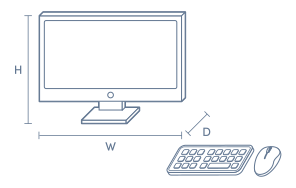
Product Dimensions
- Product Height (mm):
- 552.3
- Product Width (mm):
- 148.6
- Product Depth (mm):
- 366.6
- Product Weight (kg):
- 4.1
Box Dimensions
- Box Height (mm):
- 515
- Box Width (mm):
- 150
- Box Depth (mm):
- 660
- Box Weight (kg):
- 9

No reviews found for this product.
Product Reviews of HP Envy Move 24" i5 16GB 512GB AIO

Overall Rating Snapshot
You've viewed 0 of 0 reviews
The below information is AI generated based on Australian websites information around this item. We have done our best to ensure its accuracy but suggest verifying any information within this tab before purchasing.
At a glance
The HP Envy Move 24 is a stylish all-in-one desktop for households, remote workers and students who want a cleaner, more flexible setup than a standard PC. Its standout strengths are portability within the home, an integrated design and easy everyday usability. The main limitation is limited upgrade flexibility compared with a traditional tower desktop.
What it’s great for
- Everyday Productivity
- Home Office Work
- Video Calls
- Web Browsing
- Streaming
- Family Computing
- Student Computing
Where it works best
- Home Office
- Living Room
- Kitchen Bench
- Shared Family Space
- Apartment
- Study Nook
Who it’s for
- Remote Worker
- University Student
- Home User
- Family Household
- Everyday Professional
Things to consider
This all-in-one is less flexible to upgrade or customise than a conventional tower PC, so power users and dedicated gamers may prefer a desktop with easier component access.
Gaming suitability score
4/10 - suitable for light casual gaming, but not the best choice for demanding modern titles or high-end graphics settings.
Home office fit
9/10 - excellent for remote work thanks to its clean setup, large display and easy room-to-room flexibility.
Student use suitability
8/10 - strong fit for study, assignments, research and video classes, especially in shared living spaces.
Upgrade flexibility
3/10 - compact all-in-one design offers less upgrade freedom than a standard desktop tower.
Noise level vs category average
Generally quieter than many traditional desktop setups during everyday productivity and media use.
Key benefits
- Portable all-in-one design: easier to move between rooms than a standard desktop setup with separate monitor and tower.
- Built-in battery support: lets you relocate the PC around the home without shutting down immediately when away from a power point.
- 24-inch class display: gives you a comfortable screen size for work, study and entertainment in one compact unit.
- All-in-one footprint: reduces cable clutter and helps keep desks, benches and shared spaces looking tidy.
- Integrated webcam and speakers: simplifies video calls and everyday media use without needing extra accessories.
- Modern premium styling: fits well in visible home spaces where appearance matters as much as function.
- Wireless accessory focus: makes setup neater and more convenient for flexible use around the home.
- Touch-friendly design: makes casual navigation, browsing and shared family use feel more intuitive.
Q: How long does the HP Envy Move run on battery power?
A: It is designed for short cordless use rather than a full workday away from power. In typical web, document and video use, around 3 to 4 hours is a reasonable expectation, with higher screen brightness and streaming tending to reduce runtime.
Q: Is the HP Envy Move a good fit if the computer will be used in different rooms?
A: Yes. The Envy Move is built for room-to-room use, combining a 24 inch all-in-one design with a built-in battery. It suits kitchens, studies and shared spaces better than a fixed desktop, but it is still larger and heavier than a laptop.
Q: Can this HP Envy Move handle photo editing, office work and everyday multitasking?
A: Yes. The Intel Core i5, 16GB RAM and 512GB SSD are well suited to office apps, web browsing, video calls and light to moderate photo editing. It is a stronger everyday setup than entry AIO models with 8GB RAM, but not aimed at heavy 3D workloads.
Q: Is this HP Envy Move suitable for gaming?
A: No, not as a primary gaming PC. This model is better suited to productivity and media use than demanding AAA games, because its mobile Core i5 platform typically relies on integrated graphics rather than the dedicated GPU power serious gaming benefits from.
Q: What does the QHD screen add compared with a standard Full HD all-in-one?
A: A QHD display gives more detail and more working space than Full HD, which helps with spreadsheets, photo work and sharper video. On a 24 inch screen, text and images generally look crisper, though higher resolution can use a little more battery power unplugged.