



Epson WorkForce All -round 4-in-1 Printer
WF-2950
NOT AVAILABLE
+ Delivery from $11


Play Video


Product Overview
Key Features
- Print, scan and copy with A4 paper, 100 sheet tray, double-sided
- 5760 x 1440 print, 1200 x 2400 scan, up to 10.3ppm B&W
- Uses Black, Cyan, Magenta and Yellow ink, USB and Wi-Fi
- Compatible with Epson Smart Panel, Email Print, iPrint apps
Key Specifications
- Brand:
- Epson
- Model Number:
- WF-2950
- Printer Functions:
- Print, Scan & Copy
- Double Sided Printing:
- Yes
- Paper Capacity:
- 100 pieces
- Max Print Speed:
- B&W: 10.3ppm, Colour: 5.8ppm
- Wireless Connections:
- Wi-Fi 802.11 b/g/n
Computers & Tablets
- Printing Resolution:
- 5760 x 1440
- Paper Size:
- A4, A5, B5, B6, A6, Legal, 13 x 18cm, 10 x 15cm, 13 x 18cm, 20 x 25cm Envelopes: C6, No 10, DL
- Scan Resolution:
- 1200 x 2400
Smart Features
- Compatible Apps:
- Epson Email Print, Epson Smart Panel, Epson iPrint™ App(iOS®, Android)
Connections
- Wired Connections:
- USB 2.0
General Information
- Type:
- Inkjet Printer
- Colour:
- Black
- Additional Features:
- Screen Size 2.4", Smart Device Printing Solutions Epson Smart Panel, Email Print, Scan to Cloud, Apple AirPrint
- What's In The Box:
- WorkForce WF-2930 Printer, Instruction manual, Warranty documents, Power cord, USB cable and Fax cable not included (Optional extra), Initial ink cartridges: Black, Cyan, Magenta, & Yellow
Warranty
- Manufacturer's Warranty:
- 1 Year
Computers & Tablets
- Printing Resolution:
- 5760 x 1440
- Paper Size:
- A4, A5, B5, B6, A6, Legal, 13 x 18cm, 10 x 15cm, 13 x 18cm, 20 x 25cm Envelopes: C6, No 10, DL
- Scan Resolution:
- 1200 x 2400
Connections
- Wired Connections:
- USB 2.0
Warranty
- Manufacturer's Warranty:
- 1 Year
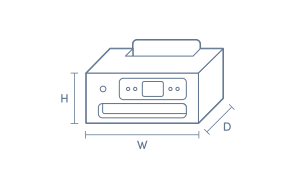
Product Dimensions
- Product Height (mm):
- 218
- Product Width (mm):
- 375
- Product Depth (mm):
- 300
- Product Weight (g):
- 5300
Box Dimensions
- Box Height (mm):
- 292
- Box Width (mm):
- 388
- Box Depth (mm):
- 466
- Box Weight (kg):
- 6

No reviews found for this product.
Product Reviews of Epson WorkForce All -round 4-in-1 Printer

Overall Rating Snapshot
You've viewed 0 of 0 reviews
The below information is AI generated based on Australian websites information around this item. We have done our best to ensure its accuracy but suggest verifying any information within this tab before purchasing.
At a glance
The Epson WorkForce WF-2950 is a compact 4-in-1 inkjet printer for homes and light home offices that need printing, scanning and copying in one unit. Its strengths are wireless printing, automatic double-sided output, an automatic document feeder and solid everyday colour quality. It is best for moderate use rather than heavy-volume printing, as the 100-sheet input tray is modest compared with larger office-focused models.
What it’s great for
- Everyday Printing
- Home Office Work
- School Assignments
- Colour Documents
- Occasional Photo Printing
- Document Scanning
Where it works best
- Home Office
- Family Home
- Study Nook
- Small Office
Who it’s for
- Remote Worker
- Family Household
- Student
- Home User
- Small Business User
Things to consider
This model is better suited to everyday home and light office use than high-volume workloads, with a 100-sheet paper capacity and slower print speeds than more premium office inkjet printers.
Home office suitability score
8/10 - strong fit for remote work and general admin thanks to Wi-Fi, duplex printing and an automatic document feeder.
Photo printing quality
7/10 - good for occasional family photos and colour graphics, but not aimed at specialist photo enthusiasts.
Ease of use rating
8/10 - straightforward for everyday use with wireless setup options, app support and practical document handling.
Running cost guidance
Best suited to light to moderate printing volumes; occasional users and households are likely to get better value than high-volume office users.
Family friendliness
8/10 - well suited to families printing homework, forms, colour handouts and the occasional photo at home.
Key benefits
- 4-in-1 Functionality: Print, scan and copy functions cover everyday document tasks in one compact device.
- Automatic Double-sided Printing: Built-in duplex printing helps reduce paper use on regular A4 documents.
- Automatic Document Feeder: The ADF makes it easier to scan or copy short multi-page document sets without feeding each page by hand.
- Wi-Fi Connectivity: Wireless printing allows more flexible placement around the home or office without keeping the printer beside a computer.
- Mobile App Support: Works with Epson Smart Panel, Email Print and iPrint for convenient printing from compatible smart devices.
- Fine Detail Output: Up to 5760 x 1440 dpi print resolution helps produce sharp colour graphics and better-looking occasional photo prints.
- Versatile Media Handling: Supports A4, A5, B5, B6, A6, Legal and common envelope sizes for forms, school tasks and household paperwork.
- Practical Paper Capacity: The 100-sheet rear paper feed is suitable for everyday home printing and light office batches.
Q: Can it print borderless photos or only standard documents?
A: Yes. Epson WorkForce WF-2950 supports borderless printing on 4 x 6, 5 x 7 and A4 media sizes. It suits occasional family photos and colour layouts, but it is still an everyday inkjet rather than a dedicated photo printer.
Q: Will the paper capacity suit regular home office printing?
A: Yes, for light to moderate use. Epson WorkForce WF-2950 has a 100-sheet rear paper feed, which is practical for forms, homework and routine admin, but frequent larger batches will need more refilling than an office-focused printer.
Q: Does the document feeder work for multi-page scans and copies?
A: Yes. Epson WorkForce WF-2950 includes an automatic document feeder, so short multi-page scan and copy jobs do not need each sheet placed by hand. It is better suited to everyday paperwork than large archive or office-volume batches.
Q: Can this printer handle envelopes and legal-size paper?
A: Yes. Epson WorkForce WF-2950 supports Legal paper plus C6, No 10 and DL envelopes, along with common A-series sizes. That makes it suitable for school packs, forms and occasional envelope printing without changing to a different printer.
Q: Is Wi-Fi enough, or do I still need USB?
A: Wi-Fi is enough for normal wireless printing. Epson WorkForce WF-2950 supports Wi-Fi 802.11 b/g/n as well as USB 2.0, so USB is optional unless a wired connection suits the setup better or wireless access is limited.
Q: Would this cope with heavy daily printing in a small office?
A: No. Epson WorkForce WF-2950 is better for everyday home and light office use than heavy daily output, with print speeds of 10.3 ISO ppm in black and 5.8 ISO ppm in colour. Larger ongoing workloads will feel slower and need more paper top-ups.