


Epson EcoTank Printer ET-2810
ET-2810


Play Video
In Store Only


Product Overview
Key Features
- Print, scan and copy with 100 sheet capacity, A4 and more
- 5760 x 1440 print, 1200 x 2400 scan, up to 10 ISO ppm
- Ink Bottle T522, USB cable, Wi-Fi, Epson iPrint App
Key Specifications
- Brand:
- Epson
- Model Number:
- ET-2810
- Printer Functions:
- Print, Scan & Copy
- Double Sided Printing:
- Yes
- Paper Capacity:
- 100 sheets
- Max Print Speed:
- Black: 10 ISO ppm Colour: 5 ISO ppm
- Wireless Connections:
- 802.11 b/g/n
Computers & Tablets
- Printing Resolution:
- 5760 x 1440
- Paper Size:
- Legal, Letter, 8.5" x 13", A4, B5, A5, A6, B6, user definable (182mm x 257mm – 215.9mm x 297mm")
- Compatible Ink / Toner:
- Ink Bottle T522
- Scan Resolution:
- 1200 x 2400
Smart Features
- Compatible Apps:
- Epson iPrint™ App
Connections
- Wired Connections:
- USB Printer cable
General Information
- Type:
- Inkjet Printer
- Colour:
- White
- What's In The Box:
- Epson Eco Tank ET-2810, Instruction manual, CD-ROM for product setup, Power cord, Initial Ink bottle 1 x 522 Black, 522 Cyan, 522 Magenta & 522 Yellow
Warranty
- Manufacturer's Warranty:
- 1 Year
Computers & Tablets
- Printing Resolution:
- 5760 x 1440
- Paper Size:
- Legal, Letter, 8.5" x 13", A4, B5, A5, A6, B6, user definable (182mm x 257mm – 215.9mm x 297mm")
- Compatible Ink / Toner:
- Ink Bottle T522
- Scan Resolution:
- 1200 x 2400
Connections
- Wired Connections:
- USB Printer cable
Warranty
- Manufacturer's Warranty:
- 1 Year
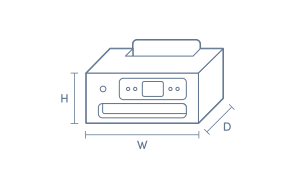
Product Dimensions
- Product Height (mm):
- 253
- Product Width (mm):
- 375
- Product Depth (mm):
- 578
- Product Weight (g):
- 3900
Box Dimensions
- Box Height (mm):
- 244
- Box Width (mm):
- 408
- Box Depth (mm):
- 436
- Box Weight (kg):
- 6

Product Reviews of Epson EcoTank Printer ET-2810

Overall Rating Snapshot
4.2 out of 5 stars from 352 reviews
83% of users recommend this product
What customers say, summarised by AI
- Very economical to run due to refillable ink tanks, much cheaper than cartridges
- Generally easy to use once set up, with simple refilling and wireless print options
- Print quality is good for documents, but colour vibrancy and photo quality can be average
- Many found the Wi-Fi and initial set-up process confusing or time-consuming
- Lacks automatic double-sided printing and AirPrint, which disappoints some users
- Compact, modern design fits easily on a desk and is visually appealing for home offices
Pros
Easy (58)
Quality (33)
Value (8)
Efficient (4)
Reliable (3)
Cheap (3)
Speed (2)
Cons
Noisy (1)
Great Little Printer from Epson
Works well - great speed and performance for a great price.
Kaz Larkin
Confirmed purchase 13 June 2026
Published on 26 September 2026
Yes, I recommend this product.
This customer is a verified purchaser who may have received an incentive in return for providing an authentic review.
Great printer
This is my second printer from Epson and it never disappointed me. Eco tank is the best option amongst the other printers. Quite happy with jt.
Rajnish
Confirmed purchase 13 June 2026
Published on 9 August 2026
Yes, I recommend this product.
This customer is a verified purchaser who may have received an incentive in return for providing an authentic review.
good product. great price
product is working well and meets my requirements. excellent price point for what it does
david henderson
Confirmed purchase 19 June 2026
Published on 15 July 2026
Yes, I recommend this product.
This customer is a verified purchaser who may have received an incentive in return for providing an authentic review.
Great printer, scan and copy
Don't know why I didn't get this printer sooner. So easy to use, print scan and copy. Fill the ink tanks was child's play. Can't recommend enough
Michell
Confirmed purchase 17 June 2026
Published on 14 July 2026
Yes, I recommend this product.
This customer is a verified purchaser who may have received an incentive in return for providing an authentic review.
Economical & easy to use
I found this product, incredibly easy to install and have up and running quickly. Also I found the replacement ink to be very reasonably priced..
Therese
Confirmed purchase 19 June 2026
Published on 14 July 2026
Yes, I recommend this product.
This customer is a verified purchaser who may have received an incentive in return for providing an authentic review.
Old Epson was able to Print on both sides of paper, not this printer
Taking some getting used to. needs Wi-Fi resetting often. Ather wise working ok
Andrew
Confirmed purchase 29 May 2026
Published on 12 July 2026
Yes, I recommend this product.
This customer is a verified purchaser who may have received an incentive in return for providing an authentic review.
Epson ET2810scanner printer
This is our 5 th Epson product. It is reasonably priced and does the home office work we bought it for well. We chose it as it uses the same ink system as our last printer.
Geoff Gelling
Confirmed purchase 2 June 2026
Published on 9 July 2026
Yes, I recommend this product.
This customer is a verified purchaser who may have received an incentive in return for providing an authentic review.
Great product
Great product but not that easy to install
Donna McInnes
Confirmed purchase 12 June 2026
Published on 7 July 2026
Yes, I recommend this product.
This customer is a verified purchaser who may have received an incentive in return for providing an authentic review.
Excellent service
Much more economical printer
Bev Stehn
Confirmed purchase 15 June 2026
Published on 2 July 2026
Yes, I recommend this product.
This customer is a verified purchaser who may have received an incentive in return for providing an authentic review.
Great little Printer
Does what says on tin. Having said that, wish it was more compatible with Apple features.
Gazza
Confirmed purchase 27 May 2026
Published on 24 June 2026
Yes, I recommend this product.
This customer is a verified purchaser who may have received an incentive in return for providing an authentic review.
You've viewed 10 of 352 reviews
ABOUT THE GOOD GUYS REVIEWSThe Good Guys product reviews are collected from verified purchasers who may have received an incentive in return for providing an authentic review.
The below information is AI generated based on Australian websites information around this item. We have done our best to ensure its accuracy but suggest verifying any information within this tab before purchasing.
At a glance
The Epson EcoTank ET-2810 is a refillable inkjet all-in-one for households and small home offices that need affordable everyday printing, scanning and copying. Its main strengths are low ongoing ink costs, wireless mobile printing and simple paper handling for common jobs. A key limitation is that print speeds and overall performance are better suited to light use than busy office workloads.
What it’s great for
- Everyday Printing
- Homework and School Projects
- Home Office Documents
- Occasional Colour Printing
- Basic Scanning and Copying
Where it works best
- Home Office
- Family Home
- Study Room
- Small Office
Who it’s for
- Families
- Students
- Home Users
- Remote Workers
- Small Office Users
Things to consider
This model is best for light to moderate everyday use, as faster and more feature-rich printers are better suited to high-volume printing or more demanding photo work.
Home office suitability score
8/10 - well suited to everyday document printing, scanning and copying with wireless convenience and duplex support.
Photo printing quality
Good for casual home photo printing, but not aimed at enthusiast or specialist photo users.
Ease of use rating
8/10 - straightforward all-in-one setup with app support, simple controls and easy refill guidance from keyed bottles.
Running cost guidance
Low running costs for regular home use thanks to the refillable EcoTank system and bottle-based ink replacement.
Family friendliness
9/10 - a strong fit for family printing needs such as homework, forms, colour worksheets and occasional photos.
Key benefits
- Refillable ink tank system: Helps reduce interruptions and ongoing ink replacement hassles compared with cartridge-based printers.
- Print, scan and copy functions: Covers core document tasks in one device for day-to-day home or small office use.
- Wireless 802.11 b/g/n connectivity: Lets you place the printer more flexibly and print without needing it next to a computer.
- Epson iPrint app support: Makes mobile printing and setup more convenient from compatible smartphones and tablets.
- Automatic double-sided printing: Helps reduce paper use for everyday documents and schoolwork.
- 100-sheet paper capacity: Handles regular household or home office printing without constant reloading.
- Keyed ink bottles: Helps reduce the chance of filling the wrong colour tank during refills.
- Support for A4, legal and custom paper sizes: Gives flexibility for forms, letters, school tasks and general document printing.
Q: Is this EcoTank printer a good fit for occasional use?
A: Epson ET-2810 suits regular home use better than very infrequent printing. Like many inkjet tank printers, long gaps between prints can let ink dry in the print head, so a routine print is a better fit than leaving it idle for months.
Q: How does double-sided printing work on the Epson ET-2810?
A: Yes. Epson ET-2810 supports double-sided printing for everyday documents. It is better suited to shorter home jobs than bigger office runs, because duplex printing on this model can require following prompts and feeding pages back in.
Q: Can I print from an iPhone or iPad wirelessly?
A: Yes. Epson ET-2810 can print wirelessly from phones and tablets over Wi-Fi using the Epson iPrint app. That suits iPhone and iPad use without placing the printer beside a computer, but mobile printing depends on the Epson app workflow.
Q: Will this printer handle schoolwork, forms and casual colour jobs?
A: Yes. Epson ET-2810 is geared to home tasks such as homework, forms and occasional colour pages, with print speeds of 10 ISO ppm in black and 5 ISO ppm in colour. It is less suited to frequent high-volume jobs where turnaround matters.
Q: Can the ET-2810 connect by USB as well as Wi-Fi?
A: Yes. Epson ET-2810 supports Wi-Fi for cable-free printing and can also connect to a computer by USB. A USB printer cable is not listed in the box contents, so wireless setup may be the simpler option if you do not already have a cable.
Q: Does the ET-2810 come with ink bottles in the box?
A: Yes. Epson ET-2810 includes initial 522 Black, 522 Cyan, 522 Magenta and 522 Yellow ink bottles in the box. That lets you complete first setup and start printing straight away, rather than buying a separate refill set first.
Q: What paper sizes does the ET-2810 handle at home?
A: Epson ET-2810 takes A4, legal, letter, 8.5 x 13, B5, A5, A6 and B6 paper, plus user-definable sizes within the listed range. That covers most home documents and smaller prints, but it is not intended for large-format printing.