


Epson EcoTank ET-4810 Multi Function Printer with ADF
ET-4810


Product Overview
Key Features
- Print, scan, copy and fax with A4 and legal paper, 100 sheet tray
- 4800 x 1200 print, 600 x 1200 scan, up to 15.58ppm B and W
- Uses 522 ink bottles, Wi-Fi, Ethernet and app connectivity
Key Specifications
- Brand:
- Epson
- Model Number:
- ET-4810
- Printer Functions:
- Print, Scan, Copy & Fax
- Paper Capacity:
- 100 pieces
- Max Print Speed:
- B&W: 15.58ppm, Colour: 8.72ppm
- Wireless Connections:
- Wi-Fi 802.11 b/g/n
Computers & Tablets
- Printing Resolution:
- 4800 x 1200
- Paper Size:
- Legal, Letter, 8.5" x 13", A4, B5, A5, A6, B6, user definable (182mm x 257mm – 215.9mm x 297mm")
- Scan Resolution:
- 600 x 1,200
Smart Features
- Compatible Apps:
- Epson Email Print, Epson Smart Panel, Epson iPrint™ App(iOS®, Android)
Connections
- Wired Connections:
- Ethernet 10/100
General Information
- Type:
- Inkjet Printer
- Colour:
- Black
- Additional Features:
- Epson Smart Panel, Email Print, Epson iPrint
- What's In The Box:
- Epson EcoTank ET-4810, Instruction manual, CD-ROM for product setup, Power cord, Initial ink bottles: 1 x 522 Black, 522 Cyan, 522 Magenta & 522 Yellow
Warranty
- Manufacturer's Warranty:
- 1 Year
Computers & Tablets
- Printing Resolution:
- 4800 x 1200
- Paper Size:
- Legal, Letter, 8.5" x 13", A4, B5, A5, A6, B6, user definable (182mm x 257mm – 215.9mm x 297mm")
- Scan Resolution:
- 600 x 1,200
Connections
- Wired Connections:
- Ethernet 10/100
Warranty
- Manufacturer's Warranty:
- 1 Year
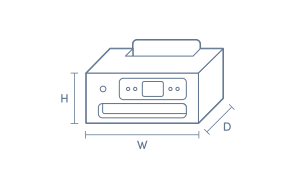
Product Dimensions
- Product Height (mm):
- 237
- Product Width (mm):
- 375
- Product Depth (mm):
- 347
- Product Weight (g):
- 5200
Box Dimensions
- Box Height (mm):
- 310
- Box Width (mm):
- 420
- Box Depth (mm):
- 448
- Box Weight (kg):
- 8

Product Reviews of Epson EcoTank ET-4810 Multi Function Printer with ADF

Overall Rating Snapshot
4.3 out of 5 stars from 26 reviews
96% of users recommend this product
What customers say, summarised by AI
- Excellent print quality on both normal and photo paper; vivid colours.
- Refillable ink tanks are affordable and simple to use, with bottles lasting a long time.
- Printer set-up varies; some found it easy while others struggled with wireless connectivity.
- Rear paper feed may lead to curling and lacks an enclosed paper tray.
- Manual duplex printing only; double-sided printing isn't automatic.
- Compact design fits desks well, but screen and menu can be small and hard to read.
Pros
Easy (8)
Quality (3)
Cheap (2)
Value (1)
Cons
Speed (2)
Awesome
The features are really good
Naveen
Confirmed purchase 7 September 2026
Published on 30 September 2026
Yes, I recommend this product.
This customer is a verified purchaser who may have received an incentive in return for providing an authentic review.
Epson Printer
Printer works excellent print on the Paper well colour is good. Works wirelessly.
Matt
Confirmed purchase 31 August 2026
Published on 23 September 2026
Yes, I recommend this product.
This customer is a verified purchaser who may have received an incentive in return for providing an authentic review.
Printer
Great overall product and service
Joanne Jaeger
Confirmed purchase 14 August 2026
Published on 8 September 2026
Yes, I recommend this product.
This customer is a verified purchaser who may have received an incentive in return for providing an authentic review.
Excellent product
The print quality is excellent; however, the duplex scanning speed is quite slow. Our children are very happy.
Ojas
Confirmed purchase 1 July 2026
Published on 26 August 2026
Yes, I recommend this product.
This customer is a verified purchaser who may have received an incentive in return for providing an authentic review.
Great device
I like the liquid refillable ink However, too soon to see if it is more economical
Gav
Confirmed purchase 13 July 2026
Published on 5 August 2026
Yes, I recommend this product.
This customer is a verified purchaser who may have received an incentive in return for providing an authentic review.
Good service from goodguy
John
Confirmed purchase 24 June 2026
Published on 22 July 2026
Yes, I recommend this product.
This customer is a verified purchaser who may have received an incentive in return for providing an authentic review.
amazing
comes out really good love it
O.C
Confirmed purchase 10 June 2026
Published on 9 July 2026
Yes, I recommend this product.
This customer is a verified purchaser who may have received an incentive in return for providing an authentic review.
Printer
Very easy to use and love the ink tanks never used them before , cheaper than other ink , great price , always very helpful
Marianne
Confirmed purchase 24 April 2026
Published on 19 May 2026
Yes, I recommend this product.
This customer is a verified purchaser who may have received an incentive in return for providing an authentic review.
Printer appears good. Set up very difficult.
I the Good Guy salesperson told me to set up the printer by the APP or computer. Neither worked as both wanted a password. There isn’t one. I spent 5 hours on and off trying to get it to work. I went back to the GG. They were charming, but did not suggest using the printer panel. My daughter did it in 10 minutes via the printer panel. I still can not get the scan to work nor double sided printing. The hardest printer to work ever. I need to get my daughter here again.
Angela Bailey
Confirmed purchase 8 March 2026
Published on 4 April 2026
This customer is a verified purchaser who may have received an incentive in return for providing an authentic review.
Hard to set up but still good
Anonymous
Confirmed purchase 4 March 2026
Published on 1 April 2026
Yes, I recommend this product.
This customer is a verified purchaser who may have received an incentive in return for providing an authentic review.
You've viewed 10 of 26 reviews
ABOUT THE GOOD GUYS REVIEWSThe Good Guys product reviews are collected from verified purchasers who may have received an incentive in return for providing an authentic review.
The below information is AI generated based on Australian websites information around this item. We have done our best to ensure its accuracy but suggest verifying any information within this tab before purchasing.
At a glance
The Epson EcoTank ET-4810 is a compact multifunction inkjet printer designed for home offices and small business routines. It prints, scans, copies and faxes, with an automatic document feeder for easier multi-page jobs and flexible Wi-Fi or Ethernet connectivity. It is best for everyday document work rather than specialist photo output or high-volume duplex workflows, as double-sided printing is manual.
What it’s great for
- Everyday Printing
- Home Office Admin
- Schoolwork
- Invoices and Forms
- Small Business Document Tasks
Where it works best
- Home Office
- Small Office
- Study
- Family Workspace
Who it’s for
- Remote Worker
- Small Business Owner
- Family Household
- Student
- Home Office User
Things to consider
This model is better suited to everyday document tasks than premium office printers, as duplex printing is manual and it is not positioned as a fast, heavy-duty workflow machine.
Home office suitability score
8/10 - strong fit for home office printing, scanning, copying and faxing, with ADF and network connectivity.
Photo printing quality
6/10 - suitable for casual colour printing, but it is primarily positioned for documents rather than photo-focused output.
Ease of use rating
8/10 - straightforward for everyday use thanks to the ADF, app support and flexible wireless or Ethernet setup.
Running cost guidance
EcoTank design is generally suited to lower ongoing ink replacement needs than traditional cartridge-based inkjets for regular document printing.
Family friendliness
8/10 - a good family all-rounder for homework, forms and household admin, with simple scanning and copying support.
Key benefits
- Multifunction 4-in-1: Prints, scans, copies and faxes in one compact device for everyday home or office admin.
- Automatic Document Feeder: Lets you scan or copy multi-page originals with less hands-on effort.
- 100-sheet paper tray: Holds a practical stack of paper for regular daily printing without constant refills.
- Wi-Fi and Ethernet connectivity: Gives you flexible setup options for shared use across home or office networks.
- App compatibility: Works with Epson Email Print, Smart Panel and iPrint for easier printing and management from compatible devices.
- 4800 x 1200 print resolution: Produces sharp text and clear colour output for reports, forms and school documents.
- Print speed up to 15.58 ppm black: Keeps everyday black document jobs moving at a practical pace for routine use.
- Compact footprint: Fits more easily into smaller desks, study nooks and home office setups.
Q: Does the ET-4810 print on both sides automatically
A: No. Epson ET-4810 supports manual double-sided printing, so paper needs to be turned and reloaded for the second side. That suits occasional duplex jobs, but frequent two-sided printing is less convenient.
Q: Is this EcoTank printer mainly for documents or photos
A: Epson ET-4810 is mainly geared to everyday document printing, with speeds of 15.58ppm for black and 8.72ppm for colour. It can handle casual colour graphics, but specialist photo printing is not its main focus.
Q: Can the ET-4810 connect through Ethernet instead of Wi-Fi
A: Yes. Epson ET-4810 supports both Wi-Fi 802.11 b/g/n and 10/100 Ethernet. Ethernet suits a fixed desk or shared office setup, while Wi-Fi gives more freedom on placement when several devices need printer access.
Q: Will the ADF scan or copy multi-page originals easily
A: Yes. Epson ET-4810 has an automatic document feeder, so multi-page originals can be scanned, copied or faxed without lifting the lid for every sheet. It is especially useful for invoices, forms and other regular admin paperwork.
Q: What paper sizes fit in the ET-4810 input tray
A: The Epson ET-4810 tray supports A4 and legal paper sizes, and it holds 100 sheets. That works well for everyday letters, schoolwork and office forms, though it is not designed for keeping multiple paper types loaded at once.
Q: Can I print from my phone on the ET-4810
A: Yes. Epson ET-4810 works with Epson Email Print, Smart Panel and iPrint apps for printing and basic printer management from compatible mobile devices. That is handy when the printer is shared across phones, tablets and computers.