


Dell Wired Headset (WH125)
520-BBLT


Play Video
Online Only
INSTANT DEAL
Get $40 off when you spend $300-$399.99 or $60 off when you spend over $400 on a Range~~
Use promocode SPRING in cart.
~~Ends 11.59pm AEDT 31/10/2026. Excludes Apple, Mobile Phones, Dyson Airwrap (113161-01) & Dyson Travel Hair Dryer (492459-01), products marked special order, sold out, unavailable, coming soon and shipped by “supplier”, all Pre-orders, Telstra Plans, digital vouchers, gaming credits and streaming services, Gift Cards, Gaming Consoles, Gaming Accessories & VR Headsets, Services, Gold Service Extras, Installation & Delivery. For online purchases, excludes products marked as in store only. You must spend over the eligible amounts on eligible products excluding delivery in a single transaction to use the Code. Code can be used in store, over the phone and via online chat. Code cannot be used on any commercial orders. For instore and over the phone purchases, code will be applied at point of sale. For online purchases code must be applied in cart to receive the discount. Code can be used in conjunction with any available Price Beat online. Offer applies to the current ticketed price of relevant products. As prices change regularly and we frequently run sales and negotiate on price, some products are likely to have been sold below the current price prior to this offer. Prices may change after offer ends.


Product Overview
Key Features
- Wired Headset with hassle-free connectivity
- Effortlessly control volume and mute settings with the inline controller.
- Adjust the 270° rotatable boom mic for left or right-side use and keep cords organised with the Cord Storage fastener.
INSTANT DEAL
Get $40 off when you spend $300-$399.99 or $60 off when you spend over $400 on a Range~~
Use promocode SPRING in cart.
~~Ends 11.59pm AEDT 31/10/2026. Excludes Apple, Mobile Phones, Dyson Airwrap (113161-01) & Dyson Travel Hair Dryer (492459-01), products marked special order, sold out, unavailable, coming soon and shipped by “supplier”, all Pre-orders, Telstra Plans, digital vouchers, gaming credits and streaming services, Gift Cards, Gaming Consoles, Gaming Accessories & VR Headsets, Services, Gold Service Extras, Installation & Delivery. For online purchases, excludes products marked as in store only. You must spend over the eligible amounts on eligible products excluding delivery in a single transaction to use the Code. Code can be used in store, over the phone and via online chat. Code cannot be used on any commercial orders. For instore and over the phone purchases, code will be applied at point of sale. For online purchases code must be applied in cart to receive the discount. Code can be used in conjunction with any available Price Beat online. Offer applies to the current ticketed price of relevant products. As prices change regularly and we frequently run sales and negotiate on price, some products are likely to have been sold below the current price prior to this offer. Prices may change after offer ends.
Key Specifications
- Brand:
- Dell
- Model Number:
- 520-BBLT
- Connections:
- Wired
- Type:
- Wired Headset
General Information
- Colour:
- Black
- Additional Features:
- Mute, Unmute, Volume, Audio on/off
Warranty
- Manufacturer's Warranty:
- 3 Year
General Information
- Colour:
- Black
- Additional Features:
- Mute, Unmute, Volume, Audio on/off
Product Dimensions
- Product Weight (g):
- 125
- Cord Length (m):
- 2.1
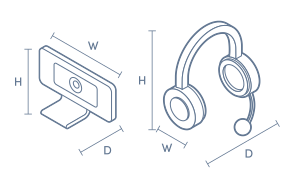
Box Dimensions
- Box Height (mm):
- 59
- Box Width (mm):
- 172
- Box Depth (mm):
- 182
- Box Weight (kg):
- 0

No reviews found for this product.
Product Reviews of Dell Wired Headset (WH125)

Overall Rating Snapshot
You've viewed 0 of 0 reviews
The below information is AI generated based on Australian websites information around this item. We have done our best to ensure its accuracy but suggest verifying any information within this tab before purchasing.
At a glance
The Dell Wired Headset WH125 is a practical wired headset for office calls, meetings and shared workspaces. It suits professionals who want simple plug-in audio, easy inline controls and a lightweight fit for longer sessions. Its long 2.1 m cable and rotatable boom mic add flexibility. The main limitation is that it lacks premium noise cancelling features for louder environments.
What it’s great for
- Office Work
- Video Calls
- Hot-Desking
- Everyday Productivity
- Shared Workspaces
Where it works best
- Corporate Office
- Home Office
- Shared Desk Environments
- Reception Desks
- Call-Focused Workstations
Who it’s for
- Everyday Professional
- Remote Worker
- Office Staff
- Hot-Desk User
- Call-Focused Employee
Things to consider
This headset is best for straightforward office communication rather than premium audio or noisy-call environments, as it does not offer advanced noise cancelling or higher-end sound tuning.
Remote work suitability
8/10 - well suited to remote meetings and daily calls thanks to simple wired setup, light weight and inline controls.
Gaming vs office fit
Office-focused
Audio/video quality score
7/10 - suitable for clear everyday call audio, but it is aimed at practical office communication rather than premium sound performance.
Plug-and-play ease
9/10 - wired connectivity makes setup quick and straightforward for compatible laptops and desktops.
Key benefits
- 2.1 m cable: Gives you extra reach around your desk without needing to stay close to your device.
- 125 g lightweight design: Helps keep the headset comfortable during extended calls and meetings.
- 270 degree rotatable boom mic: Lets you position the microphone for left or right-side wear.
- Inline controls: Makes it easy to mute, unmute, adjust volume and switch audio on or off without using your computer controls.
- Wired connection: Provides a dependable plug-in setup for calls and meetings without needing charging.
- On-ear design: Offers a practical fit for daily office use while keeping the headset compact.
- Cord storage fastener: Helps keep the cable tidier on desks and in shared workspaces.
- 3 year manufacturer warranty: Adds longer-term support coverage for business and everyday use.
Q: Is the microphone noise cancelling on the Dell WH125 headset
A: No. Dell Wired Headset WH125 does not include noise-cancelling on the microphone. It suits regular office calls, but it will pick up more room sound than a headset designed specifically to filter background noise.
Q: Will this headset work with Google Meet and Webex calls
A: Yes. Dell Wired Headset WH125 is listed for Zoom, Microsoft Teams, Google Meet, Cisco WebEx, Slack, Cisco Jabber, Rainbow and Amazon Chime. It is intended for devices that support a wired audio connection, so the port still needs to match your computer.
Q: Is this Dell headset good for gaming or mainly office calls
A: Dell Wired Headset WH125 is mainly for calls, meetings and everyday office audio. It provides stereo sound, but it is not designed as a gaming headset and does not offer the immersive tuning or advanced isolation buyers usually look for in game-focused models.
Q: Can the boom mic be worn on either side
A: Yes. The boom microphone rotates through 270 degrees, so Dell Wired Headset WH125 can be set up for left or right-side wear. That is useful in shared desks and hot-desking, where different users may want the mic positioned differently.
Q: Is the 2.1 metre cable long enough for desk use
A: Yes. The 2.1 metre cord gives Dell Wired Headset WH125 enough reach for typical desk setups, including when a desktop tower sits below the desk. It is still a wired model, so movement stays limited to the cable length and how it is routed.
Q: Does this suit hot-desking and shared office workstations
A: Yes. Dell Wired Headset WH125 is built for quick plug-in use at desks that are shared between users. The wired design avoids pairing steps, and the rotatable boom plus cord fastener make it easier to set up neatly for each session.