


Apple MacBook Air 13" with M3 chip 24GB 512GB - Space Grey
MC8M4X/A
NOT AVAILABLE


Product Overview
Key Features
- 13.6 Inch Liquid Retina LED display, 2560 x 1664
- 24GB memory, Apple M3 chip, 512GB SSD storage
- Apple integrated graphics
- Up to 18 hours movie playback, four-speaker sound system
Key Specifications
- Brand:
- Apple
- Model Number:
- MC8M4X/A
- Graphics Processing Unit:
- Apple Integrated
- Screen Size (Inches):
- 13.6
- Peak Brightness (Nits):
- 500
- Total Storage:
- 512GB
- Wireless Connections:
- Wi-Fi 6E 802.11ax, Bluetooth v5.3
- Battery:
- 52.6Wh, Up to 18 hours Apple TV app movie playback, Up to 15 hours wireless web surfing, up to 70W charging (not included, 35W Dual USB-C charger included)
- Operating System:
- macOS Sequoia
Computers & Tablets
- Processor Brand:
- Apple
- Processor Specifications:
- Apple M3 8 core CPU with 4 performance, 4 efficiency, 16 core Neural Engine
- GPU Specificiations:
- 10 core GPU
- Webcam:
- 1080p FaceTime HD camera
Screen Technology
- Display Resolution (px):
- 2560 x 1664, 224ppi
Screen Features
- Screen Size Range:
- 12 - 13.9 Inches
- Screen Type:
- Liquid Retina LED backlit with IPS technology, P3 Wide 1 billion colours, True Tone
Capacity
- Storage:
- 512GB SSD
- RAM (GB):
- 24
Connections
- Wired Connections:
- MagSafe 3, 3.5mm Headphone Jack, 2 Thunderbolt (USB-C) ports supporting charging, DisplayPort, Thunderbolt 3 / USB 4 up to 40 Gbps
- Cellular or Wi-Fi Only:
- Wi-Fi Only
Audio
- Sound:
- Four-speaker sound system, Supports Spatial Audio on Dolby Atmos enabled content, Three-mic array with directional beamforming
General Information
- Type:
- MacBook Air
- Family:
- MacBook Air M3
- Colour:
- Grey
- Supplier Colour:
- Space Grey
- Release Year:
- 2024
- Additional Features:
- Supports 1 external display up to 6K resolution at 60Hz and when closed an additional display at 6K 60Hz, HDR with Dolby Vision, HDR10 and HLG, Backlit Magic Keyboard with Touch ID and Force Touch trackpad, Apple Intelligence
- What's In The Box:
- MacBook Air, 35W Dual USB-C Port Compact Power Adapter, USB-C to MagSafe 3 Cable (2m)
Warranty
- Manufacturer's Warranty:
- 1 Year
Computers & Tablets
- Processor Brand:
- Apple
- Processor Specifications:
- Apple M3 8 core CPU with 4 performance, 4 efficiency, 16 core Neural Engine
- GPU Specificiations:
- 10 core GPU
- Webcam:
- 1080p FaceTime HD camera
Screen Features
- Screen Size Range:
- 12 - 13.9 Inches
- Screen Type:
- Liquid Retina LED backlit with IPS technology, P3 Wide 1 billion colours, True Tone
Connections
- Wired Connections:
- MagSafe 3, 3.5mm Headphone Jack, 2 Thunderbolt (USB-C) ports supporting charging, DisplayPort, Thunderbolt 3 / USB 4 up to 40 Gbps
- Cellular or Wi-Fi Only:
- Wi-Fi Only
General Information
- Type:
- MacBook Air
- Family:
- MacBook Air M3
- Colour:
- Grey
- Supplier Colour:
- Space Grey
- Release Year:
- 2024
- Additional Features:
- Supports 1 external display up to 6K resolution at 60Hz and when closed an additional display at 6K 60Hz, HDR with Dolby Vision, HDR10 and HLG, Backlit Magic Keyboard with Touch ID and Force Touch trackpad, Apple Intelligence
- What's In The Box:
- MacBook Air, 35W Dual USB-C Port Compact Power Adapter, USB-C to MagSafe 3 Cable (2m)
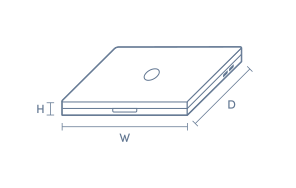
Product Dimensions
- Product Height (mm):
- 11.3
- Product Width (mm):
- 304.1
- Product Depth (mm):
- 215
- Product Weight (kg):
- 1.24
Box Dimensions
- Box Height (mm):
- 244
- Box Width (mm):
- 56
- Box Depth (mm):
- 334
- Box Weight (kg):
- 2

No reviews found for this product.
Product Reviews of Apple MacBook Air 13" with M3 chip 24GB 512GB - Space Grey

Overall Rating Snapshot
You've viewed 0 of 0 reviews
The below information is AI generated based on Australian websites information around this item. We have done our best to ensure its accuracy but suggest verifying any information within this tab before purchasing.
At a glance
The 13-inch MacBook Air with M3 is a premium ultraportable laptop for students, professionals and anyone who values speed, battery life and easy portability. It is especially strong for office work, web tasks, coding and light-to-moderate creative use. The main limitation is that its fanless design is not ideal for long, intensive professional rendering or similar sustained workloads.
What it’s great for
- Everyday Productivity
- Office Work
- Student Computing
- Remote Work
- Travel
- Light Creative Work
- Web Browsing
- Video Calls
Where it works best
- Home Office
- University Campus
- Corporate Office
- Shared Workspaces
- Commuting
- Travel
Who it’s for
- University Student
- Everyday Professional
- Remote Worker
- Frequent Traveller
- Apple Ecosystem User
- Small Business User
Things to consider
Excellent for portable everyday and mixed-use computing, but not the best choice if you regularly run long, heavy video exports, 3D workloads or other sustained pro tasks where a MacBook Pro offers better thermal headroom and more connectivity.
Student suitability
Excellent for note-taking, research, assignments, presentations and daily campus carry.
Creative professional suitability
7/10 - strong for photo editing, design work and lighter video projects, but not ideal for long sustained high-end production workloads.
Portability rating
9/10 - very light and compact, making it easy to carry every day.
Battery endurance rating
9/10 - built for all-day mobile use with minimal charging interruptions.
Windows compatibility score
5/10 - best for users committed to macOS; Windows-specific apps may require web versions, alternatives or compatibility workarounds.
Key benefits
- Ultra-portable design: Easy to carry between classes, meetings and travel without feeling bulky.
- 13-inch display size: Comfortable for daily work while staying compact enough for backpacks and small desks.
- All-day battery life: Well suited to full days of study or work away from a charger.
- Fanless design: Runs quietly, making it ideal for libraries, meetings and shared spaces.
- Apple silicon performance: Feels fast and responsive for multitasking, productivity apps and everyday creative projects.
- Premium build quality: Solid aluminium construction gives it a durable, refined feel for daily use.
- macOS and Apple ecosystem integration: Works smoothly with other Apple devices for file sharing, messaging and continuity features.
- 24GB unified memory configuration: Better suited to heavier multitasking and longer-term use than lower-memory variants.
Q: Is 24GB of unified memory a worthwhile upgrade on this 13-inch MacBook Air M3?
A: Yes, 24GB suits buyers who keep many apps open, work with large photo libraries, edit bigger files or run heavier multitasking loads. For email, web, streaming and study, less memory is often enough, but this configuration gives more headroom over time.
Q: How does the MacBook Air 13-inch M3 compare with older M1 or M2 MacBook Air models?
A: The M3 version is newer and adds features such as hardware-accelerated ray tracing, AV1 decode and support for up to two external displays with the lid closed.
Q: Can this MacBook Air M3 run two external monitors?
A: Yes, this 13-inch M3 MacBook Air can support up to two external displays when the laptop lid is closed. If the built-in screen needs to stay on, display options are more limited, so that detail matters for desk setups and docking plans.
Q: Does this 512GB, 24GB MacBook Air include a fast charger in the box?
A: No, this configuration includes Apple’s 35W Dual USB-C Port Compact Power Adapter and a USB-C to MagSafe 3 cable. It is fast-charge capable with a 70W USB-C Power Adapter, but that higher-wattage charger is not the one normally included.
Q: Is the 13-inch MacBook Air M3 suitable for heavy creative work or coding?
A: Yes, it can handle photo editing, coding and everyday creative work well, especially with 24GB memory and a 10-core GPU. It is fanless though, so long sustained jobs like heavy 4K exports can be better suited to a MacBook Pro with active cooling.
Q: What ports does this MacBook Air have, and will an adaptor be needed?
A: It has MagSafe 3 for charging, two Thunderbolt or USB 4 ports, and a 3.5mm headphone jack. That covers charging, data and display output, but buyers using HDMI, USB-A, SD cards or Ethernet will usually need a USB-C hub or adaptor.