



Alienware 32" 4K OLED Gaming Monitor
AW3226Q


Product Overview
Key Features
- 32 Inch OLED with 4K Ultra HD
- 165 Hertz refresh and 0.03 ms response
- 250 Nits peak brightness
- Height, swivel and tilt stand
Key Specifications
- Brand:
- Alienware
- Model Number:
- AW3226Q
- Screen Size (Inches):
- 32
- Resolution Type:
- 4K Ultra HD
- Peak Brightness (Nits):
- 250
- Refresh Rate (Hz):
- 165
- Connections:
- 2 HDMI ports (HDCP 1.4 & HDCP 2.3) (Supports up to 3840 x 2160, 165 Hz, HDR, VRR, DSC as specified in HDMI 2.1 (FRL)), 1 DisplayPort 1.4 (HDCP 1.4 & HDCP 2.3) port, 1 USB Type-A 5Gbps downstream port, 1 USB Type-B 5Gbps upstream port
- Type:
- Gaming Monitor
Screen Technology
- Screen Technology:
- OLED
- Aspect Ratio:
- 16:09
- Display Resolution (px):
- 3840 x 2160
- Response Time (ms):
- 0.03
Computers & Tablets
- Contrast Ratio:
- 1.5 million:1 (typical)
- Positional Adjustments:
- Horizontal 178 Degrees, Vertical 178 Degrees, Tilt - 5 to 21 Degrees, Swivel - 20 to 20 Degrees
Screen Features
- Screen Size Range:
- 30 Inches and Above
- G-Sync / Freesync Compatible:
- AMD FreeSync Premium Pro
Mounting
- VESA Wall Mount Size (mm):
- 100 x 100
General Information
- Colour:
- Black
- Additional Features:
- AMD FreeSync Premium Pro + NVIDIA G-SYNC Compatible + VESA AdaptiveSync
- What's In The Box:
- Monitor Stand QR Card Safety Information, Power Cable
Warranty
- Manufacturer's Warranty:
- 3 Year
Screen Technology
- Screen Technology:
- OLED
- Aspect Ratio:
- 16:09
- Display Resolution (px):
- 3840 x 2160
- Response Time (ms):
- 0.03
Screen Features
- Screen Size Range:
- 30 Inches and Above
- G-Sync / Freesync Compatible:
- AMD FreeSync Premium Pro
General Information
- Colour:
- Black
- Additional Features:
- AMD FreeSync Premium Pro + NVIDIA G-SYNC Compatible + VESA AdaptiveSync
- What's In The Box:
- Monitor Stand QR Card Safety Information, Power Cable
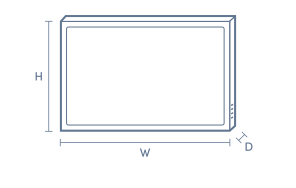
Without Stand Dimensions
- Height Without Stand (mm):
- 415.42
- Width Without Stand (mm):
- 715.71
- Depth Without Stand (mm):
- 57.35
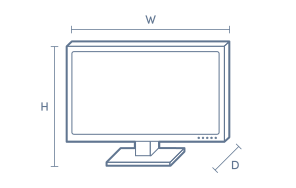
With Stand Dimensions
- Height With Stand (mm):
- 597.41
- Width With Stand (mm):
- 715.71
- Depth With Stand (mm):
- 232
- Weight With Stand (kg):
- 8.12
Box Dimensions
- Box Height (mm):
- 535
- Box Width (mm):
- 168
- Box Depth (mm):
- 975
- Box Weight (kg):
- 12

No reviews found for this product.
Product Reviews of Alienware 32" 4K OLED Gaming Monitor

Overall Rating Snapshot
You've viewed 0 of 0 reviews
The below information is AI generated based on Australian websites information around this item. We have done our best to ensure its accuracy but suggest verifying any information within this tab before purchasing.
At a glance
The Alienware AW3226Q is a premium 32-inch OLED gaming monitor designed for players and creators who want sharp 4K detail, fast motion handling and flexible ergonomics. It stands out for rich contrast, very quick response time and broad adaptive sync support. It also works well for a full desktop workspace. One limitation is that its large screen size can feel oversized on compact desks.
What it’s great for
- PC Gaming
- Console Gaming
- Creative Work
- Home Office
- Media Viewing
- Competitive Gaming
Where it works best
- Home Gaming Setup
- Home Office
- Study
- Creator Workspace
- Entertainment Room
Who it’s for
- PC Gamer
- Competitive Gamer
- Content Creator
- Remote Worker
- Hybrid Worker
- Tech Enthusiast
Things to consider
A 32-inch screen delivers strong immersion and workspace room, but it needs a reasonably deep desk and may be less practical than smaller monitors for tight home office setups.
Gaming suitability score
9.5/10 - Excellent for high-end gaming thanks to OLED image quality, very fast response time and broad adaptive sync support.
Home office fit
Strong fit for spacious desks, multitasking and mixed work-and-play use
Colour accuracy rating
8.8/10 - OLED delivers rich contrast and vivid image quality that suits creative and visual tasks well.
Multi-monitor setup compatibility
Best as a primary display; the 32-inch size can be less practical in multi-monitor layouts on smaller desks
Eye comfort score
8/10 - Smooth motion and ergonomic adjustment support comfort, though the large screen can be intense at close viewing distances.
Key benefits
- Oled panel: Delivers deep blacks and strong contrast for more immersive games, movies and creative work.
- 32-inch screen: Gives you more room for multitasking, detailed game worlds and side-by-side windows on a full desktop setup.
- Up to 165hz refresh rate: Helps supported games look smoother and feel more responsive during fast movement.
- 0.03ms response time: Reduces visible blur in fast scenes, which helps keep motion clearer in competitive play.
- Adaptive sync support: Works with AMD FreeSync Premium Pro, NVIDIA G-SYNC Compatible and VESA AdaptiveSync to help reduce tearing with supported hardware.
- Adjustable stand: Height, swivel and tilt controls make it easier to set a more comfortable viewing position at your desk.
- Versatile connectivity: Dual HDMI, DisplayPort 1.4 and USB ports make it easier to connect gaming gear and desktop accessories.
- 3 year manufacturer warranty: Adds longer-term support for a premium monitor purchase.
Q: Can I connect a gaming PC and console at the same time?
A: Yes. This monitor has 2 HDMI ports plus DisplayPort 1.4, so a PC and a console can stay connected without swapping cables each time. The best refresh rate and sync support depend on the source device and which connection it uses.
Q: Will this monitor work with a USB-C-only laptop?
A: No. The listed video connections are HDMI and DisplayPort 1.4, with USB Type-A and USB Type-B for accessories or hub functions. A USB-C-only laptop will usually need a dock or adapter that outputs HDMI or DisplayPort.
Q: Does it support variable refresh with AMD and NVIDIA cards?
A: Yes. Alienware AW3226Q supports AMD FreeSync Premium Pro, NVIDIA G-SYNC Compatible and VESA AdaptiveSync for smoother gameplay with supported hardware. The result depends on the graphics card, game settings and the connection in use.
Q: Is a 32 inch screen too large for a compact desk?
A: It can be. A 32 inch display gives plenty of workspace and game detail, but it suits a reasonably deep desk more than a tight setup. On a compact desk, the screen can dominate the space and leave less room for keyboard and speaker placement.
Q: Does the stand rotate into portrait mode?
A: No. The stand adjustment listed for Alienware AW3226Q is height, swivel and tilt, which helps with viewing position but does not indicate portrait pivot. If portrait use matters, a compatible monitor arm may be the more practical setup.
Q: Is the AW3226Q practical in a dual-monitor setup?
A: Yes, but it is usually better as the main screen rather than one of two equal displays. The 32 inch size gives a lot of workspace on its own, and a pair of screens this large needs more desk width and depth than many home setups allow.


