



One For All Universal Dual Gaming Monitor Mount
UE-DM8210
COMING SOON
$499


Play Video


Product Overview
Key Features
- Supports 2 screens from 21 to 45 Inch
- VESA 75 x 75 mm and 100 x 100 mm
- 360° rotation, 180° turn and 80° tilt
- Height adjustment with smart levelling
- Desk clamp and grommet mounting
Key Specifications
- Brand:
- One For All
- Model Number:
- UE-DM8210
- Type:
- Monitor Arm
Lighting
- Lighting:
- Immersive RGB lighting (triple RGB lighting)
General Information
- Colour:
- Black
- Supplier Colour:
- Black
- Compatible Products:
- 21–45 inch monitors; VESA 75 × 75 mm and 100 × 100 mm; curved and ultra-wide screens
- Additional Features:
- Supports 2 screens, 360° rotation, 180° turn, 80° tilt, height adjustment, smart levelling system, easy release, soft-touch rubber, cable management, portrait/landscape rotation, rotation stop, desk clamp and grommet mounting
- What's in The Box:
- Dual monitor arm and mounting hardware
Warranty
- Manufacturer's Warranty:
- 10 Year
Lighting
- Lighting:
- Immersive RGB lighting (triple RGB lighting)
Warranty
- Manufacturer's Warranty:
- 10 Year
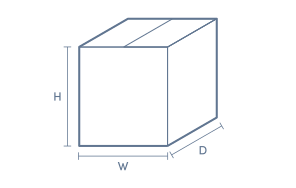
Box Dimensions
- Box Height (mm):
- 281
- Box Width (mm):
- 440
- Box Depth (mm):
- 128
- Box Weight (kg):
- 7
No reviews found for this product.
Product Reviews of One For All Universal Dual Gaming Monitor Mount

Overall Rating Snapshot
You've viewed 0 of 0 reviews
The below information is AI generated based on Australian websites information around this item. We have done our best to ensure its accuracy but suggest verifying any information within this tab before purchasing.
At a glance
The One For All Universal Dual Gaming Monitor Mount is a dual-screen desk arm for gamers, streamers and home office users who want more usable desk space and flexible screen positioning. Its strengths are broad monitor compatibility, smooth adjustment and tidy cable management. One limitation is that it focuses on practical adjustment and mounting flexibility rather than premium gas-spring styling or advanced fine-tuning.
What it’s great for
- Dual-Screen Gaming Setups
- Streaming Setups
- Home Office Productivity
- Content Creation
- Everyday Workstations
Where it works best
- Home Office
- Gaming Room
- Streaming Desk
- Study
- Small Desk Setups
Who it’s for
- Gamer
- Streamer
- Remote Worker
- Content Creator
- Everyday Professional
Things to consider
It offers strong adjustability and compatibility, but it may not feel as refined or as effortless to fine-tune as premium specialist monitor arms with advanced spring-assisted movement.
Ergonomic improvement score
8/10 - strong range of movement and height adjustment help position two screens more comfortably at eye level.
Desk space optimisation
Very good - lifts two monitors off the desk to free up usable surface area for peripherals and accessories.
Multi-monitor compatibility
Excellent - supports 2 monitors from 21-45 inch with VESA 75 x 75 mm and 100 x 100 mm compatibility, including curved and ultra-wide screens.
Installation ease
8/10 - easy release design plus clamp and grommet options make setup and later changes relatively straightforward.
Stability vs category average
8/10 - desk clamp/grommet mounting and levelling features suggest solid everyday stability for a dual-monitor arm.
Key benefits
- Dual Monitor Support: Holds two monitors to expand screen space for multitasking, gaming or streaming.
- Wide Screen Compatibility: Supports 21-45 inch monitors, including curved and ultra-wide models, for flexible setup planning.
- VESA Mount Support: Fits VESA 75 x 75 mm and 100 x 100 mm patterns, making it easier to match with many popular monitors.
- Smart Levelling System: Helps align both displays neatly for a more balanced and comfortable viewing setup.
- Flexible Adjustment: 360° rotation, 180° turn, 80° tilt and height adjustment make it easier to position screens for work or play.
- Portrait and Landscape Viewing: Lets you switch screen orientation to suit coding, editing, browsing or chat monitoring.
- Dual Mounting Options: Desk clamp and grommet mounting help it suit different desk layouts and installation preferences.
- Cable Management: Built-in cable routing helps keep the desk looking tidier and reduces visible cable clutter.