Sign up to Earn or Access 90 Day StoreCash> here

Sign up to Earn or Access 90 Day StoreCash> here

The Good Guys
The Good Guys
Stores
loading...
Seen it Cheaper?1300 942 765
Logo

Microsoft Surface Pro (11th Ed) Copilot+ PC 13" X Plus 10 Core 16GB 512GB - Dune

ZHY-00047
NOT AVAILABLE
+ Delivery from $6

This product is no longer available. Please browse our Shop Products menu or Search above for an alternative.

Microsoft Surface Accessories Notice: Surface Pro Signature Keyboard & Pen sold separately.
You May Also LikeYou May Also Like

You May Also LikeYou May Also Like

Product Overview

The Surface Pro (11th Ed) Copilot+ PC 13" X Plus 10 Core 16GB 512GB - Dune runs Windows 11 Home on a 13 inch display for work, study and creative tasks.

This tablet suits users who need a portable device for multitasking, document editing and video calls. With 16GB LPDDR5x memory and 512GB storage, it handles large files and multiple browser tabs. The 895g weight and slim 9.3mm profile make it easy to carry between home, office or campus.

The Snapdragon X Plus 10 core processor operates at 3.4GHz for responsive performance. USB Type-C ports connect to modern docks and external monitors, while Wi-Fi 7 and Bluetooth v5.4 support fast wireless connections. The battery lasts up to 14 hours of local video playback, and the 12MP front and 10MP rear cameras record in QHD and 4K for clear video calls and content creation.

Model ZHY-00047 in brown comes with a 1 year manufacturer's warranty.

Key Features

  • 13 Inch display, 2880 x 1920 resolution, 150 nits
  • Snapdragon X Plus 10 Core, 16GB LPDDR5x, Windows 11 Home
  • Rear 10MP 4K and front 12MP QHD cameras
  • Up to 14 hours local video playback battery
Microsoft Surface Accessories Notice: Surface Pro Signature Keyboard & Pen sold separately.

Key Specifications

Brand:
Microsoft
Model Number:
ZHY-00047
Screen Size (Inches):
13
Peak Brightness (Nits):
150
Storage Capacity:
512GB
Cellular or Wi-Fi Only:
Wi-Fi Only
Battery:
Up to 14 hours of local video playback
Supplier Colour:
Dune
Processor:
Snapdragon X Plus (10 Core). 3.4 GHz Processor Speed

Screen Technology

Display Resolution (px):
2880 x 1920

Screen Features

Screen Size Range:
13 - 13.9 Inches

Capacity

Memory:
LPDDR5x 16GB

Connections

Wireless Connections:
Wi-Fi 7, Bluetooth v5.4
Wired Connections:
2x USB Type-C Port

Cameras

Front Camera:
12MP, 1440p QHD @ 30fps recording
Rear Camera:
10MP, 4K @ 30fps recording
Video:
Up to 4K

General Information

Type:
Tablet
Family:
Surface Pro (11th Edition)
Colour:
Brown
Operating System:
Windows 11 Home
Sensor Technology:
Accelerometer, Gyroscope, Magnetometer, Ambient Color
Additional Features:
Qualcomm Hexagon NPU, Qualcomm Adreno GPU, 3:2 aspect ratio
What's In The Box:
Surface Pro (11th Edition), Quick Start Guide, Safety and warranty documents, 39W Power Supply, SIM card access tool

Warranty

Manufacturer's Warranty:
1 Year

Screen Technology

Display Resolution (px):
2880 x 1920

Capacity

Memory:
LPDDR5x 16GB

Cameras

Front Camera:
12MP, 1440p QHD @ 30fps recording
Rear Camera:
10MP, 4K @ 30fps recording
Video:
Up to 4K

Warranty

Manufacturer's Warranty:
1 Year

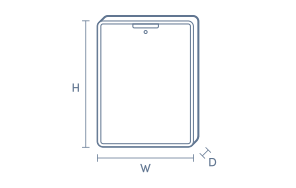
Product Dimensions

Product Height (mm):
287
Product Width (mm):
209
Product Depth (mm):
9.3
Product Weight (g):
895

Box Dimensions

Box Height (mm):
50
Box Width (mm):
228
Box Depth (mm):
307
Box Weight (kg):
2

No reviews found for this product.

The below information is AI generated based on Australian websites information around this item. We have done our best to ensure its accuracy but suggest verifying any information within this tab before purchasing.

At a glance

The Microsoft Surface Pro 11th Edition is a premium 2-in-1 tablet PC built for students, professionals and frequent travellers who want laptop-style productivity in a lighter, more flexible design. Its strengths are portability, strong everyday Windows performance and useful AI-focused features. The main limitation is that the best laptop-like experience usually depends on optional accessories such as the keyboard.

What it’s great for

  • Everyday Productivity
  • Office Work
  • Student Computing
  • Hybrid Work
  • Travel Computing
  • Note Taking
  • Video Calls

Where it works best

  • Home Office
  • University Campus
  • Corporate Office
  • Shared Workspaces
  • On the Go
  • Frequent Travel

Who it’s for

  • University Student
  • Everyday Professional
  • Remote Worker
  • Frequent Traveller
  • Mobile Creative
  • Executive User

Things to consider

It is more expensive than many standard tablets and mid-range laptops, and it reaches its full productivity potential when paired with optional keyboard and pen accessories.

Student suitability score

9/10 - Excellent for lectures, assignments, note taking and carrying between classes, especially for students who want full Windows apps.

Travel portability rating

9/10 - Slim, light and easy to pack, making it a strong choice for commuting and frequent travel.

Creative use fit

Good for note taking, light illustration, mark-ups and portable design tasks; less ideal than specialist creative devices for heavy-duty studio workflows.

Family sharing suitability

7/10 - Versatile and easy to use for browsing, streaming and schoolwork, though its premium price point makes it less casual for shared household use.

Productivity vs entertainment balance

Strongly productivity-leaning with enough entertainment appeal for streaming, browsing and casual downtime.

Key benefits

  • 2-in-1 Design: Switches easily between tablet use and laptop-style work for more flexibility across study, meetings and travel.
  • 13-Inch Display: Provides a comfortable screen size for documents, web browsing and streaming without feeling bulky in a bag.
  • Windows Compatibility: Runs familiar desktop apps and workflows that many students and professionals already use every day.
  • Copilot+ PC Platform: Adds access to newer on-device AI experiences that can help with search, writing and everyday workflow tasks.
  • Portable Form Factor: Easier to carry than many full-size laptops, making it well suited to commuting, campus use and mobile work.
  • Touch and Pen Support: Better suited to handwritten notes, sketching and direct on-screen interaction than a traditional clamshell laptop.
  • Premium Build: Delivers a polished feel and refined design that fits well in professional and study environments.
  • Dune Finish: Offers a softer, more distinctive colour choice for buyers who want a professional device that looks less plain than standard silver or black.

Q: Does this Surface Pro 11 come with the keyboard or pen?

A: No. The Surface Pro Keyboard and Slim Pen are usually sold separately, so this model works as a tablet out of the box. If you want laptop-style typing or handwritten notes, add the matching accessories at the same time.

Q: Will normal Windows apps run properly on the Snapdragon X Plus processor?

A: Most everyday Windows apps run on the Snapdragon X Plus, either natively or through Microsoft's Prism translation. The main watch-out is older drivers, niche business software and some VPN or security tools, which may not be fully compatible.

Q: Can this Surface Pro 11 replace a traditional laptop for work or study?

A: Yes, for study, office work, web use and video calls it can replace a laptop, especially with the detachable keyboard. The trade-off is fewer built-in ports and a kickstand setup, so desk-heavy users may prefer a dock and keyboard.

Q: Can the Microsoft Surface Pro 11 connect to an external monitor or dock?

A: Yes. Surface Pro 11 includes USB-C ports that support modern docks and external displays, so it can slot into a desk setup easily. If your monitor uses HDMI or DisplayPort, a compatible USB-C adapter or dock may still be needed.

Q: Is 16GB RAM and a 512GB SSD enough for this Surface Pro configuration?

A: Yes, 16GB RAM and a 512GB SSD suit multitasking, large documents, many browser tabs and everyday creative work. If you keep big local video libraries or large game installs, 512GB can fill quickly, so cloud or external storage helps.

Q: Can this Surface Pro 11 charge through USB-C, or does it need the Surface charger?

A: Yes. Surface Pro 11 can charge through USB-C Power Delivery as well as the Surface charging port. A low-watt phone charger may charge very slowly or not keep up during use, so a proper USB-C laptop charger is the safer option.