


Logitech Flip Folio for iPad Pro 11" (M4 & M5) 11" (M2,M3 & M4) Air (5th Gen)
920-013409


Play Video
Online Only


Product Overview
Key Features
- Scissor-switch keys with detachable keyboard and trackpad
- Backlit keys with adjustable brightness
- Apple Smart Connector for power and connection
- Full iPadOS shortcut row and multi-touch gestures
- Adjustable kickstand and multiple usage modes
Key Specifications
- Brand:
- Logitech
- Model Number:
- 920-013409
- Key Switches:
- Scissor-switch (detachable keyboard, laptop-style keys)
- Bluetooth:
- Yes
- Battery:
- No internal battery required (powered by iPad)
- Type:
- Tablet Cover
Computers & Tablets
- Additional Buttons / Keys:
- Full iPadOS shortcut row, Multi-touch trackpad gestures (via iPadOS), Detachable keyboard
Connections
- Connections:
- Apple Smart Connector (primary connection to iPad)
Power & Charging
- Power:
- Powered via Smart Connector (iPad supplied power)
Lighting
- Lighting:
- Yes (backlit keys, adjustable brightness)
General Information
- Colour:
- Black
- Additional Features:
- Adjustable kickstand, Detachable keyboard, Integrated trackpad with gesture support, Full device protection (front, back, corners), Multiple usage modes (Type, View, Sketch, Read)
- What's in The Box:
- Bluetooth Keyboard, iPad Folio, CR2016 battery x4, Documentation
Warranty
- Manufacturer's Warranty:
- 1 Year
Computers & Tablets
- Additional Buttons / Keys:
- Full iPadOS shortcut row, Multi-touch trackpad gestures (via iPadOS), Detachable keyboard
Power & Charging
- Power:
- Powered via Smart Connector (iPad supplied power)
General Information
- Colour:
- Black
- Additional Features:
- Adjustable kickstand, Detachable keyboard, Integrated trackpad with gesture support, Full device protection (front, back, corners), Multiple usage modes (Type, View, Sketch, Read)
- What's in The Box:
- Bluetooth Keyboard, iPad Folio, CR2016 battery x4, Documentation
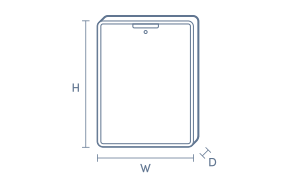
Product Dimensions
- Product Height (mm):
- 253
- Product Width (mm):
- 181
- Product Depth (mm):
- 20.4
- Product Weight (g):
- 465
Box Dimensions
- Box Height (mm):
- 282
- Box Width (mm):
- 28
- Box Depth (mm):
- 194
- Box Weight (kg):
- 1

No reviews found for this product.
Product Reviews of Logitech Flip Folio for iPad Pro 11" (M4 & M5) 11" (M2,M3 & M4) Air (5th Gen)

Overall Rating Snapshot
You've viewed 0 of 0 reviews
The below information is AI generated based on Australian websites information around this item. We have done our best to ensure its accuracy but suggest verifying any information within this tab before purchasing.
At a glance
The Logitech Flip Folio is a premium-style iPad cover with a detachable Bluetooth keyboard, adjustable kickstand and broad device protection, making it a strong fit for students, mobile professionals and everyday users who type often. Its backlit keys and flexible portrait or landscape setup add versatility, but it is less specialised than a full laptop replacement keyboard case.
What it’s great for
- Everyday Productivity
- Study Tasks
- Mobile Typing
- Video Calls
- Reading and Media Viewing
- Light Creative Work
Where it works best
- Home Office
- University Campus
- Classroom
- Shared Workspaces
- Commuting
- Travel
Who it’s for
- University Student
- Remote Worker
- Everyday Professional
- Frequent Traveller
- iPad-First User
Things to consider
It prioritises flexibility and portability over a more rigid laptop-style setup, so users wanting a heavier-duty workstation feel may prefer a specialist keyboard case with a more fixed hinge design.
Ipad model compatibility
Compatible with selected iPad Pro 11-inch models, selected iPad Air 11-inch models, and iPad Air (5th Gen).
Work/study enhancement score
9/10 - detachable keyboard, trackpad support, shortcut row and backlit keys make it highly practical for regular typing and study routines.
Travel friendliness
8/10 - protective folio design and detachable keyboard suit commuting and travel, though it is still more of a work accessory than a minimal cover.
Durability vs style
8/10 - balances everyday protection with a clean, professional look, with front, back and corner coverage for daily use.
Key benefits
- Detachable keyboard: Lets you separate typing from viewing or sketching for a more flexible daily setup.
- Adjustable kickstand: Makes it easier to set a comfortable angle for typing, streaming, reading or video calls.
- Bluetooth multi-device pairing: Can pair with up to 3 devices, so you can switch between your iPad, phone or laptop.
- Backlit keys: Adjustable brightness supports easier typing in dim rooms or at night.
- Integrated trackpad: Supports multi-touch iPadOS gestures for smoother navigation without reaching for the screen.
- Scissor-switch keys: Delivers a more familiar laptop-style typing feel for longer writing sessions.
- Full device protection: Covers the front, back and corners to help guard against everyday bumps and scratches.
- Multiple usage modes: Type, View, Sketch and Read modes help the folio adapt to different tasks throughout the day.
Q: Which iPad models fit the Logitech Flip Folio 920-013409?
A: It fits iPad Pro 11-inch (M4 and M5), iPad Air 11-inch (M2, M3 and M4), and iPad Air (5th gen). It is a model-specific case, so it is not the right choice for 13-inch iPad Pro or iPad Air models.
Q: Does this Logitech Flip Folio case have a built-in trackpad?
A: No. Logitech Flip Folio 920-013409 is a keyboard case without an integrated trackpad. If a laptop-style cursor workflow matters, this suits typing and shortcut use better than trackpad-based navigation.
Q: Can the detachable keyboard pair with devices besides the iPad?
A: Yes. The keyboard can pair with up to 3 Bluetooth devices and switch between them using Easy-switch keys. It works with iPadOS, macOS, iOS, Windows, Android and ChromeOS, so it is not limited to the attached iPad.
Q: Will the keyboard work while detached from the iPad case?
A: Yes. The keyboard is designed to be used separately from the folio, so it can sit where it feels most natural on a desk or table. When you are finished, it snaps back onto the case magnetically for storage.
Q: Can you use the iPad in portrait and landscape modes?
A: Yes. Flip Folio supports both portrait and landscape positioning, which is useful for reading, video calls, browsing and document work. The kickstand adjusts the viewing angle, so the setup is more flexible than a fixed-shell case.
Q: Is the Flip Folio comfortable to use on your lap?
A: It is better on a desk or tray table than directly on your lap. The setup uses a separate keyboard and kickstand rather than a rigid laptop-style hinge, so it is designed more for flexible positioning than lap stability.


