


Garmin Drivecam 76 MT-S
010-02729-20


Online Only


Product Overview
Key Features
- 7 Inch super wide view IPS colour TFT touch display
- Live traffic updates and lane guidance for easy navigation
- Bluetooth speakerphone and spoken street names
- Expandable storage with MicroSD and 32GB internal memory
Key Specifications
- Brand:
- Garmin
- Model Number:
- 010-02729-20
- Screen Size (Inches):
- 7
- Internal Storage:
- 32GB
- External Storage:
- MicroSD sold separately
- Maps:
- Preloaded Street Maps, Ability to Add Maps
- Manufacturer's Warranty:
- 1 Year
Screen Technology
- Display:
- Super wide view IPS, color TFT, with on-cell capacitive touch panel
Connections
- Connections:
- Bluetooth
General Information
- What's In The Box:
- Garmin Drivecam 76 MT-S, included accessories and user manuals - Garmin DriveCam™ 76, Vehicle suction cup mount, CLA adapter, Vehicle power cable, Pre-installed 16 GB microSD™ card, CLA adapter, Documentation
Screen Technology
- Display:
- Super wide view IPS, color TFT, with on-cell capacitive touch panel
General Information
- What's In The Box:
- Garmin Drivecam 76 MT-S, included accessories and user manuals - Garmin DriveCam™ 76, Vehicle suction cup mount, CLA adapter, Vehicle power cable, Pre-installed 16 GB microSD™ card, CLA adapter, Documentation
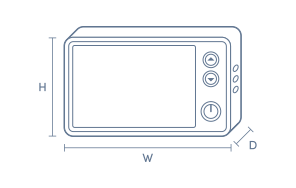
Product Dimensions
- Product Height (mm):
- 106
- Product Width (mm):
- 177
- Product Depth (mm):
- 35
Box Dimensions
- Box Height (mm):
- 84
- Box Width (mm):
- 135
- Box Depth (mm):
- 203
- Box Weight (kg):
- 1

No reviews found for this product.
Product Reviews of Garmin Drivecam 76 MT-S

Overall Rating Snapshot
You've viewed 0 of 0 reviews
The below information is AI generated based on Australian websites information around this item. We have done our best to ensure its accuracy but suggest verifying any information within this tab before purchasing.
At a glance
The Garmin Drivecam 76 MT-S is a combined dash cam and GPS navigator designed for drivers who want navigation and incident recording in one unit. It suits commuters, family road trips and regional travel, with a large 7 inch display, AU/NZ maps and hands-free calling. Its main strength is convenience and screen size, but the larger format may not suit every windscreen or compact cabin layout.
What it’s great for
- Daily Commuting
- Road Trips
- Regional Travel
- In-Car Navigation
- Incident Recording
Where it works best
- Passenger Cars
- Family Vehicles
- Touring Vehicles
- Regional Roads
- Urban Commuting Routes
Who it’s for
- Everyday Driver
- Frequent Commuter
- Road Trip Traveller
- Regional Driver
- Driver Wanting Navigation and Dash Cam in One
Things to consider
This model focuses on convenience and screen size rather than a discreet compact design, so drivers wanting a smaller, less visible dash cam may prefer a dedicated camera setup.
Accident evidence quality score
8/10 - built-in incident recording and saved footage make it strong for general evidence capture, though it is positioned as a combo navigator rather than a specialist evidence-first camera.
Night recording performance
6/10 - suitable for everyday night driving use, but no standout low-light recording features are specified.
Parking mode suitability
Moderate - best suited to drivers focused on active driving footage and navigation rather than a parking surveillance-first setup.
Ease of installation rating
8/10 - a single combined navigation and dash cam unit simplifies setup compared with installing two separate devices.
App connectivity score
7/10 - Bluetooth support and secure online video storage add useful connected features, though smartphone app details are not heavily specified here.
Key benefits
- Built-in dash cam: Continuously records driving footage and saves detected incidents for added evidence if something happens on the road.
- 7 inch super wide IPS touchscreen: Makes maps, lane guidance and prompts easier to read while driving.
- Combined navigation and camera design: Reduces windscreen clutter compared with running separate GPS and dash cam devices.
- Preloaded Australia and New Zealand maps: Provides route guidance without depending on mobile coverage.
- Map updates: Helps keep routing current as roads and traffic layouts change.
- Bluetooth hands-free calling: Lets you take calls more conveniently when paired with a compatible smartphone.
- Spoken street name alerts: Gives clearer voice guidance so upcoming turns are easier to follow.
- 32 GB internal storage with microSD expansion: Gives you onboard space for footage and the flexibility to add more storage later.
Q: Does the Garmin DriveCam 76 MT-S need a phone connection to work as a GPS?
A: No. The DriveCam 76 MT-S works as a standalone GPS with onboard AU and NZ mapping, so route guidance does not rely on mobile signal. A compatible smartphone is mainly needed for extras such as hands-free calling and some connected services.
Q: How does the built-in dash cam change the way this sat nav is used day to day?
A: The built-in dash cam means this model combines navigation and incident recording in one windscreen device, so there is less clutter than running a separate GPS and camera. It is best suited to drivers who want both functions active on every trip.
Q: Can the Garmin DriveCam 76 MT-S be updated, or will the maps go out of date?
A: Yes. This model supports map updates for Australia and New Zealand, which is important if road layouts and speed zones change over time. Updating helps keep routing current, especially if the unit is used for frequent commuting or regional travel.
Q: Is the 7-inch screen a practical size for everyday driving?
A: Yes. A 7-inch display gives a larger map view than compact 5-inch units, which can make turn prompts and lane guidance easier to read at a glance. The trade-off is that it takes up more windscreen space, so mount position matters more.
Q: Does the dash cam save everything automatically, or only when an incident is detected?
A: It continuously records while driving, and detected incidents are saved so important footage is not overwritten in normal loop recording. This is useful for everyday driving, but saved video management and any online storage features still need to be set up correctly.
Q: Who is the Garmin DriveCam 76 MT-S best suited to compared with a standard Garmin sat nav?
A: It suits drivers who want navigation and a built-in dash cam in one unit rather than buying and mounting two separate devices. If dash cam recording is not important, a standard sat nav may cover the same core routing with a simpler setup.


