


Ergovida Spring Balance Single Monitor Arm
EMA-S1B


Product Overview
Key Features
- Built in spring tension mechanism for perfect adjustment
- Wide movement range allows swivel, rotate, tilt and height adjustment
- Keyhole mount pattern for easy installation
- Desk clamp or bolt in grommet mounting
- Fits 17-32 inch screens with max weight 9kg
Key Specifications
- Brand:
- Ergovida
- Model Number:
- EMA-S1B
- Type:
- Monitor Arm
General Information
- Colour:
- Black
- Compatible Products:
- Fits 17-32 inch screens with max weight 9kg
Warranty
- Manufacturer's Warranty:
- 3 Year
General Information
- Colour:
- Black
- Compatible Products:
- Fits 17-32 inch screens with max weight 9kg
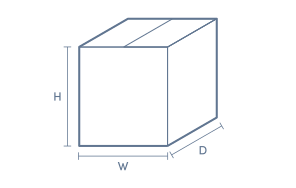
Box Dimensions
- Box Height (mm):
- 92
- Box Width (mm):
- 120
- Box Depth (mm):
- 393
- Box Weight (kg):
- 3
No reviews found for this product.
Product Reviews of Ergovida Spring Balance Single Monitor Arm

Overall Rating Snapshot
You've viewed 0 of 0 reviews
The below information is AI generated based on Australian websites information around this item. We have done our best to ensure its accuracy but suggest verifying any information within this tab before purchasing.
At a glance
The Ergovida Spring Balance Single Monitor Arm offers smooth, spring-assisted adjustment for one monitor, making it ideal for professionals and students who want ergonomic comfort and tidy cable management. Its compact design saves desk space and suits screens up to 34 inches. However, it does not support dual monitors, limiting expansion for multi-screen setups.
What it’s great for
- Office Productivity
- Ergonomic Workstations
- Student Computing
- Desk Organisation
Where it works best
- Home Office
- Corporate Office
- Study Desk
- Shared Workspaces
Who it’s for
- Everyday Professional
- Remote Worker
- Student
- Small Business Owner
Things to consider
Only supports a single monitor; users needing dual or multi-monitor setups should consider specialist alternatives.
Ergonomic improvement score
8/10 - Spring-assisted movement and wide tilt range significantly enhance ergonomic comfort.
Desk space optimisation
Excellent - Compact arm design frees up valuable desk area.
Multi-monitor compatibility
Single monitor only - Not suitable for dual or multi-monitor setups.
Installation ease
8/10 - Quick-release mount and clear instructions make setup straightforward.
Stability vs category average
7/10 - Stable for single monitors up to 9 kg, but less robust than heavy-duty dual arms.
Key benefits
- Spring Assisted Adjustment: Enables effortless height and angle changes for optimal viewing comfort.
- Cable Management: Integrated channels keep cables organised and reduce desktop clutter.
- Quick-Release Mount: Allows fast installation and removal of monitors for easy setup.
- VESA Compatibility: Supports 75x75 and 100x100 mm VESA mounts for broad monitor compatibility.
- Swivel Base: Provides flexible screen positioning for improved collaboration and comfort.
- Wide Tilt Range: Offers tilt adjustment from 90° to -40°, accommodating varied viewing preferences.
- Compact Design: Maximises desk space by minimising footprint.
Q: Is the Ergovida Spring Balance Single Monitor Arm made for one screen only?
A: Yes. This model is a single-monitor arm, so it is designed to support one display rather than a dual-screen setup. If your workspace uses two monitors side by side, a dual-arm or dual-monitor mount will be the better fit.
Q: What does the spring balance design do on this monitor arm?
A: A spring balance arm uses internal tension to offset the monitor’s weight, so height and viewing-angle changes feel smoother and lighter. It works best when the screen sits within the arm’s supported weight range, not above or below it.
Q: Is this Ergovida arm a good choice for a sit-stand desk or shared workstation?
A: Yes. A spring balance single arm is well suited to sit-stand desks and shared work areas because the monitor can be repositioned quickly as users or desk height change. The main limitation is that it still supports only one screen at a time.
Q: What should I check before buying the Ergovida Spring Balance Single Monitor Arm?
A: Check that your monitor is a single display with rear mounting points and that its weight suits a spring balance arm. This matters most with heavier, very large, or unusually shaped screens, which can limit how well the arm holds position.


