



Samsung Galaxy Tab S12 Ultra 5G 12GB 256GB - Grey
SM-X946BZAAATS


Online Only


Product Overview
Key Features
- 14.6 Inch Dynamic AMOLED 2X touch screen with 2960 x 1848 display
- 256GB storage and 12GB memory
- Wi Fi 7, Cellular 5G and Bluetooth 6.0
- S Pen included with fingerprint sensor
- 10600mAh battery and Octa Core processor
Key Specifications
- Brand:
- Samsung
- Model Number:
- SM-X946BZAAATS
- Screen Size (Inches):
- 14.6
- Peak Brightness (Nits):
- 1600
- Storage Capacity:
- 256GB
- Cellular or Wi-Fi Only:
- Cellular & Wi-Fi
- Battery:
- 11.600mAh (Typical Rating), Up to 23 Video Playback Time (Hours, Wireless)
- Processor:
- Octa Core 4.21GHz, 3.5GHz, 2.7GHz
- Release Year:
- 2026
Computers & Tablets
- Touch Screen:
- Yes
Screen Technology
- Display Resolution (px):
- 2960 x 1848 (WQXGA+)
Screen Features
- Screen Size Range:
- 14 - 15.9 Inches
Capacity
- Memory:
- 12GB
Connections
- Wireless Connections:
- MicroSD (Up to 2TB)
- Wired Connections:
- Wi-Fi7, Cellular 5G, Bluetooth V6.0
Cameras
- Front Camera:
- 12.0MP (UW)
- Rear Camera:
- 13.0MP + 8.0MP (UW)
- Video:
- UHD 4K (3840 x 2160)@60fps
Safety
- Water Resistant:
- IP68
General Information
- Type:
- Tablet
- Family:
- Galaxy Tab S12 Ultra
- Colour:
- Grey
- Operating System:
- Android 17.0
- Sensor Technology:
- Accelerometer, Fingerprint, Gyro, Geomagnetic, Hall, Light
- Additional Features:
- S-Pen included, Samsung Galaxy AI, Fingerprint Sensor, Facial Recognition, Samsung Knox
- What's In The Box:
- S-Pen, Tablet, Charger
Warranty
- Manufacturer's Warranty:
- 2 Year
Computers & Tablets
- Touch Screen:
- Yes
Screen Features
- Screen Size Range:
- 14 - 15.9 Inches
Connections
- Wireless Connections:
- MicroSD (Up to 2TB)
- Wired Connections:
- Wi-Fi7, Cellular 5G, Bluetooth V6.0
Safety
- Water Resistant:
- IP68
Warranty
- Manufacturer's Warranty:
- 2 Year
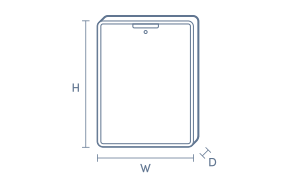
Product Dimensions
- Product Height (mm):
- 208.5
- Product Width (mm):
- 326.3
- Product Depth (mm):
- 5.1
- Product Weight (g):
- 695
Box Dimensions
- Box Height (mm):
- 21
- Box Width (mm):
- 226
- Box Depth (mm):
- 345
- Box Weight (kg):
- 1

No reviews found for this product.
Product Reviews of Samsung Galaxy Tab S12 Ultra 5G 12GB 256GB - Grey

Overall Rating Snapshot
You've viewed 0 of 0 reviews
The below information is AI generated based on Australian websites information around this item. We have done our best to ensure its accuracy but suggest verifying any information within this tab before purchasing.
At a glance
The Samsung Galaxy Tab S12 Ultra 5G is a premium tablet for students, professionals and creatives who want a big, immersive screen with pen input and fast mobile connectivity. Its standout strengths are the expansive display, included S Pen and AI-supported note workflows. The main trade-off is that its very large size can feel less convenient for one-handed use or compact travel.
What it’s great for
- Everyday Productivity
- Note Taking
- Media Streaming
- Online Learning
- Mobile Work
- Creative Sketching
- Multitasking
Where it works best
- Home Office
- University Campus
- Studio Desk
- Living Room
- Commute
- Business Travel
Who it’s for
- University Student
- Remote Worker
- Everyday Professional
- Frequent Traveller
- Creative User
- Entertainment-Focused User
Things to consider
Its extra-large format is excellent for multitasking and media, but it is less compact and less comfortable to hold for long periods than smaller tablets.
Student suitability score
9/10 - Excellent for note taking, research, online learning and multitasking, though the large size may not suit every backpack or lecture setup.
Travel portability rating
7/10 - Slim and travel-friendly for its class, but the oversized screen makes it less compact than smaller tablets.
Creative use fit
Strong fit for sketching, visual planning, annotation and concept work with the included S Pen and large display.
Family sharing suitability
8/10 - Great for shared streaming, browsing and casual creative use, though its premium size and positioning may be more than some households need.
Productivity vs entertainment balance
Balanced strongly toward productivity while still excelling at movies, streaming and casual play thanks to its large premium display.
Key benefits
- Large AMOLED display: Gives you more room for split-screen work, detailed note review and immersive video viewing.
- 5G connectivity: Helps you stay productive and connected away from Wi-Fi for study, work and streaming.
- Included S Pen: Makes handwriting, sketching and annotating documents feel more natural straight out of the box.
- AI note tools: Supports searching, summarising and transcribing information to speed up revision and meeting follow-up.
- Next-generation processor: Keeps demanding apps, multitasking and everyday workflows feeling smooth and responsive.
- Long-lasting battery: Better suited to full days of mixed work, study and entertainment between charges.
- Thin portable design: Easier to carry between classes, meetings and travel than a traditional laptop.
- Galaxy ecosystem pairing: Works well with compatible Samsung devices and accessories for a more seamless setup.
Q: Is the 14.6-inch screen practical for travel and commuting?
A: Yes, the 14.6-inch display gives you far more room for split-screen work, documents and video than a compact tablet. The trade-off is size. It is less convenient for one-handed use, cramped tray tables and tight bags than smaller tablets.
Q: Can this tablet replace a laptop for work or study?
A: It can cover a lot of tablet-based work and study, including note taking, research, multitasking and video calls. It is still an Android tablet, so some desktop-style software and keyboard-heavy workflows may be better suited to a laptop.
Q: Does the Galaxy Tab S12 Ultra come with an S Pen?
A: Yes. Samsung Galaxy Tab S12 Ultra includes an S Pen in the box, so handwritten notes, annotation and sketching are available straight away. It does not create a full laptop-style setup on its own, so typing-heavy work may still suit extra accessories.
Q: Is 256GB enough for notes, apps and downloaded media?
A: 256GB is a solid starting point for documents, apps, lecture notes and offline streaming on one device. It can fill faster if you keep large games, 4K video files or extensive downloads locally, so heavier media use needs more active storage management.
Q: Do the AI note features cost extra to use?
A: Basic Samsung Galaxy AI features are free to use on this tablet. Future releases may be offered on a paid basis, and different terms can apply to third-party AI features, so ongoing cost depends on which tools you choose to keep using.
Q: Is 5G useful if you already have home Wi-Fi?
A: Yes. 5G matters most when you want the tablet online away from Wi-Fi for study, work or streaming. If most use stays at home or in the office, the main draw is the large display and included S Pen rather than mobile network access.

Samsung Galaxy Tab S11/S12 Ultra Anti-Reflecting Screen Protector Transparent
EF-UX930CTEGWW
No reviews yet
$74


Samsung Galaxy Tab S9 / S9FE / S10FE / S10 Lite Anti-Glare Screen Guard
EF-UX710CTEGWW
No reviews yet
$34


