



Navman MiVue Smart True 4K Dash Cam (2026)
6751123


Product Overview
Key Features
- True 4K UHD 2160P Recording
- Integrated Smart Parking Mode (Includes Smart Parking 12V Hard Wiring Kit)
- Smart Safety Camera Alerts including Average Speed Camera Alerts
- Supercapacitor
Key Specifications
- Brand:
- Navman
- Model Number:
- 6751123
- Screen Size (Inches):
- 2.7
- External Storage:
- Supports up to 256GB Endurance microSD (not included)
- Maps:
- GPS Tagged Video
- Manufacturer's Warranty:
- 3 Year
Cameras
- Video:
- True 4K Ultra HD 2160P at 30 FPS
Screen Technology
- Display:
- IPS screen
Connections
- Connections:
- MiVue Pro App
General Information
- Type:
- Single Channel Dash Cam
- Colour:
- Black
- What's In The Box:
- 1 x Unit, Vehicle Power Adapter, Smart Parking 12V Hard Wiring Kit, 3M Sticker Windshield Mount, Electrostatic Film, Cable Clips and Documentation
Cameras
- Video:
- True 4K Ultra HD 2160P at 30 FPS
Connections
- Connections:
- MiVue Pro App
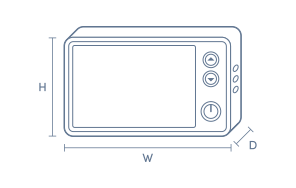
Product Dimensions
- Product Height (mm):
- 86
- Product Width (mm):
- 26.5
- Product Depth (mm):
- 54
- Product Weight (kg):
- 0.11
Box Dimensions
- Box Height (mm):
- 77
- Box Width (mm):
- 136
- Box Depth (mm):
- 150
- Box Weight (kg):
- 1

Product Reviews of Navman MiVue Smart True 4K Dash Cam (2026)

Overall Rating Snapshot
4 out of 5 stars from 1 review
100% of users recommend this product
Navman MiVue Smart True 4K Dash Cam
Dash Cam has good resolution. However, the power connection is a proprietary cable connection rather a USB cable connection.
Ian Shaw
Confirmed purchase 6 September 2026
Published on 26 October 2026
Yes, I recommend this product.
This customer is a verified purchaser who may have received an incentive in return for providing an authentic review.
You've viewed 1 of 1 reviews
ABOUT THE GOOD GUYS REVIEWSThe Good Guys product reviews are collected from verified purchasers who may have received an incentive in return for providing an authentic review.
The below information is AI generated based on Australian websites information around this item. We have done our best to ensure its accuracy but suggest verifying any information within this tab before purchasing.
At a glance
The Navman MiVue Smart True 4K Dash Cam is a compact single-channel model for drivers who want sharp front-facing footage, GPS-tagged recordings and simple app-based file management. Its strengths are clear 4K video, parking support and an easy-to-review screen. The main limitation is that it focuses on front-only coverage, so it is less comprehensive than multi-camera premium systems.
What it’s great for
- Daily Driving
- Commute Recording
- Incident Evidence Capture
- Parked Vehicle Monitoring
- Front-Only Dash Cam Setups
Where it works best
- Urban Roads
- Suburban Driving
- Daily Commutes
- Family Cars
- Personal Vehicles
Who it’s for
- Everyday Driver
- Commuter
- Rideshare Driver
- New Car Owner
- Safety-Conscious Motorist
Things to consider
This is a single-channel dash cam, so it does not provide rear or cabin coverage like more specialised multi-camera systems.
Accident evidence quality score
8.8/10 - True 4K front recording and GPS-tagged footage provide strong detail and useful event context for incident review.
Night recording performance
7.4/10 - 4K recording helps with detail, but no specific low-light enhancement feature is stated.
Parking mode suitability
Well suited for parked vehicle monitoring thanks to integrated Smart Parking Mode and the included hard wiring kit.
Ease of installation rating
8.5/10 - The included mount, electrostatic film, cable clips and power accessories support a straightforward installation.
App connectivity score
8.2/10 - MiVue Pro App support adds convenient file transfer and footage management for everyday use.
Key benefits
- True 4K Recording: Captures high-detail front-facing footage at 30 fps to help make number plates, road signs and incident details easier to review.
- GPS Video Logging: Adds location and time data to recordings for clearer trip records and incident context.
- 2.7 Inch IPS Screen: Lets you review footage clearly on the dash cam without needing to remove the card first.
- Smart Parking Mode: Helps monitor your vehicle while parked when paired with the included hard wiring kit.
- MiVue Pro App Support: Makes it easier to transfer and manage recorded files from your compatible mobile device.
- Up to 256 GB microSD Support: Allows extended recording capacity with a compatible endurance microSD card.
- Compact Lightweight Design: Sits discreetly on the windscreen and suits drivers who prefer a less intrusive setup.
- Included Installation Kit: Comes with a vehicle power adapter, hard wiring kit, windshield mount, electrostatic film and cable clips for a more complete setup out of the box.
Q: Does this dash cam record the rear of the car too
A: No. This is a single-channel dash cam, so it records the front view only. If you want rear or cabin footage as well, this model will need to be replaced by a multi-camera setup rather than used on its own.
Q: Do I need to buy a memory card before using it
A: Yes. The included kit does not include a microSD card, and recording storage comes from that card. Choose a compatible endurance card if you want the dash cam ready to record as soon as it is installed.
Q: Can parking mode work without using the included hard wiring kit
A: Parking surveillance is designed to work with the included hard wiring kit. The box also includes a vehicle power adapter for driving use, but parked monitoring needs a constant vehicle power connection rather than a simple plug-in setup.
Q: What microSD card should I buy for this Navman dash cam
A: Use a compatible endurance microSD card rather than a standard card made for occasional phone or camera use. This model supports cards up to 256GB, which suits longer recording time and repeated overwrite cycles.
Q: Can I check footage on the camera without the phone app
A: Yes. The built-in 2.7 inch IPS screen lets you review clips and settings directly on the dash cam. The MiVue Pro App helps with file transfer and management, but it is not the only way to view recordings.
Q: Will GPS still tag videos if I do not use the app
A: Yes. GPS tagging is built into the dash cam, so location and time data are added to recorded events without needing the app open while you drive. The app is mainly for moving and organising files after recording.


