Sign up to Earn or Access 90 Day StoreCash> here

Sign up to Earn or Access 90 Day StoreCash> here

The Good Guys
The Good Guys
Stores
loading...
Seen it Cheaper?1300 942 765
Logo

Lenovo IdeaCentre 27" Core Ultra 7 16GB 1TB AIO

F0JW005YAU
$1999
± Click the icons above as terms, conditions & fees apply

Participating Credit Cards. 50 Months Interest Free.
No Interest. No Deposit. Monthly payments required.

Recommended for youYou May Also Like

Recommended for youYou May Also Like

Product Overview

Ever wondered how much smoother your work or streaming could be with a 27 inch IPS anti-glare screen? The IdeaCentre All In One Desktop in Cloud Grey brings your favourite shows and projects to life with a crisp 1920 by 1080 display and 300 nits of brightness, so you can see every detail clearly, even in bright rooms. With an Intel Core Ultra 7 processor and 16GB memory, you’ll breeze through multitasking, while the 1TB storage means you can keep all your files, photos, and videos close at hand. Integrated Intel Arc Graphics handle everyday visuals with ease, and Wi-Fi 6 plus Bluetooth 5.3 keep you connected without fuss. You’ll find handy ports for USB and HDMI at the back, making it simple to plug in accessories or an extra screen. The sleek grey design fits neatly on your desk, and at just over seven kilos, it’s easy to move if you need to rearrange your space. The box includes everything you need to get started, and you’re covered by a one year manufacturer’s warranty. Model F0JW005YAU. Take the next step in home computing and enjoy reliable performance every day.

Key Features

  • 27 Inch IPS Anti-Glare screen with 1920 x 1080 resolution
  • Intel Core Ultra 7 256v processor up to 4.8GHz, 16GB memory
  • 1TB storage and integrated Intel Arc Graphics 140V
  • Wi-Fi 6 and Bluetooth 5.3 connectivity, USB and HDMI ports

Key Specifications

Brand:
Lenovo
Model Number:
F0JW005YAU
Graphics Processing Unit:
Intel Integrated
Screen Size (Inches):
27
Peak Brightness (Nits):
300
Total Storage:
1TB
Wireless Connections:
Wi-Fi 6. 802. 11ax 2x2, Bluetooth BT5.3
Operating System:
Windows 11 Home

Computers & Tablets

Processor Brand:
Intel
Processor Specifications:
Intel Core Ultra 7 256V, 8C (4P + 4LPE) / 8T, Max Turbo up to 4.8GHz, 12MB Intel Smart Cache
GPU Specificiations:
Integrated Intel Arc Graphics 140V

Screen Technology

Display Resolution (px):
1920 x 1080

Screen Features

Screen Size Range:
24 Inches & Above
Screen Type:
IPS Anti-Glare

Capacity

Storage:
1TB
Memory Specifications:
16GB

Connections

Back Wired Connections:
1x USB-A (USB 10Gbps / USB 3.2 Gen 2), 2x USB-A (Hi-Speed USB / USB 2.0), 1x HDMI-in 1.4, 1x HDMI 2.1 TMDS, 1x Ethernet (RJ-45)
Cellular or Wi-Fi Only:
Wi-Fi Only

General Information

Type:
All In One Desktop
Family:
IdeaCentre
Colour:
Grey
Supplier Colour:
Cloud Grey
Release Year:
2026
What's In The Box:
IdeaCentre 27" , Power Connector, Booklet

Warranty

Manufacturer's Warranty:
1 Year

Computers & Tablets

Processor Brand:
Intel
Processor Specifications:
Intel Core Ultra 7 256V, 8C (4P + 4LPE) / 8T, Max Turbo up to 4.8GHz, 12MB Intel Smart Cache
GPU Specificiations:
Integrated Intel Arc Graphics 140V

Screen Features

Screen Size Range:
24 Inches & Above
Screen Type:
IPS Anti-Glare

Connections

Back Wired Connections:
1x USB-A (USB 10Gbps / USB 3.2 Gen 2), 2x USB-A (Hi-Speed USB / USB 2.0), 1x HDMI-in 1.4, 1x HDMI 2.1 TMDS, 1x Ethernet (RJ-45)
Cellular or Wi-Fi Only:
Wi-Fi Only

Warranty

Manufacturer's Warranty:
1 Year

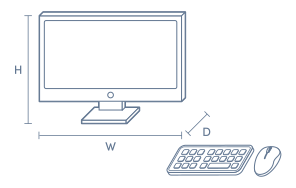
Product Dimensions

Product Height (mm):
192.1
Product Width (mm):
611.72
Product Depth (mm):
478.46
Product Weight (kg):
7.1

Box Dimensions

Box Height (mm):
5700
Box Width (mm):
7660
Box Depth (mm):
2230
Box Weight (kg):
11

No reviews found for this product.

The below information is AI generated based on Australian websites information around this item. We have done our best to ensure its accuracy but suggest verifying any information within this tab before purchasing.

At a glance

The Lenovo IdeaCentre 27 is a mid-range all-in-one desktop designed for home users, students and remote workers who want a large screen and clean setup. Its strengths are smooth multitasking, a spacious 27 inch display and simple connectivity. A key limitation is that integrated graphics make it less suitable for demanding gaming or specialist creative workloads.

What it’s great for

  • Everyday Productivity
  • Office Work
  • Student Computing
  • Web Browsing
  • Video Streaming
  • Family Computing

Where it works best

  • Home Office
  • Study Nook
  • Family Home
  • Small Business Office
  • Reception Desk

Who it’s for

  • Remote Worker
  • University Student
  • Everyday Professional
  • Family User
  • Home Office User

Things to consider

This model is best for mainstream computing rather than high-end gaming, advanced 3D work or users who want broad internal upgrade options.

Gaming suitability score

4/10 - fine for casual and lighter games, but integrated graphics are not ideal for demanding modern titles.

Home office fit

Excellent - large screen, tidy all-in-one format and strong everyday performance make it a practical home office choice.

Student use suitability

8/10 - well suited to assignments, research, video classes and general study, though less ideal for specialised design or gaming-heavy needs.

Upgrade flexibility

Limited compared with traditional desktop towers due to the all-in-one design.

Noise level vs category average

7/10 - likely quieter than many tower desktops under everyday use thanks to integrated all-in-one hardware.

Key benefits

  • 27 inch IPS anti-glare display: gives you a large, easy-to-view screen that is well suited to spreadsheets, documents and streaming.
  • 1920 x 1080 resolution: delivers clear everyday visuals for work, study and entertainment without overcomplicating setup.
  • 300 nit brightness: helps keep the screen comfortably visible in many bright indoor rooms.
  • Intel Core Ultra 7 processor: provides responsive performance for multitasking across productivity apps, browsing and media use.
  • 16GB memory: supports smoother switching between multiple everyday apps and browser tabs.
  • 1TB storage: gives you generous space for documents, photos, videos and daily software.
  • Wi-Fi 6 and Bluetooth 5.3: support modern wireless connectivity for faster networking and easy pairing with compatible accessories.
  • All-in-one design: reduces desk clutter by combining the computer and display into one neat unit.

Q: Can you use the HDMI-in port to show a laptop or console?

A: Yes. The Lenovo IdeaCentre 27 has an HDMI-in 1.4 port, so the built-in screen can be used for another compatible device. The panel is 1920 x 1080, so any connected source will display at full HD rather than a higher resolution.

Q: Does this all-in-one support a second monitor for extra screen space?

A: Yes. This model has an HDMI 2.1 TMDS port for connecting an external display, so you can use the built-in 27 inch screen and add another monitor beside it. That setup suits documents, browser windows and general multitasking better than a single screen.

Q: Is the Lenovo IdeaCentre 27 suitable for gaming and video editing?

A: It is suitable for everyday games and general photo or video tasks, but it is not built like a desktop with dedicated graphics. Lenovo IdeaCentre 27 uses integrated Intel Arc Graphics 140V, so GPU-heavy 3D gaming and demanding editing workloads are the main limitation.

Q: Does the screen support touch input or only keyboard and mouse?

A: No. The Lenovo IdeaCentre 27 does not have a touchscreen, so navigation and input rely on separate peripherals rather than tap controls on the display. That matters if you prefer drawing, direct touch shortcuts or kiosk-style use.

Q: Will wired internet work on this Lenovo all-in-one desktop?

A: Yes. Lenovo IdeaCentre 27 includes an Ethernet RJ-45 port for a wired network connection, alongside Wi-Fi 6 for wireless use. Wired networking is the better fit if the desk is near a router and stable speeds matter more than cable-free placement.

Q: What comes in the box with the Lenovo IdeaCentre 27?

A: The box includes the IdeaCentre 27 desktop, a power connector and the booklet. Keyboard and mouse are not listed in the included items, so plan to add input devices if you want to use the computer straight away.