loading
loadingloading

Press Esc to close the search results, the Up and Down arrow keys to navigate the results, and Enter to select a result.





4.6 out of 5 stars from 244 reviews
93% of users recommend this product
Not wanting a super expensive printer for my occasional home printing and scanning use, I decided on this Epson Workforce Pro colour printer and scanner from The Good Guys and I am so happy with my choice. It was so easy to set up the wifi for immediate use and everything worked like clockwork. I have also remotely used the printing function a number of times since with no issues. I would recommend this printer.
Corinne Allan
Confirmed purchase 11 September 2026
Published on 6 October 2026
Yes, I recommend this product.
This customer is a verified purchaser who may have received an incentive in return for providing an authentic review.
It's one of the easiest printers I have ever had to set up. Easy to use screen and instructions. This is an upgrade from my old epson printer, so much quieter and prints faster and seems to use alot less ink. Really great printer for the price.
Lisa
Confirmed purchase 17 July 2026
Published on 12 August 2026
Yes, I recommend this product.
This customer is a verified purchaser who may have received an incentive in return for providing an authentic review.
Really easy to use with lots of features and easy to install
Anonymous
Confirmed purchase 26 June 2026
Published on 3 August 2026
Yes, I recommend this product.
This customer is a verified purchaser who may have received an incentive in return for providing an authentic review.
So far very happy with my purchase. Easy to install and set up. Minimal space on home office desk area and good functionality and output for what I was looking. It ticks off my wish list of copying and scanning multiple pages and good value for money.
Nola
Confirmed purchase 29 June 2026
Published on 22 July 2026
Yes, I recommend this product.
This customer is a verified purchaser who may have received an incentive in return for providing an authentic review.
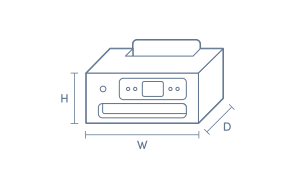
The print quality is great and the speed is decent enough for everyday use. The booting up time is like 5s if power turned off! Only problem is that it requires a lot of space.
Murtaza
Confirmed purchase 28 June 2026
Published on 22 July 2026
Yes, I recommend this product.
This customer is a verified purchaser who may have received an incentive in return for providing an authentic review.
Bruce
Confirmed purchase 19 June 2026
Published on 15 July 2026
Yes, I recommend this product.
This customer is a verified purchaser who may have received an incentive in return for providing an authentic review.
Easy to install
Brett Lee
Confirmed purchase 13 June 2026
Published on 10 July 2026
Yes, I recommend this product.
This customer is a verified purchaser who may have received an incentive in return for providing an authentic review.
Great budget home office printer
Haissam ali
Confirmed purchase 7 June 2026
Published on 1 July 2026
Yes, I recommend this product.
This customer is a verified purchaser who may have received an incentive in return for providing an authentic review.
Great product. Easy to set up and works very quietly.
Peter
Confirmed purchase 9 May 2026
Published on 3 June 2026
Yes, I recommend this product.
This customer is a verified purchaser who may have received an incentive in return for providing an authentic review.
Very fast printer with great print quality including photos. Easy set up.
Cheryl
Confirmed purchase 6 May 2026
Published on 2 June 2026
Yes, I recommend this product.
This customer is a verified purchaser who may have received an incentive in return for providing an authentic review.
You've viewed 10 of 244 reviews
The below information is AI generated based on Australian websites information around this item. We have done our best to ensure its accuracy but suggest verifying any information within this tab before purchasing.
The Epson WorkForce Pro WF-3825 is a mid-range all-in-one inkjet printer built for home offices and small teams that need reliable document printing, scanning, copying and faxing. Its strengths are fast ISO print speeds, automatic two-sided printing and practical paper handling. It is best suited to document work rather than buyers seeking a more photo-focused printer or higher-capacity office model.
This model is geared more toward fast document handling than premium photo output, so dedicated photo printers or higher-end office models may suit specialist needs better.
9/10 - strong fit for home office use thanks to all-in-one functions, automatic two-sided printing, a 250-sheet tray and a 35-page auto document feeder.
Good for occasional colour graphics and casual photo use, but it is primarily designed for document-focused printing rather than photo-first output.
8/10 - the 2.7-inch colour touchscreen, Wi-Fi connectivity and auto document feeder make everyday tasks straightforward.
Best suited to regular document printing where automatic two-sided printing can help reduce paper use; heavy-volume users may want to compare ongoing cartridge costs with higher-capacity alternatives.
Good for households that need one printer for schoolwork, forms, scanning and occasional colour documents, especially where several users share the device.
A: Yes. The Epson WorkForce Pro WF-3825 has a 2.7-inch colour touchscreen for print, copy and scan tasks at the printer, and it also works over Wi-Fi with Epson iPrint. A USB cable is optional rather than required for everyday use.
A: Yes. The Epson WorkForce Pro WF-3825 has a 35-page auto document feeder, so stacks of pages can be scanned, copied or faxed without placing each sheet on the glass. It is best suited to loose paper documents rather than bound or thick originals.
A: Yes. Epson WorkForce Pro WF-3825 supports automatic double-sided printing, so reports and reference pages can print double-sided without manual page flipping. That helps with routine document jobs, but the automatic duplex feature is for printing rather than scan jobs.
A: Yes. Epson WorkForce Pro WF-3825 prints at 21 ISO pages per minute in black and 11 ISO pages per minute in colour, which suits routine reports, forms and school paperwork. It is designed for steady document work rather than large shared-office print runs.
A: No. Epson WorkForce Pro WF-3825 is aimed more at everyday office jobs such as documents, scanning and copying. It can handle casual colour prints, but it is not positioned as a specialist photo printer for frequent glossy or presentation-focused output.
A: The main paper tray holds 250 sheets, so casual home and home office use should need fewer refills than smaller entry printers. It is still a single-tray design, so if printing is frequent across different paper types, swaps will be more manual.
¤Discounts apply to previous ticketed/advertised price prior to the discount offer. As we negotiate, products will likely have been sold below ticketed/advertised price prior to the discount offer.
▽The Good Guys acts as agent for the supplier of this product. Refer to Agency supplier’s T&Cs available on supplier’s website. Discounts apply to Agency supplier’s list price of the relevant product.
>Qualifying conditions, including signing up to 90 Day StoreCash, activating a Digital Wallet before being eligible to earn/win and where a qualifying purchase is required, delivery/collection of product within 60 days. 90 Day StoreCash expires 90 days after issue. Personal purchases only. Exclusions and purchase limits apply. Each 90 Day StoreCash reward must be used in one transaction and no change/credit for any unused balance. Refer to 90 Day StoreCash T&Cs for details, including how to receive 90 Day StoreCash deposit notifications, how to earn & timing for issue of 90 Day StoreCash.