

Apple iPad Air 11" M2 Wi-Fi + Cellular 128GB - Starlight


Product Overview
Key Features
- 11 Inch display, 2360 x 1640 resolution, 500 nits brightness
- Apple M2 processor, 8GB RAM, runs iPadOS 17
- 12MP front camera, 4K video at 60fps, slow motion support
- Up to 10 hours web surfing or video playback battery life
Key Specifications
- Brand:
- Apple
- Model Number:
- MUXF3X/A
- Screen Size (Inches):
- 11
- Peak Brightness (Nits):
- 500
- Storage Capacity:
- 128GB
- Cellular or Wi-Fi Only:
- Cellular & Wi-Fi
- Battery:
- Up to 10 hours of surfing the web on Wi‐Fi or watching video
- Supplier Colour:
- Starlight
- Processor:
- Apple M2, 8 core CPU with 4 performance cores & 4 efficiency cores, 9 core GPU, 16 core Neural Engine
Screen Technology
- Display Resolution (px):
- 2360 x 1640
Screen Features
- Screen Size Range:
- 11 - 11.9 Inches
Connections
- Wireless Connections:
- Wi-Fi 6E (802.11ax), Bluetooth v5.3
- Wired Connections:
- USB Type-C Port
Cameras
- Front Camera:
- 12MP, ƒ/2 aperture
- Video:
- 4K @ max 60fps, 1080p @ max 240fps, slow motion video support, cinematic video stabilisation, continuous autofocus
General Information
- Type:
- iPad
- Family:
- iPad Air M2
- Colour:
- White
- Operating System:
- iPadOS 17
- Sensor Technology:
- Touch ID, Three axis gyroscope, Accelerometer, Barometer, Ambient light
- Additional Features:
- 8GB RAM, FaceTime SharePlay, Spatial Audio, Landscape stereo speakers, dual microphones, Digital compass, iBeacon microlocation, Apple Pay, Siri, 4K AirPlay mirroring, Dolby Vision and HDR10
- What's In The Box:
- iPad Air, USB‑C Charge Cable (1 meter), 20W USB‑C Power Adapter
Warranty
- Manufacturer's Warranty:
- 1 Year
Screen Technology
- Display Resolution (px):
- 2360 x 1640
Connections
- Wireless Connections:
- Wi-Fi 6E (802.11ax), Bluetooth v5.3
- Wired Connections:
- USB Type-C Port
General Information
- Type:
- iPad
- Family:
- iPad Air M2
- Colour:
- White
- Operating System:
- iPadOS 17
- Sensor Technology:
- Touch ID, Three axis gyroscope, Accelerometer, Barometer, Ambient light
- Additional Features:
- 8GB RAM, FaceTime SharePlay, Spatial Audio, Landscape stereo speakers, dual microphones, Digital compass, iBeacon microlocation, Apple Pay, Siri, 4K AirPlay mirroring, Dolby Vision and HDR10
- What's In The Box:
- iPad Air, USB‑C Charge Cable (1 meter), 20W USB‑C Power Adapter
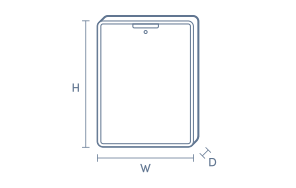
Product Dimensions
- Product Height (mm):
- 247.6
- Product Width (mm):
- 178.5
- Product Depth (mm):
- 6.1
- Product Weight (g):
- 462
Box Dimensions
- Box Height (mm):
- 51
- Box Width (mm):
- 190
- Box Depth (mm):
- 262
- Box Weight (kg):
- 1

No reviews found for this product.
Product Reviews of Apple iPad Air 11" M2 Wi-Fi + Cellular 128GB - Starlight

Overall Rating Snapshot
You've viewed 0 of 0 reviews
The below information is AI generated based on Australian websites information around this item. We have done our best to ensure its accuracy but suggest verifying any information within this tab before purchasing.
At a glance
The Apple iPad Air 11-inch is a premium, portable tablet for students, creatives and professionals who want fast everyday performance plus Wi-Fi + Cellular freedom. Its strengths are easy mobility, a sharp and responsive display, and broad app support for work and entertainment. One limitation is that 128GB can feel tight if you store lots of large files, videos or creative projects locally.
What it’s great for
- Everyday Productivity
- Note-Taking
- Streaming
- Travel
- Online Learning
- Light Creative Work
- Mobile Connectivity
Where it works best
- Home
- University Campus
- Office
- Commute
- Travel
- Cafes
- On the Go
Who it’s for
- University Student
- Everyday Professional
- Frequent Traveller
- Remote Worker
- Family User
- Casual Creative
Things to consider
The 128GB capacity is fine for everyday apps and cloud-based use, but heavier creators or users with large offline media libraries may prefer a higher-capacity model or the iPad Pro range.
Student suitability score
9/10 - Excellent for note-taking, research, online classes and portable study, though accessories and storage upgrades can add cost.
Creative use fit
Strong fit for illustration, photo editing and casual content creation; less ideal than iPad Pro models for advanced, storage-heavy professional workflows.
All-day portability rating
9/10 - Easy to carry across campus, between meetings or while travelling thanks to its light, compact tablet design.
Family sharing suitability
Very good for shared household use, including streaming, browsing, video calls, school tasks and casual apps across different age groups.
Key benefits
- Wi-Fi + Cellular: Stay connected for browsing, messaging and cloud access when you are away from Wi-Fi.
- 11-inch design: Gives you a practical screen size for study, work and entertainment while staying easy to carry.
- Lightweight build: More comfortable to hold during reading, streaming, note-taking and travel.
- Apple ecosystem integration: Works smoothly with iPhone, Mac and iCloud for easy file sharing and continuity.
- Apple Pencil support: Helpful for handwriting, annotation, sketching and more natural note-taking workflows.
- Magic Keyboard compatibility: Lets the iPad Air shift closer to a laptop-style setup for typing and productivity.
- 128GB storage: A practical starting capacity for everyday apps, documents, photos and downloaded entertainment.
- Front and rear cameras: Useful for video calls, scanning documents and capturing everyday photos and clips.
Q: What does the Wi-Fi + Cellular version add over the Wi-Fi only iPad Air 11-inch?
A: It adds mobile data connectivity, so this iPad Air can get online away from Wi-Fi using a compatible plan. That suits commuting or travel. The main trade-off is higher purchase cost than the Wi-Fi only version.
Q: Which Apple Pencil works with the iPad Air 11-inch M2?
A: This model works with Apple Pencil Pro and Apple Pencil USB-C. That matters if you want pressure-sensitive note taking or drawing. It does not support older Lightning-based Apple Pencil models, so existing accessories may not carry over.
Q: Is 128GB enough storage for the iPad Air 11-inch M2?
A: Yes, 128GB suits web browsing, streaming, email, study notes and a moderate app library. It can feel tight if you keep large games, 4K video projects or lots of offline media on the device rather than in cloud storage.
Q: Can the iPad Air 11-inch M2 be used with a keyboard for work or study?
A: Yes, it supports keyboard accessories including the Magic Keyboard for iPad Air, which helps with typing, trackpad use and desk-based tasks. It is a practical option for documents and email, but it is still iPadOS rather than macOS.
Q: Can this iPad Air connect to an external monitor?
A: Yes, the USB-C port can connect to a compatible external display for more viewing space. With the M2 chip, it can support a monitor up to 6K at 60Hz when using the right adapter or USB-C display, which is useful for desk setups.
Q: Does the iPad Air 11-inch M2 use Face ID or Touch ID?
A: It uses Touch ID built into the top button, not Face ID. That gives quick unlock and app authentication without a Home button. Buyers moving from an iPad Pro should note the different placement and fingerprint-based login method.